<?xml version="1.0" encoding="utf-8"?>
<feed xmlns="http://www.w3.org/2005/Atom">
  <title>墨嗓 - Mouson</title>
  
  <subtitle>墨嗓 - Mouson</subtitle>
  <link href="https://mouson.im/atom.xml" rel="self"/>
  
  <link href="https://mouson.im/"/>
  <updated>2025-12-19T08:50:29.000Z</updated>
  <id>https://mouson.im/</id>
  
  <author>
    <name>墨嗓 (陳佑竹)</name>
    
  </author>
  
  <generator uri="https://hexo.io/">Hexo</generator>
  
  <entry>
    <title>演講紀錄 - AI 時代的 Legacy Code 營救術 - 2025 WebConf</title>
    <link href="https://mouson.im/Publication/Common/20251212-2025webconf-refactor-legacy/"/>
    <id>https://mouson.im/Publication/Common/20251212-2025webconf-refactor-legacy/</id>
    <published>2025-12-12T03:50:29.000Z</published>
    <updated>2025-12-19T08:50:29.000Z</updated>
    
    <content type="html"><![CDATA[<p><img src="/Publication/Common/20251212-2025webconf-refactor-legacy/slide-webconf-refactor-legacy-01.png" alt="AI 時代的 Legacy Code 營救術 - 2025 WebConf" loading="lazy"></p><h2 id="01-活動紀錄"><a href="#01-活動紀錄" class="headerlink" title="01 - 活動紀錄"></a>01 - 活動紀錄</h2><ul><li><p>活動：2025 WebConf</p></li><li><p>名稱：AI 時代的 Legacy Code 營救術</p></li><li><p>基本介紹：</p><blockquote><p>在軟體開發現場，面對沉澱多年的 Legacy Code，常常會陷入兩難：想改，又怕連帶影響整個系統；不改，又得持續承受技術債累積帶來的負擔。其實無論是在 AI 尚未普及的過去，還是今日各式 AI 輔助工具蓬勃發展，處理 Legacy Code 的核心原則始終如一——仍需要團隊共識、清晰流程以及足夠的驗證機制。然而在 AI 的協助下，我們能以更高的效率、更低的風險來面對這些挑戰。</p></blockquote><blockquote><p>本議程將會分享：<br>非 AI 時代 面對 Legacy Code 時的典型思考方式與策略。<br>AI 介入後，如何在重構與維護過程中發揮助力，提升理解、驗證與調整的效率。<br>來自實務經驗的觀察與建議，協助團隊在新舊並存的系統中更有信心地前進。</p></blockquote></li></ul><span id="more"></span><h2 id="02-活動簡報"><a href="#02-活動簡報" class="headerlink" title="02 - 活動簡報"></a>02 - 活動簡報</h2>    <script async class="speakerdeck-embed"      data-slide="1"      data-id="3a9d73db7fa842859745abc690269091"      data-ratio="1.77777777777778"      src="//speakerdeck.com/assets/embed.js">    </script><p>簡報連結：<a href="https://speakerdeck.com/mouson/20251212-ai-shi-dai-de-legacy-code-ying-jiu-shu-2025-webconf">20251212 AI 時代的 Legacy Code 營救術 2025 WebConf - Speaker Deck</a></p>]]></content>
    
    
    <summary type="html">在軟體開發現場，面對沉澱多年的 Legacy Code，常常會陷入兩難：想改，又怕連帶影響整個系統；不改，又得持續承受技術債累積帶來的負擔。其實無論是在 AI 尚未普及的過去，還是今日各式 AI 輔助工具蓬勃發展，處理 Legacy Code 的核心原則始終如一——仍需要團隊共識、清晰流程以及足夠的驗證機制。然而在 AI 的協助下，我們能以更高的效率、更低的風險來面對這些挑戰。</summary>


    <category term="Publication" scheme="https://mouson.im/categories/Publication/"/>
    
    <category term="Common" scheme="https://mouson.im/categories/Publication/Common/"/>
    
    
    <category term="Publication" scheme="https://mouson.im/tags/Publication/"/>
    
    <category term="Common" scheme="https://mouson.im/tags/Common/"/>
    
    <category term="演講" scheme="https://mouson.im/tags/%E6%BC%94%E8%AC%9B/"/>
    
    <category term="Speak" scheme="https://mouson.im/tags/Speak/"/>
    
    <category term="Slide" scheme="https://mouson.im/tags/Slide/"/>
    
  </entry>
  
  <entry>
    <title>演講紀錄 - Laravel x Vue Conf Taiwan 2022 - 從 Legacy 到 Lovely，用 CI/CD 改建二十年祖產全記錄</title>
    <link href="https://mouson.im/Publication/PHP/20221203_laravelxvueconf2022_legacy2lovely/"/>
    <id>https://mouson.im/Publication/PHP/20221203_laravelxvueconf2022_legacy2lovely/</id>
    <published>2022-12-02T16:50:29.000Z</published>
    <updated>2022-12-03T16:50:29.000Z</updated>
    
    <content type="html"><![CDATA[<p><img src="/Publication/PHP/20221203_laravelxvueconf2022_legacy2lovely/slide-laravelconf_legacy2lovely_01.png" alt="從 Legacy 到 Lovely，用 CI/CD 改建二十年祖產全記錄" loading="lazy"></p><h2 id="01-活動紀錄"><a href="#01-活動紀錄" class="headerlink" title="01 - 活動紀錄"></a>01 - 活動紀錄</h2><ul><li><p>活動：Laravel x Vue Conf Taiwan 2022</p></li><li><p>名稱：從 Legacy 到 Lovely 用 CI&#x2F;CD 改建二十年祖產全記錄</p></li><li><p>基本介紹：</p><blockquote><p>曾經一個數十萬行規模的 PHP4 專案，沒有文件、沒有測試甚至沒有原始碼版本控制的 Legacy，到現在已轉化為以 Laravel 為核心運行，開發的過程中陸續導入單元測試、Lint、持續整合(CI)、持續部署(CD)甚至是上線後的 系統監控。這段轉化的過程中，這個團隊怎麼做技術管理？怎麼邊擴增功能又邊重構？導入了哪些工具、套件又做了關鍵抉擇與取捨？</p></blockquote><blockquote><p>在這個議程中你可以聽到一些故事、技術管理的抉擇、一些技術與工具選擇的原因以及得到一個使用 Laravel 可以參考 DevOps 流程工具框架。</p></blockquote></li></ul><span id="more"></span><h2 id="02-活動簡報"><a href="#02-活動簡報" class="headerlink" title="02 - 活動簡報"></a>02 - 活動簡報</h2>    <script async class="speakerdeck-embed"      data-slide="1"      data-id="93f357c34f54491cb37a3349e3861b93"      data-ratio="1.77777777777778"      src="//speakerdeck.com/assets/embed.js">    </script><p>簡報連結：<a href="https://speakerdeck.com/mouson/cd-gai-jian-er-shi-nian-zu-chan-quan-ji-lu">20221202 從 Legacy 到 Lovely，用 CI&#x2F;CD 改建二十年祖產全記錄 - Speaker Deck</a></p><h2 id="03-簡報內容對應資源"><a href="#03-簡報內容對應資源" class="headerlink" title="03 - 簡報內容對應資源"></a>03 - 簡報內容對應資源</h2><h3 id="1-GitLab-相關資源"><a href="#1-GitLab-相關資源" class="headerlink" title="1. GitLab 相關資源"></a>1. GitLab 相關資源</h3><ul><li><a href="https://gitlab.com/mo-playground/laravel-vue-conf-taiwan-2022-gitlabci-example">GitLab CI&#x2F;CD 範例專案</a><ul><li><a href="https://gitlab.com/mo-playground/laravel-vue-conf-taiwan-2022-gitlabci-example/-/blob/main/.gitlab-ci.yml">.gitlab-ci.yml</a></li></ul></li><li><a href="https://mouson.im/Notes/GitLab/gitlab-show-phpunit-report-in-pipeline/">GitLab CI - 在 Pipeline 檢視 PHPUnit 單元測試報告</a></li><li><a href="https://mouson.im/Notes/GitLab/gitlab-show-php-code-coverage-in-merge-request/">GitLab CI - 在 Merge Request(MR) 中檢視 PHP 測試代碼覆蓋 (Code Coverage) 情況</a></li></ul><h3 id="2-靜態分析工具"><a href="#2-靜態分析工具" class="headerlink" title="2. 靜態分析工具"></a>2. 靜態分析工具</h3><ul><li>靜態分析大禮包，整合了了很多種靜態分析、Lint 工具：<a href="https://github.com/EdgedesignCZ/phpqa">EdgedesignCZ&#x2F;phpqa: Analyze PHP code with one command</a></li><li>統計 PHP 專案原始碼行數數量的工具：<a href="https://github.com/sebastianbergmann/phploc">sebastianbergmann&#x2F;phploc: A tool for quickly measuring the size of a PHP project.</a> </li><li>程式碼依賴度檢查：<a href="https://github.com/pdepend/pdepend">pdepend&#x2F;pdepend: PHP_Depend is an adaptation of the established Java development tool JDepend. This tool shows you the quality of your design in terms of extensibility, reusability and maintainability.</a></li><li>靜態分析工具：<a href="https://github.com/phpmetrics/PhpMetrics">phpmetrics&#x2F;PhpMetrics: Beautiful and understandable static analysis tool for PHP</a></li></ul><h3 id="3-Code-Lint-工具"><a href="#3-Code-Lint-工具" class="headerlink" title="3. Code Lint 工具"></a>3. Code Lint 工具</h3><ul><li>快速的 php linting 工具：<a href="https://github.com/overtrue/phplint">overtrue&#x2F;phplint: A tool that can speed up linting of php files by running several lint processes at once.</a></li><li>Laravel 目前內建的 Pint 工具：<a href="https://laravel.com/docs/9.x/pint">Laravel Pint - Laravel - The PHP Framework For Web Artisans</a> </li><li>PHP 語法相容檢測工具：<a href="https://github.com/PHPCompatibility/PHPCompatibility">PHPCompatibility&#x2F;PHPCompatibility: PHP Compatibility check for PHP_CodeSniffer</a></li></ul><h3 id="4-PHP-相關套件安全檢查"><a href="#4-PHP-相關套件安全檢查" class="headerlink" title="4. PHP 相關套件安全檢查"></a>4. PHP 相關套件安全檢查</h3><ul><li><a href="https://github.com/enlightn/security-checker">enlightn&#x2F;security-checker: A PHP dependency vulnerabilities scanner based on the Security Advisories Database.</a></li></ul><h3 id="5-相關簡報及文章資源"><a href="#5-相關簡報及文章資源" class="headerlink" title="5. 相關簡報及文章資源"></a>5. 相關簡報及文章資源</h3><ul><li><a href="https://mouson.im/Publication/PHP/20200722-intellij-tips-upgrading-php-version-with-phpstorm/">演講紀錄 - 給您一劑面對 Legacy 專案的還魂丹 - PHP 升版絕活</a></li><li><a href="https://mouson.im/Publication/PHP/20170701-laravelconf-taiwan-2017-eloquent-destruct/">演講紀錄 - LaravelConf Taiwan 2017 - Eloquent 核心解構 讓 Laravel 支援更多資料庫</a></li><li><a href="https://jaceju.net/steps-of-refactoring-or-rebuilding/">重構或重寫 Legacy code 的幾個階段</a></li><li><a href="https://jaceju.net/refactor-or-rebuild/">面對 Legacy Code ，該重構還是重寫？</a></li><li><a href="https://tighten.com/blog/converting-a-legacy-app-to-laravel/">Legacy to Laravel: How to Modernize an Aging PHP Application | Tighten</a></li></ul>]]></content>
    
    
    <summary type="html">在這個議程中你可以聽到一些故事、技術管理的抉擇、一些技術與工具選擇的原因以及得到一個使用 Laravel 可以參考 DevOps 流程工具框架。</summary>


    <category term="Publication" scheme="https://mouson.im/categories/Publication/"/>
    
    <category term="PHP" scheme="https://mouson.im/categories/Publication/PHP/"/>
    
    
    <category term="GitLab" scheme="https://mouson.im/tags/GitLab/"/>
    
    <category term="PHP" scheme="https://mouson.im/tags/PHP/"/>
    
    <category term="Laravel" scheme="https://mouson.im/tags/Laravel/"/>
    
    <category term="Publication" scheme="https://mouson.im/tags/Publication/"/>
    
    <category term="演講" scheme="https://mouson.im/tags/%E6%BC%94%E8%AC%9B/"/>
    
    <category term="Speak" scheme="https://mouson.im/tags/Speak/"/>
    
    <category term="Slide" scheme="https://mouson.im/tags/Slide/"/>
    
  </entry>
  
  <entry>
    <title>使用 GIT Bisect 指令進行專案除錯快速找到問題</title>
    <link href="https://mouson.im/Notes/GIT/debug-with-git-bisect-command/"/>
    <id>https://mouson.im/Notes/GIT/debug-with-git-bisect-command/</id>
    <published>2022-05-15T08:29:04.000Z</published>
    <updated>2022-05-15T08:29:04.000Z</updated>
    
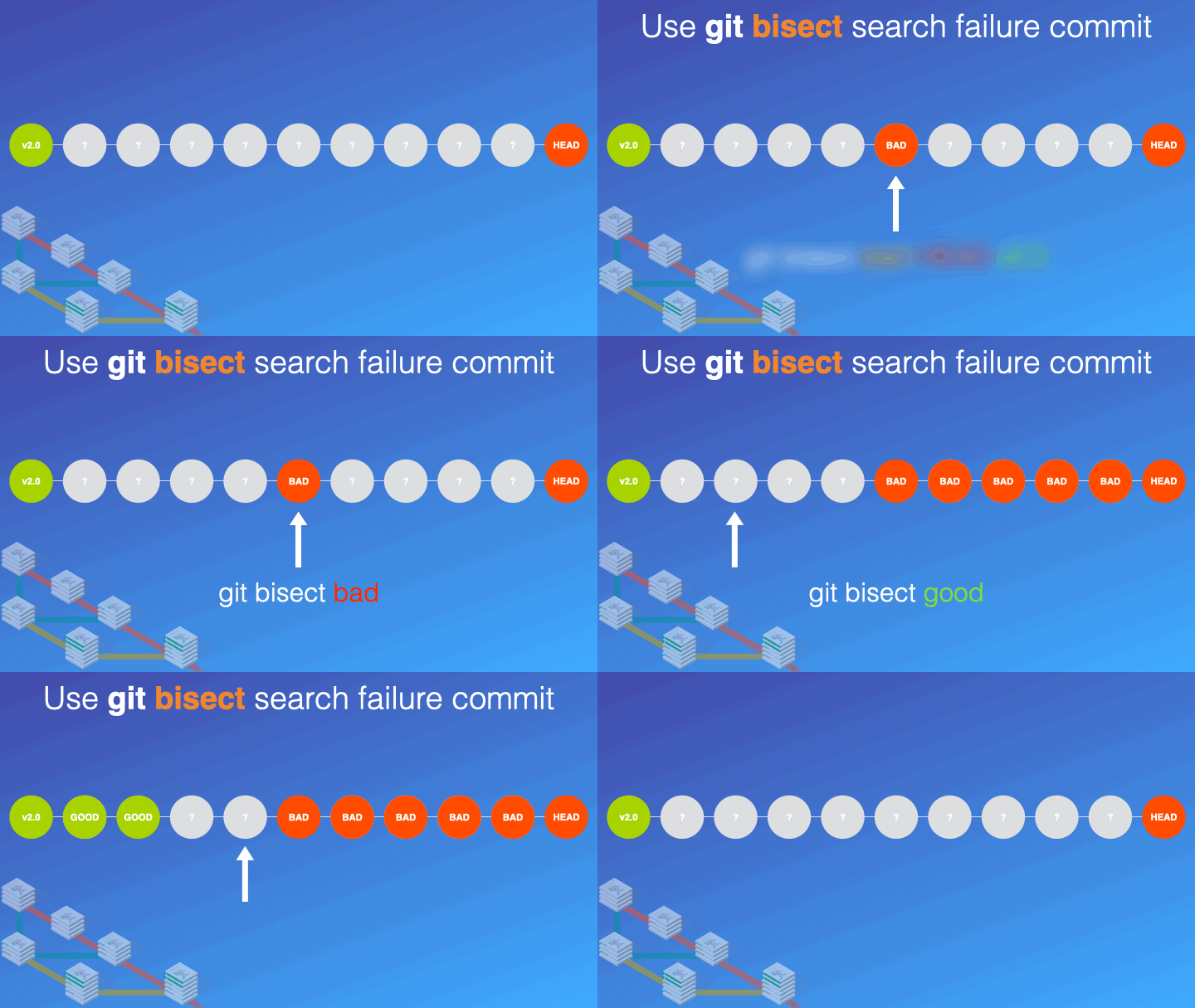
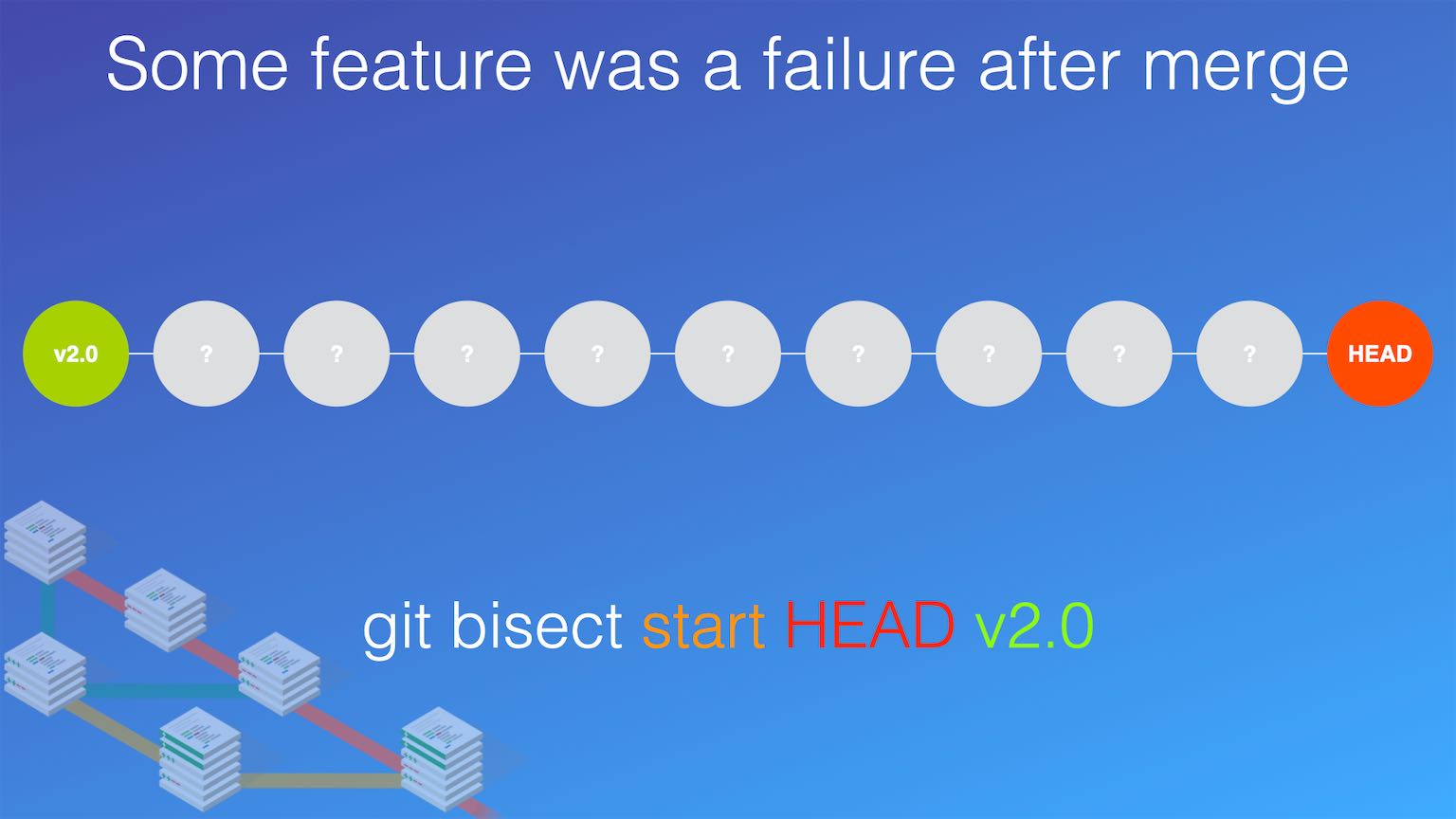
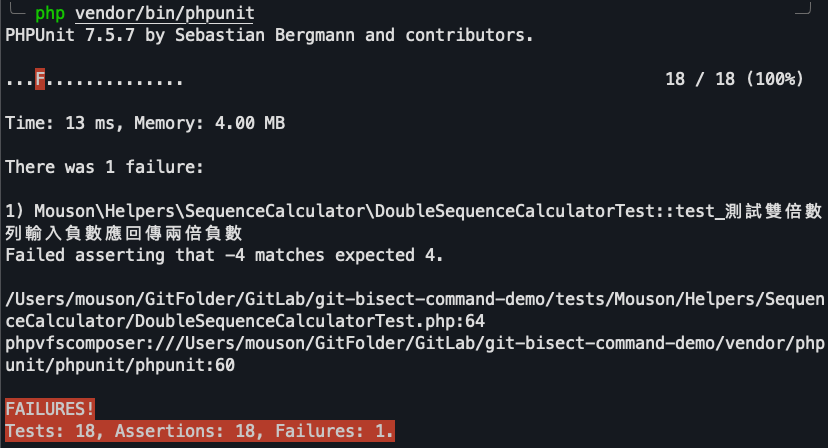
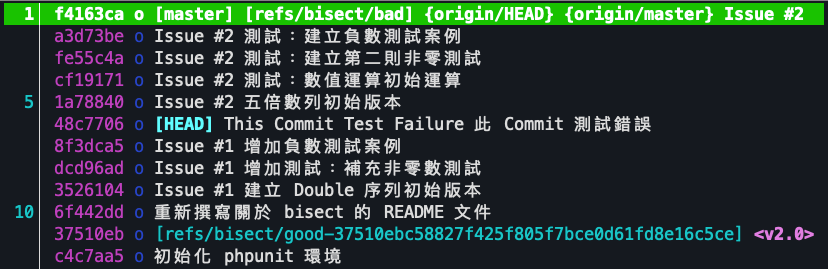
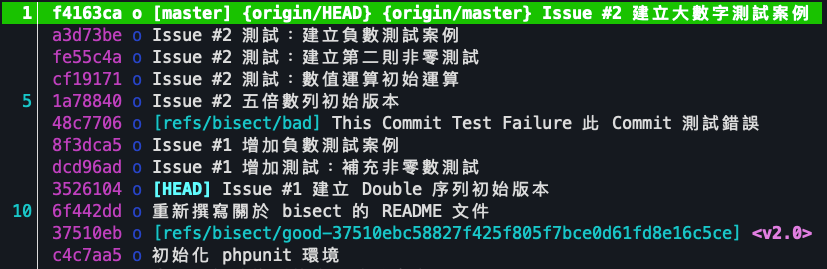
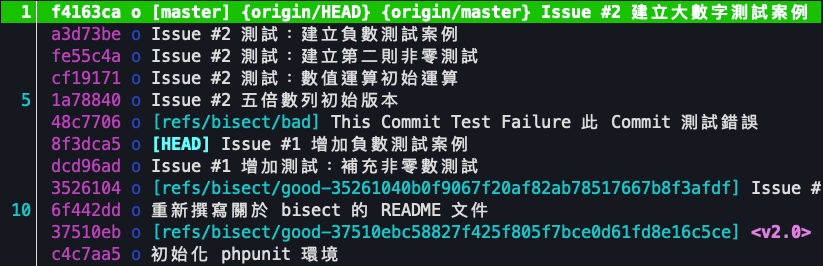
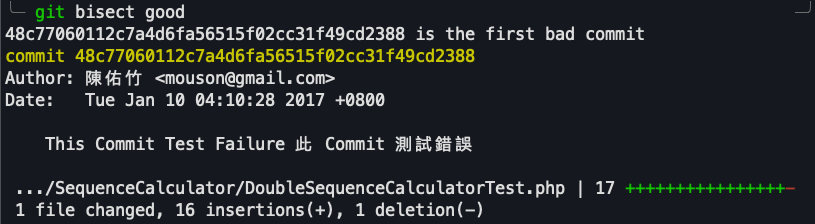
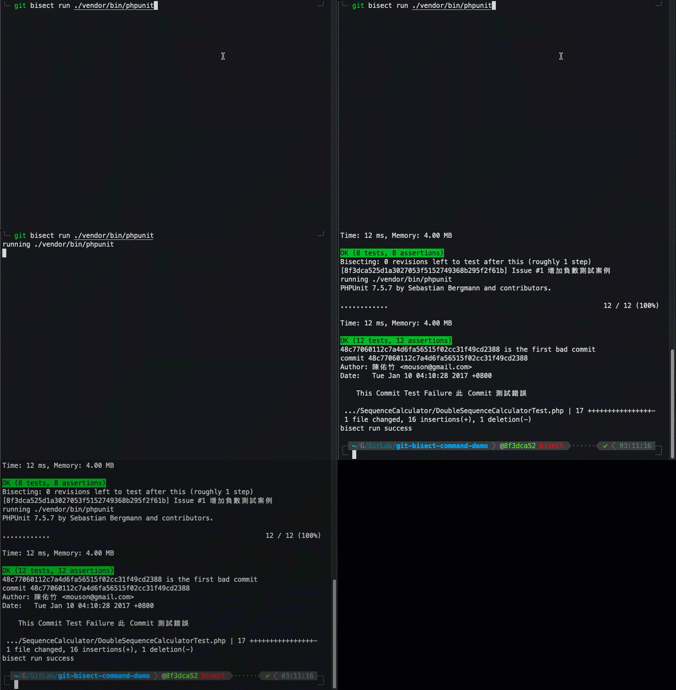
    <content type="html"><![CDATA[<p><img src="/Notes/GIT/debug-with-git-bisect-command/20220515_GIT_Bisect_Command.001.jpg" alt="Bisect Example 01" loading="lazy"></p><h2 id="一、使用-GIT-的-Bisect-指令的背景"><a href="#一、使用-GIT-的-Bisect-指令的背景" class="headerlink" title="一、使用 GIT 的 Bisect 指令的背景"></a>一、使用 GIT 的 Bisect 指令的背景</h2><p>在系統開發的過程中，難免在無意間製造 bug，但在發現系統有問題之後，該怎麼樣快速的找到產生問題的原始碼，這就是另外一門學問了。</p><p>現在開發者通常使用 GIT 作為版本控制工具，而 GIT 可以怎麼樣提供開發者快速找到問題呢？大家可以參考 GIT 的 <a href="https://git-scm.com/docs/git-bisect">bisect</a> 這個指令。以下提供一個在 PHP 開發的環境下，使用 Bisect 的案例來供大家參考。</p><span id="more"></span><h2 id="二、關於-GIT-Bisect-的介紹"><a href="#二、關於-GIT-Bisect-的介紹" class="headerlink" title="二、關於 GIT Bisect 的介紹"></a>二、關於 GIT Bisect 的介紹</h2><p><img src="/Notes/GIT/debug-with-git-bisect-command/20220515_GIT_Bisect_Command.gif" alt="Git Bisect" loading="lazy"></p><p>GIT 的 <code>Bisect</code> 指令是一個幫助開發者從儲存庫中，原本正確的 Commit 點到發現錯誤的 Commit 點的範圍內，以二分法找尋問題點的方法，以底下的例子：</p><p><img src="/Notes/GIT/debug-with-git-bisect-command/20220515_GIT_Bisect_Command.002.jpg" alt="Bisect Example 01" loading="lazy"></p><p>以上圖範例中，假設在開發的過程中，原本在 v2.0 版本確認沒有問題，但突然發現，最新的開發版本上測試發現問題，因此我們要找出從釋出 v2.0 版本後，是在哪個 commit 之後才發生這問題的，這時候就可以利用 bisect 來進行尋找錯誤的動作。</p><figure class="highlight shell"><table><tr><td class="gutter"><pre><span class="line">1</span><br></pre></td><td class="code"><pre><span class="line">git bisect start HEAD v2.0</span><br></pre></td></tr></table></figure><p>如上指令，其指令意思是「開始使用 bisect 指令除錯，定義的範圍從目前的 HEAD 一直到 refs v2.0 的位置」，使用指令務必要確定，一定要有一端測試是正常的。</p><p>當開始使用 bisect 除錯後，首先 GIT 會幫忙先把目前所在 GIT HEAD 的位置挪移到中間的 commit 上，這時候可以再次地進行「測試」，當在這次測試的過程中確認目前的 commit 還是錯的，則：</p><figure class="highlight shell"><table><tr><td class="gutter"><pre><span class="line">1</span><br></pre></td><td class="code"><pre><span class="line">git bisect bad</span><br></pre></td></tr></table></figure><p>可以使用 <code>git bisect bad</code> 來標注目前的 commit 依然是有問題的，這代表，目前所在的 commit 直到開始點的所有 commit 都是有問題的。接著 GIT 會協助繼續幫忙把 HEAD 指標移動到距離目前確認測試是正確的 commit 的一半位置。</p><p><img src="/Notes/GIT/debug-with-git-bisect-command/20220515_GIT_Bisect_Command.003.jpg" alt="Bisect Step 3" loading="lazy"></p><p>到了目前的 commit 位置後，如果發現測試是正確的，則可以使用 <code>git bisect good</code> 來標注目前所在的 commit 測試是正常的，則代表從目前的 commit 到正確端的 commit (v2.0) 都是正確的。接著 GIT 會把 HEAD 的位置移動到下一個 commit 上。</p><p><img src="/Notes/GIT/debug-with-git-bisect-command/20220515_GIT_Bisect_Command.004.jpg" alt="Bisect Step 4" loading="lazy"></p><p>最後，在這個 commit 上再次的進行測試，發現，其還是正確的，同樣的使用 <code>git bisect good</code> 進行標注。</p><p><img src="/Notes/GIT/debug-with-git-bisect-command/20220515_GIT_Bisect_Command.005.jpg" alt="Bisect Step 5" loading="lazy"></p><p>則最終可以找到第一個造成問題的 commit 上。</p><p><img src="/Notes/GIT/debug-with-git-bisect-command/20220515_GIT_Bisect_Command.006.jpg" alt="Bisect Step 6" loading="lazy"></p><p>在找到有問題的 commit 之後，GIT 會提示有問題的這個 commit 的 SHA1，此時 HEAD 會停留在原本的位置。這時候如果要回到該分支的最原始位置，則可以使用指令：</p><figure class="highlight shell"><table><tr><td class="gutter"><pre><span class="line">1</span><br></pre></td><td class="code"><pre><span class="line">git bisect reset</span><br></pre></td></tr></table></figure><blockquote><p>一般來說，如果有進行單元測試，又有進行 CICD 的流程的話，有問題的 commit 在推上 GIT Server 的第一瞬間就會被發現了，並不應該出現上述的案例。</p></blockquote><h2 id="三、以-PHP-專案使用-PHPUnit-除錯建立如上述的案例再次說明"><a href="#三、以-PHP-專案使用-PHPUnit-除錯建立如上述的案例再次說明" class="headerlink" title="三、以 PHP 專案使用 PHPUnit 除錯建立如上述的案例再次說明"></a>三、以 PHP 專案使用 PHPUnit 除錯建立如上述的案例再次說明</h2><p>在 <a href="https://gitlab.com/mouson-gitlab-playground/git-feature-demo/git-bisect-command-demo">GIT Bisect Command Demo</a> 這個 GitLab 的 Repo 上，我建立了一個以 PHP 搭配 PHPUnit 做單元測試的簡單範例。</p><h3 id="1-測試範例環境"><a href="#1-測試範例環境" class="headerlink" title="1. 測試範例環境"></a>1. 測試範例環境</h3><ul><li>PHP 7.0 以上</li><li>Composer</li></ul><h3 id="2-測試範例環境安裝"><a href="#2-測試範例環境安裝" class="headerlink" title="2. 測試範例環境安裝"></a>2. 測試範例環境安裝</h3><h4 id="Step-1-安裝"><a href="#Step-1-安裝" class="headerlink" title="Step 1. 安裝"></a>Step 1. 安裝</h4><figure class="highlight sh"><table><tr><td class="gutter"><pre><span class="line">1</span><br><span class="line">2</span><br><span class="line">3</span><br></pre></td><td class="code"><pre><span class="line">git <span class="built_in">clone</span> git@gitlab.com:mouson-gitlab-playground/git-feature-demo/git-bisect-command-demo.git</span><br><span class="line"><span class="built_in">cd</span> git-bisect-command-demo</span><br><span class="line">composer install --prefer-dist</span><br></pre></td></tr></table></figure><h4 id="Step-2-執行第一次測試，應發生測試錯誤"><a href="#Step-2-執行第一次測試，應發生測試錯誤" class="headerlink" title="Step 2. 執行第一次測試，應發生測試錯誤"></a>Step 2. 執行第一次測試，應發生測試錯誤</h4><figure class="highlight sh"><table><tr><td class="gutter"><pre><span class="line">1</span><br></pre></td><td class="code"><pre><span class="line">./vendor/bin/phpunit</span><br></pre></td></tr></table></figure><p>執行畫面如下：</p><p><img src="/Notes/GIT/debug-with-git-bisect-command/bisect_example01.png" alt="Bisect Example 01" loading="lazy"></p><h3 id="3-手動-git-bisect-測試"><a href="#3-手動-git-bisect-測試" class="headerlink" title="3. 手動 git bisect 測試"></a>3. 手動 git bisect 測試</h3><h4 id="Step-1-啟用二分法測試，執行後應跳到目前-HEAD-與-v2-0-這個版本間的-commit"><a href="#Step-1-啟用二分法測試，執行後應跳到目前-HEAD-與-v2-0-這個版本間的-commit" class="headerlink" title="Step 1. 啟用二分法測試，執行後應跳到目前 HEAD 與 v2.0 這個版本間的 commit"></a>Step 1. 啟用二分法測試，執行後應跳到目前 HEAD 與 v2.0 這個版本間的 commit</h4><figure class="highlight sh"><table><tr><td class="gutter"><pre><span class="line">1</span><br></pre></td><td class="code"><pre><span class="line">git bisect start HEAD v2.0</span><br></pre></td></tr></table></figure><p>執行後可以看到，目前 GIT HEAD 所在的位置挪移到了 <code>48c7706</code> 的這個 SHA1 上。</p><p><img src="/Notes/GIT/debug-with-git-bisect-command/bisect_example02-01.png" alt="Bisect Example 02" loading="lazy"></p><p><code>48c7706</code> 這個位置，也就是原本的 <code>master</code> 到 v2.0 之間的「中間」所在的位置。</p><p><img src="/Notes/GIT/debug-with-git-bisect-command/bisect_example02-02.png" alt="Bisect Example 02" loading="lazy"></p><h4 id="Step-2-執行-phpunit-出現錯誤，設定目前-commit-為錯誤"><a href="#Step-2-執行-phpunit-出現錯誤，設定目前-commit-為錯誤" class="headerlink" title="Step 2. 執行 phpunit 出現錯誤，設定目前 commit 為錯誤"></a>Step 2. 執行 phpunit 出現錯誤，設定目前 commit 為錯誤</h4><figure class="highlight sh"><table><tr><td class="gutter"><pre><span class="line">1</span><br><span class="line">2</span><br></pre></td><td class="code"><pre><span class="line">./vendor/bin/phpunit</span><br><span class="line">git bisect bad</span><br></pre></td></tr></table></figure><p><img src="/Notes/GIT/debug-with-git-bisect-command/bisect_example03-01.png" alt="Bisect Example 03" loading="lazy"></p><p>在執行 <code>git bisect bad</code> 宣告該 commit 為錯誤點之後，GIT 會自動的挪移 HEAD 位置到 <code>3526104</code> 的 SHA1 位置，如下圖。</p><p><img src="/Notes/GIT/debug-with-git-bisect-command/bisect_example03-02.png" alt="Bisect Example 03" loading="lazy"></p><h4 id="Step-3-執行-phpunit-通過測試，設定目前-commit-為正確"><a href="#Step-3-執行-phpunit-通過測試，設定目前-commit-為正確" class="headerlink" title="Step 3. 執行 phpunit 通過測試，設定目前 commit 為正確"></a>Step 3. 執行 phpunit 通過測試，設定目前 commit 為正確</h4><figure class="highlight sh"><table><tr><td class="gutter"><pre><span class="line">1</span><br><span class="line">2</span><br></pre></td><td class="code"><pre><span class="line">./vendor/bin/phpunit</span><br><span class="line">git bisect good</span><br></pre></td></tr></table></figure><p><img src="/Notes/GIT/debug-with-git-bisect-command/bisect_example04-01.png" alt="Bisect Example 04" loading="lazy"></p><p>在執行 <code>git bisect good</code> 宣告該 commit 為正確點之後，GIT 會自動的挪移 HEAD 位置到 <code>8f3dca5</code> 的 SHA1 位置，如下圖。</p><p><img src="/Notes/GIT/debug-with-git-bisect-command/bisect_example04-02.png" alt="Bisect Example 04" loading="lazy"></p><h4 id="Step-4-執行-phpunit-通過測試，設定目前-commit-為正確"><a href="#Step-4-執行-phpunit-通過測試，設定目前-commit-為正確" class="headerlink" title="Step 4. 執行 phpunit 通過測試，設定目前 commit 為正確"></a>Step 4. 執行 phpunit 通過測試，設定目前 commit 為正確</h4><p>目前 HEAD 所在的 SHA1 <code>8f3dca5</code> 位置，已經就在第一次剖半的 SHA1 <code>48c7706</code> 旁邊，意味著，當目前所在的位置如測試「正確」，則代表第一次錯誤的位置為 SHA1 <code>48c7706</code>，而如果「錯誤」則表示目前位置就是第一次出現錯誤的位置。</p><figure class="highlight sh"><table><tr><td class="gutter"><pre><span class="line">1</span><br></pre></td><td class="code"><pre><span class="line">./vendor/bin/phpunit</span><br></pre></td></tr></table></figure><p>同樣的透過單元測試，進行驗證，在這個步驟測試結果是正確的。因此錯誤點是第一次剖半的 SHA1 <code>48c7706</code>，此時標注目前所在的位置 SHA1 為測試正確。</p><figure class="highlight sh"><table><tr><td class="gutter"><pre><span class="line">1</span><br></pre></td><td class="code"><pre><span class="line">git bisect good</span><br></pre></td></tr></table></figure><p>在執行 <code>git bisect good</code> 指令後 GIT 如同上面所描述的，會顯示第一次出現錯誤的 commit 細節資訊，如 commit 內容、作者、時間及對應修改的原始碼內容等。</p><p><img src="/Notes/GIT/debug-with-git-bisect-command/bisect_example05-01.png" alt="Bisect Example 05" loading="lazy"></p><h4 id="Step-5-在找到錯誤點之後，需要重置回到-master-HEAD"><a href="#Step-5-在找到錯誤點之後，需要重置回到-master-HEAD" class="headerlink" title="Step 5. 在找到錯誤點之後，需要重置回到 master HEAD"></a>Step 5. 在找到錯誤點之後，需要重置回到 master HEAD</h4><p>在找到錯誤的位置之後，還需要透過 <code>git bisect reset</code> 指令來進行「恢復環境」的動作，其執行後 GIT 會幫忙將 HEAD 移回 master 的 HEAD 位置。這時候就可以針對所看到的 commit 位置進行除錯的決策及判斷與修改。</p><figure class="highlight sh"><table><tr><td class="gutter"><pre><span class="line">1</span><br></pre></td><td class="code"><pre><span class="line">git bisect reset</span><br></pre></td></tr></table></figure><h3 id="4-讓-git-bisect-自動化執行測試"><a href="#4-讓-git-bisect-自動化執行測試" class="headerlink" title="4. 讓 git bisect 自動化執行測試"></a>4. 讓 git bisect 自動化執行測試</h3><p>上面所描述的是使用「手動」透過 <code>git bisect bad</code> 以及 <code>git bisect good</code> 的方式設定目前所在位置是否正確的方法，但 <code>bisect</code> 指令還有提供自動執行測試的功能，只要使用的執行方法，當執行測試發生錯誤的時候，可以產生錯誤訊號，讓 GIT 判斷，那就可以自動找到 commit 的位置。</p><p>其自動測試的過程如下：</p><h4 id="Step-1-啟用二分法測試"><a href="#Step-1-啟用二分法測試" class="headerlink" title="Step 1. 啟用二分法測試"></a>Step 1. 啟用二分法測試</h4><p>自動化檢測的開始流程與手動的方法是一樣的，同樣是執行 <code>git bisect start HEAD v2.0</code>。</p><figure class="highlight sh"><table><tr><td class="gutter"><pre><span class="line">1</span><br></pre></td><td class="code"><pre><span class="line">git bisect start HEAD v2.0</span><br></pre></td></tr></table></figure><h4 id="Step-2-執行自動化測試，並找到錯誤的-commit"><a href="#Step-2-執行自動化測試，並找到錯誤的-commit" class="headerlink" title="Step 2. 執行自動化測試，並找到錯誤的 commit"></a>Step 2. 執行自動化測試，並找到錯誤的 commit</h4><p>主要是底下的指令，需要宣告要執行測試的指令為何，這邊以 php 的環境來說，使用的是 PHPUnit 單元測試，因此其執行路徑在專案目錄下的 <code>./vendor/bin/phpunit</code>，因此可以直接執行：</p><figure class="highlight sh"><table><tr><td class="gutter"><pre><span class="line">1</span><br></pre></td><td class="code"><pre><span class="line">git bisect run ./vendor/bin/phpunit</span><br></pre></td></tr></table></figure><p><img src="/Notes/GIT/debug-with-git-bisect-command/bisect_example06.gif" alt="Bisect Example 06" loading="lazy"></p><h4 id="Step-3-執行-phpunit-出現錯誤，此為發生問題的-commit，重置回到-master-HEAD"><a href="#Step-3-執行-phpunit-出現錯誤，此為發生問題的-commit，重置回到-master-HEAD" class="headerlink" title="Step 3. 執行 phpunit 出現錯誤，此為發生問題的 commit，重置回到 master HEAD"></a>Step 3. 執行 phpunit 出現錯誤，此為發生問題的 commit，重置回到 master HEAD</h4><p>在自動測試之後 GIT 同樣的會將錯誤的位置停在最後的 commit 並顯示第一個發生錯誤的 commit 位置及資訊，因此在取得錯誤之後，還是需要自己手動執行 <code>git bisect reset</code> 回到原本的位置進行後續的動作。</p><h2 id="四、結論："><a href="#四、結論：" class="headerlink" title="四、結論："></a>四、結論：</h2><p>使用 GIT 的 bisect 指令進行除錯，可以減少自行執行 GIT 指令做 HEAD 位置移動的麻煩，可以加速找到有問題的位置，但平時還是要養成好習慣，如果 commit 的原始碼內容太過龐大或雜亂，對於除錯依然沒有太大幫助，所以，養成好的 commit 習慣還是方便除錯的最重要根本。</p><h2 id="五、參考連結："><a href="#五、參考連結：" class="headerlink" title="五、參考連結："></a>五、參考連結：</h2><ul><li>範例使用的 Source Code：<a href="https://gitlab.com/mouson-gitlab-playground/git-feature-demo/git-bisect-command-demo">GIT Bisect Command Demo</a></li><li>相關演講內容：<a href="/Publication/GIT/20190323-3-git-tips/">演講紀錄 - 台日技術社群交流會 Three Git Tips</a></li><li><a href="https://git-scm.com/docs/git-bisect">Git - git-bisect Documentation</a></li></ul>]]></content>
    
    
    <summary type="html">在系統開發的過程中，難免在無意間製造 bug，但在發現系統有問題之後，該怎麼樣找到產生問題的原始碼，這就是另外一門學問了，現在開發者通常使用 GIT 作為版本控制工具，而 GIT 可以怎麼樣提供開發者快速找到問題呢？大家可以參考 GIT Bisect 這個指令。以下提供一個在 PHP 開發的環境下，使用 Bisect 的案例來供大家參考。</summary>


    <category term="Notes" scheme="https://mouson.im/categories/Notes/"/>
    
    <category term="GIT" scheme="https://mouson.im/categories/Notes/GIT/"/>
    
    
    <category term="Note" scheme="https://mouson.im/tags/Note/"/>
    
    <category term="GIT" scheme="https://mouson.im/tags/GIT/"/>
    
  </entry>
  
  <entry>
    <title>演講紀錄 - Advanced GitLab CI Workshop @DevOpsDays Taipei 2021</title>
    <link href="https://mouson.im/Publication/GitLab/20211124-devopsdaystaipei-advanced-gitlab-ci-workshop/"/>
    <id>https://mouson.im/Publication/GitLab/20211124-devopsdaystaipei-advanced-gitlab-ci-workshop/</id>
    <published>2021-11-24T16:56:08.000Z</published>
    <updated>2021-11-24T16:56:08.000Z</updated>
    
    <content type="html"><![CDATA[<p><img src="/Publication/GitLab/20211124-devopsdaystaipei-advanced-gitlab-ci-workshop/01-advanced-gitlab-ci.png" alt="Advanced GitLab CI Workshop" loading="lazy"></p><h2 id="01-活動紀錄"><a href="#01-活動紀錄" class="headerlink" title="01 - 活動紀錄"></a>01 - 活動紀錄</h2><ul><li>活動方：iThome - DevOpsDays Taipei 2021</li><li>名稱：Advanced GitLab CI Workshop</li><li>活動網站：<a href="https://devopsdays.tw/2021/workshop-page/213">Advanced GitLab CI Workshop - DevOpsDays 2021</a></li></ul><blockquote><p>GitLab CI 對於入門者相當的友善，但由於版本變化快速，一段時間沒關注，可能就會錯過 GitLab 在 gitlab-ci.yml 上新的或更方便的特性，如 GitLab CI 的平行處理、平行處理矩陣、繼承、參考等等的用法，在這場 Workshop 中，將帶給參加者認識進階的 GitLab CI 使用及一些除錯、降低 GitLab 執行時間的小技巧。</p></blockquote><span id="more"></span><h3 id="聽眾收穫："><a href="#聽眾收穫：" class="headerlink" title="聽眾收穫："></a>聽眾收穫：</h3><p>透過工作坊了解如何分析 GitLab CI 執行期間的瓶頸點、除錯技巧以及 GitLab CI 提供的進階語法。</p><ul><li>了解 GitLab CI 與 GitLab Runner 間如何搭配以找到執行瓶頸</li><li>了解 GitLab 使用上的除錯小技巧</li><li>了解在 GitLab 上如何建立可重複使用的 Pipeline</li><li>了解部分 GitLab 提供的進階語法</li></ul><h3 id="學員基礎能力需求："><a href="#學員基礎能力需求：" class="headerlink" title="學員基礎能力需求："></a>學員基礎能力需求：</h3><p>對於 GitLab CI 有一些基本的認識，但還不夠熟悉，想要更了解 GitLab CI 的使用族群。</p><ol><li>具備 GitLab 平台使用經驗</li><li>自備電腦且可順利上網</li><li>本次使用 GitLab.com 免費版本帳號作為展示平台，建議在參與前備妥帳號</li></ol><h2 id="02-活動簡報"><a href="#02-活動簡報" class="headerlink" title="02 - 活動簡報"></a>02 - 活動簡報</h2>    <script async class="speakerdeck-embed"      data-slide="1"      data-id="ad3f97e50eb641099155243810fba997"      data-ratio="1.77777777777778"      src="//speakerdeck.com/assets/embed.js">    </script><ul><li>簡報連結：<a href="https://speakerdeck.com/mouson/advanced-gitlab-workshop-tan-pipeline-diao-jiao-yu-jin-jie-gitlab-ci-yu-fa">Advanced GitLab Workshop - 談 pipeline 調教與進階 GitLab CI 語法 - Speaker Deck</a></li><li>工作坊所使用之範例 - <a href="https://gitlab.com/mouson-gitlab-playground/gitlab-ci-workshop-2021-11-24">GitLab PlayGround &#x2F; GitLab CI Workshop 2021-11-24 · GitLab</a></li></ul><h2 id="參考連結："><a href="#參考連結：" class="headerlink" title="參考連結："></a>參考連結：</h2><ul><li><a href="https://devopsdays.tw/2021/workshop-page/213">Advanced GitLab CI Workshop - DevOpsDays 2021</a></li></ul>]]></content>
    
    
    <summary type="html">在 DevOpsDays Taipei Advanced GitLab CI 工作坊所使用的簡報。這份簡報對應的 Gitlab Repo 包含展示範例大部分的原始碼，可透過 GitLab 提供的 Pipeline editor 選擇分支後直接查看。</summary>


    <category term="Publication" scheme="https://mouson.im/categories/Publication/"/>
    
    <category term="GitLab" scheme="https://mouson.im/categories/Publication/GitLab/"/>
    
    
    <category term="GitLab" scheme="https://mouson.im/tags/GitLab/"/>
    
    <category term="GitLabCI" scheme="https://mouson.im/tags/GitLabCI/"/>
    
    <category term="Publication" scheme="https://mouson.im/tags/Publication/"/>
    
    <category term="演講" scheme="https://mouson.im/tags/%E6%BC%94%E8%AC%9B/"/>
    
    <category term="Speak" scheme="https://mouson.im/tags/Speak/"/>
    
    <category term="Slide" scheme="https://mouson.im/tags/Slide/"/>
    
  </entry>
  
  <entry>
    <title>2021-10-17 個人書籤及剪輯</title>
    <link href="https://mouson.im/Snippets/2021/2021-10-17-bookmarks/"/>
    <id>https://mouson.im/Snippets/2021/2021-10-17-bookmarks/</id>
    <published>2021-10-17T02:02:10.000Z</published>
    <updated>2021-10-17T02:02:10.000Z</updated>
    
    <content type="html"><![CDATA[<p>蒐集個人覺得有幫助的文章及連結甚至是小範例。本次內容包含：DevOps、PHP、設計、生活及工具。</p><div class="video-container"><iframe src="https://www.youtube.com/embed/rn3-d4IiW44" frameborder="0" loading="lazy" allowfullscreen></iframe></div><p>以上影片取自 <a href="https://n8n.io/">n8n.io - Free and Open Workflow Automation Tool</a> 的介紹，n8n 是近期發現超好用的自動化工具。</p><span id="more"></span><h2 id="DevOps"><a href="#DevOps" class="headerlink" title="DevOps"></a>DevOps</h2><ul><li><p><a href="https://softnshare.com/onedev/?fbclid=IwAR3HBCUqODpK5fjOJfna1Oherfj0vc3nqlkiDwZo6QZKyOXP7tth39OyOi4">onedev：超簡單的一體化 DevOps 開源平台 - Soft &amp; Share</a></p><ul><li>看起來非常完整的 DevOps 工具，內容包含可以使用 GUI 生成的 CICD 配置、Pipeline 配置、Issue 看板、Pull Request、Code Review 等。</li><li>GitHub: <a href="https://github.com/theonedev/onedev">theonedev&#x2F;onedev: Super Easy All-In-One DevOps Platform</a></li></ul></li><li><p><a href="https://www.ithome.com.tw/news/147113">臉書公布大當機始末報告：日常維護出錯所引發的骨牌效應 | iThome</a></p><ul><li><a href="https://www.ithome.com.tw/news/147073">臉書、IG、WhatsApp全球服務中斷7小時，Cloudflare：可能是BGP惹的禍 | iThome</a></li><li><a href="https://www.ithome.com.tw/news/147079">臉書公布肇事原因：配置錯誤造成大當機 | iThome</a></li></ul></li></ul><h2 id="PHP"><a href="#PHP" class="headerlink" title="PHP"></a>PHP</h2><ul><li><a href="https://learnku.com/articles/61319">如何更好的使用OPcache实现性能优化 | Laravel China 社区</a><ul><li>這篇對於 OPcache 的原理跟怎麼調整解釋的很不錯，關於 PHP 程式從收到 Request 之後 Source Code 的解析動作流程，文末還有效能驗證及配置參考。</li></ul></li></ul><h2 id="生活"><a href="#生活" class="headerlink" title="生活"></a>生活</h2><ul><li><p><a href="https://medium.com/3pm-lab/how-to-find-your-competitors-1879a2392bbd">網路產業如何搜尋與追蹤競爭者？ 10 招競品分析實用工具與技巧大公開！ | by Anne Hsiao | 3PM LAB 產品三眼怪實驗室 | Medium</a></p><ul><li>這篇文章提到了幾個方法值得一看，包含：<ul><li>找競品，搜尋可用 <code>產品名稱 vs</code>、<code>形容這個產品的名詞</code>、<code>site:&#123;網站網址&#125;</code>、<code>related:網站網址</code>(找跟這網站相關的網站)</li><li>找相關網站可用 <a href="https://www.similarweb.com/">SimilarWeb</a>、<a href="https://www.similarweb.com/top-websites/">Top Website Ranking</a></li><li>追蹤競品：<a href="https://www.google.com/alerts">Google Alerts</a>、<a href="https://mention.com/en/competitive-analysis/">Mention</a></li></ul></li></ul></li><li><p><a href="https://www.facebook.com/raymondhou0917/posts/4803971442951035">Discord 的「付費機制」才是真正的【社群邏輯】</a></p><ul><li>這付費機制真的還蠻值得思考的，透過社群的機制，讓社群決定這個社群該不該繼續留著。</li></ul></li></ul><h2 id="工具"><a href="#工具" class="headerlink" title="工具"></a>工具</h2><ul><li><p><a href="https://namelix.com/">Business Name Generator - free AI-powered naming tool - Namelix</a></p><ul><li>命名工具，透過 AI 來針對你的一句話產生產品命名，是個有趣的工具</li></ul></li><li><p><a href="https://www.jkg.tw/p3609/">輕鬆架一套類 IFTTT 的自動化工作流「n8n」 | jkgtw’s blog </a></p><blockquote><p><a href="https://n8n.io/">n8n.io - Free and Open Workflow Automation Tool</a><br><a href="https://docs.n8n.io/#what-is-n8n">Introduction | Docs</a><br><a href="https://docs.n8n.io/getting-started/installation/advanced/server-setup.html#docker-compose-example">Server Setup | Docs</a></p></blockquote></li><li><p><a href="https://github.com/fsantini/KoboCloud">fsantini&#x2F;KoboCloud: A set of scripts to synchronize a kobo reader with popular cloud services</a></p><ul><li><a href="https://www.ptt.cc/bbs/book/M.1633078802.A.234.html">[心得] Kobo全部閱讀器可使用雲端硬碟上傳書本 - 看板 book - 批踢踢實業坊</a></li></ul></li></ul><h2 id="設計"><a href="#設計" class="headerlink" title="設計"></a>設計</h2><ul><li><a href="https://uiclub.tw/2021/10/12/%E4%BB%8B%E9%9D%A2%E8%A8%AD%E8%A8%88%E5%B8%B8%E8%A6%8B%E7%9A%84%E3%80%8C%E8%A8%AD%E8%A8%88%E3%80%8D%E8%A9%9E%E5%BD%99/">介面設計常見的「設計」詞彙 – UI Club</a><ul><li>設計價值觀（Design Values）</li><li>設計語言（Design Language）</li><li>設計系統（Design System）</li><li>設計原則（Design Principle）</li><li>設計規範（Design Guideline）</li><li>設計模式（Design Pattern）</li></ul></li></ul>]]></content>
    
    
    <summary type="html">&lt;p&gt;蒐集個人覺得有幫助的文章及連結甚至是小範例。本次內容包含：DevOps、PHP、設計、生活及工具。&lt;/p&gt;
&lt;div class=&quot;video-container&quot;&gt;&lt;iframe src=&quot;https://www.youtube.com/embed/rn3-d4IiW44&quot; frameborder=&quot;0&quot; loading=&quot;lazy&quot; allowfullscreen&gt;&lt;/iframe&gt;&lt;/div&gt;

&lt;p&gt;以上影片取自 &lt;a href=&quot;https://n8n.io/&quot;&gt;n8n.io - Free and Open Workflow Automation Tool&lt;/a&gt; 的介紹，n8n 是近期發現超好用的自動化工具。&lt;/p&gt;</summary>


    <category term="Snippets" scheme="https://mouson.im/categories/Snippets/"/>
    
    <category term="2021" scheme="https://mouson.im/categories/Snippets/2021/"/>
    
    
    <category term="Note" scheme="https://mouson.im/tags/Note/"/>
    
    <category term="PHP" scheme="https://mouson.im/tags/PHP/"/>
    
    <category term="Snippet" scheme="https://mouson.im/tags/Snippet/"/>
    
    <category term="DevOps" scheme="https://mouson.im/tags/DevOps/"/>
    
    <category term="生活" scheme="https://mouson.im/tags/%E7%94%9F%E6%B4%BB/"/>
    
    <category term="設計" scheme="https://mouson.im/tags/%E8%A8%AD%E8%A8%88/"/>
    
  </entry>
  
  <entry>
    <title>演講紀錄 - GitLab 13.0 到 14.3 版關於 CICD 設定的功能亮點</title>
    <link href="https://mouson.im/Publication/GitLab/20211008-gitlab-version-13-to-14-ci-cd-configuration-highlight/"/>
    <id>https://mouson.im/Publication/GitLab/20211008-gitlab-version-13-to-14-ci-cd-configuration-highlight/</id>
    <published>2021-10-11T11:46:09.000Z</published>
    <updated>2021-10-11T11:46:09.000Z</updated>
    
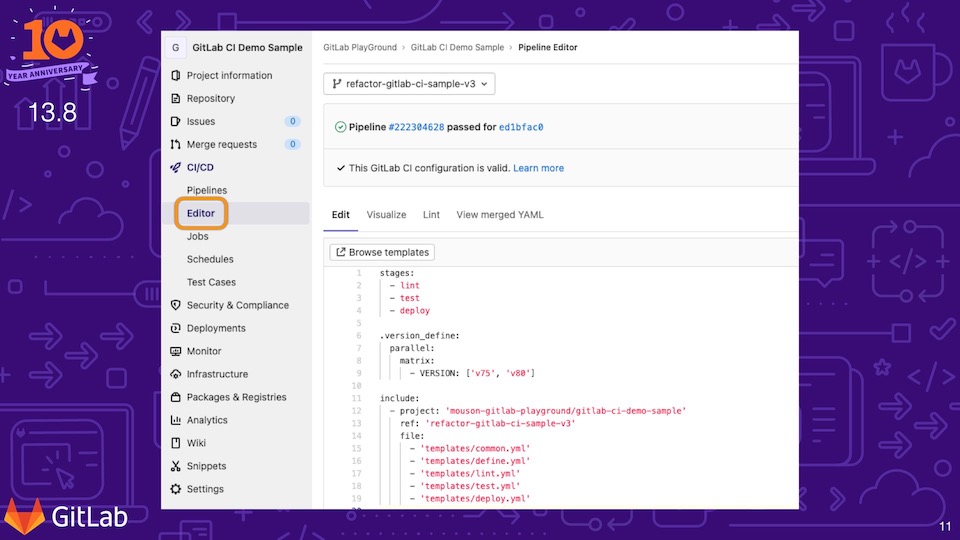
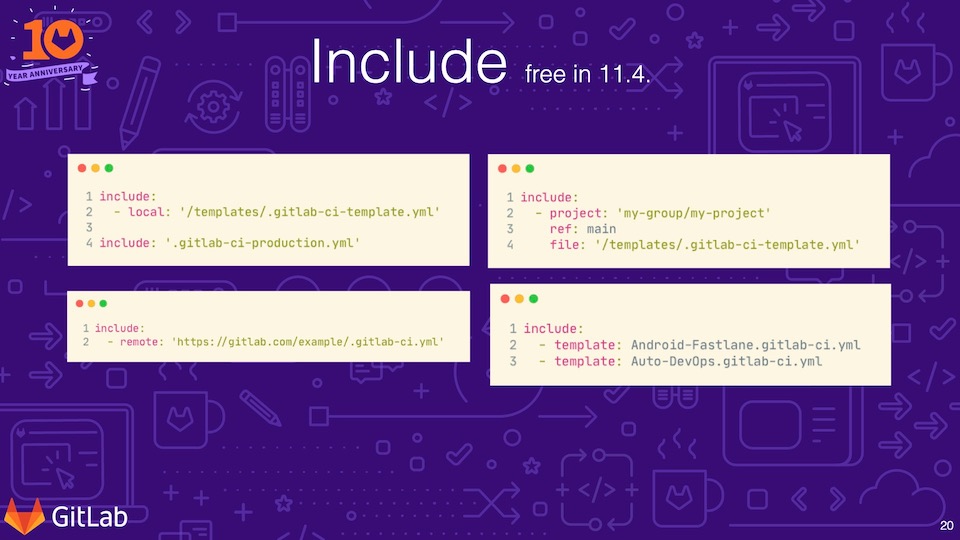
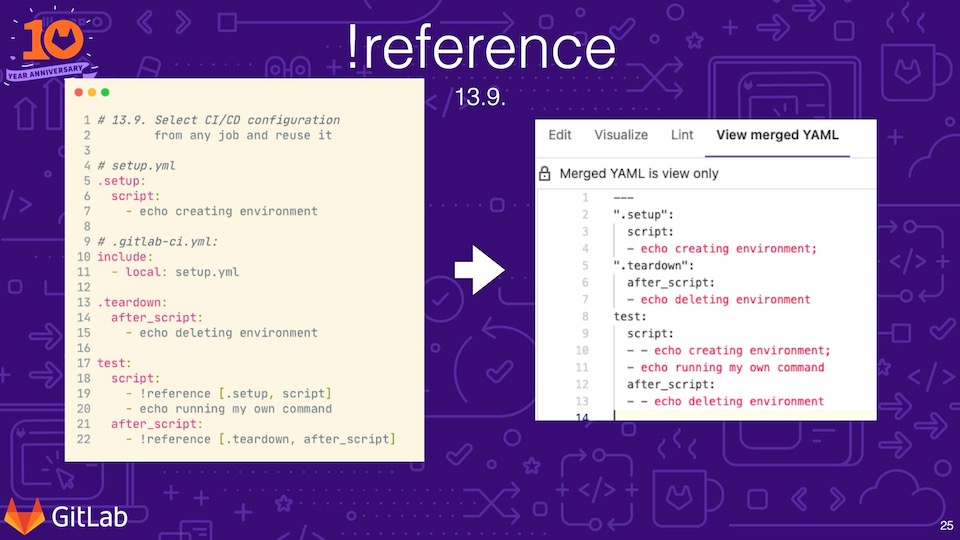
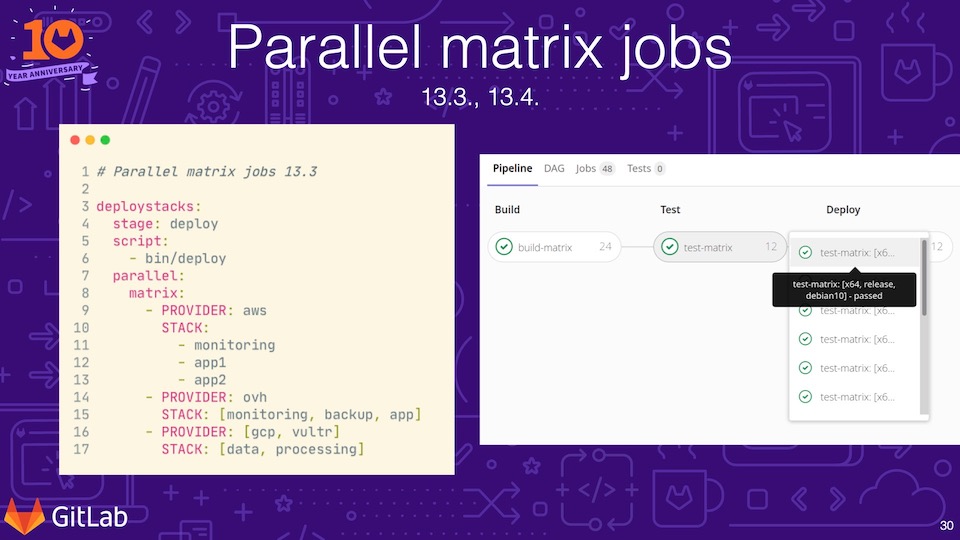
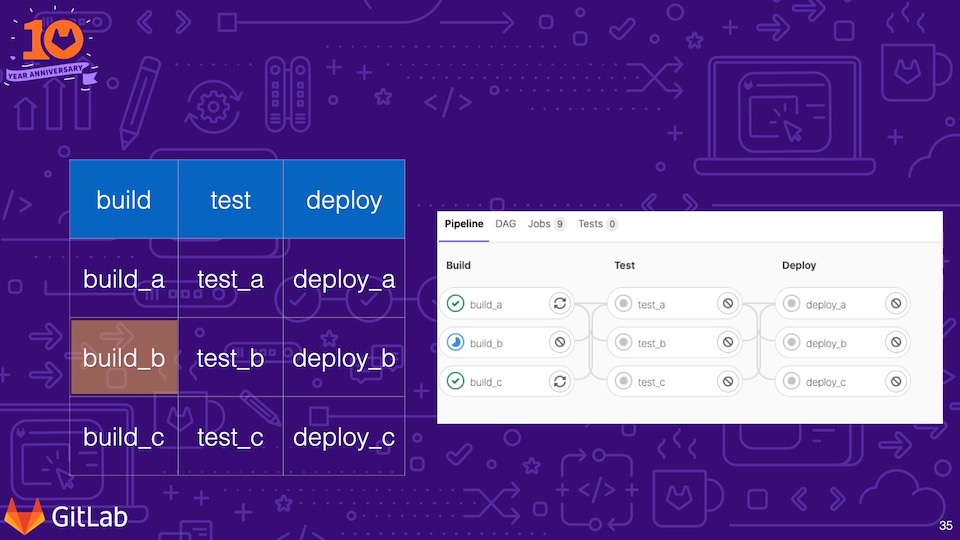
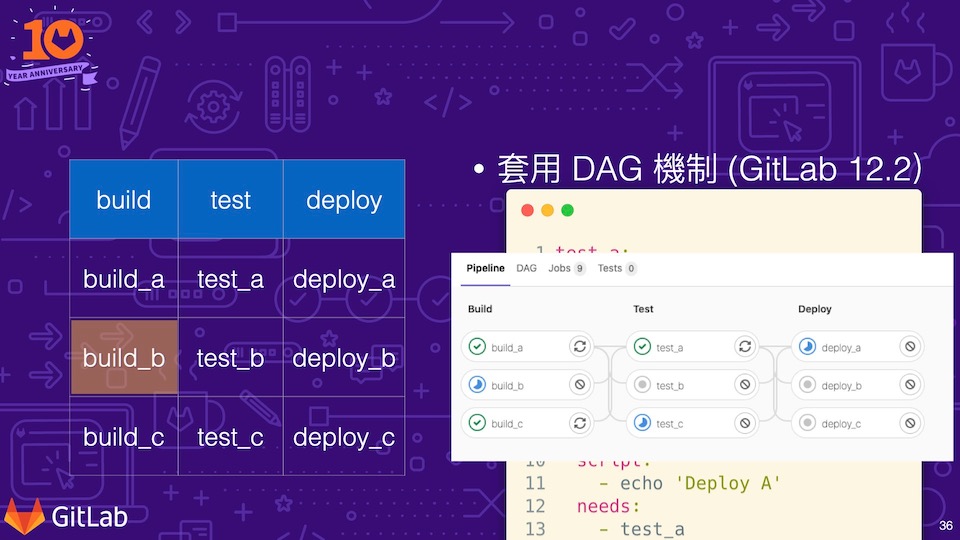
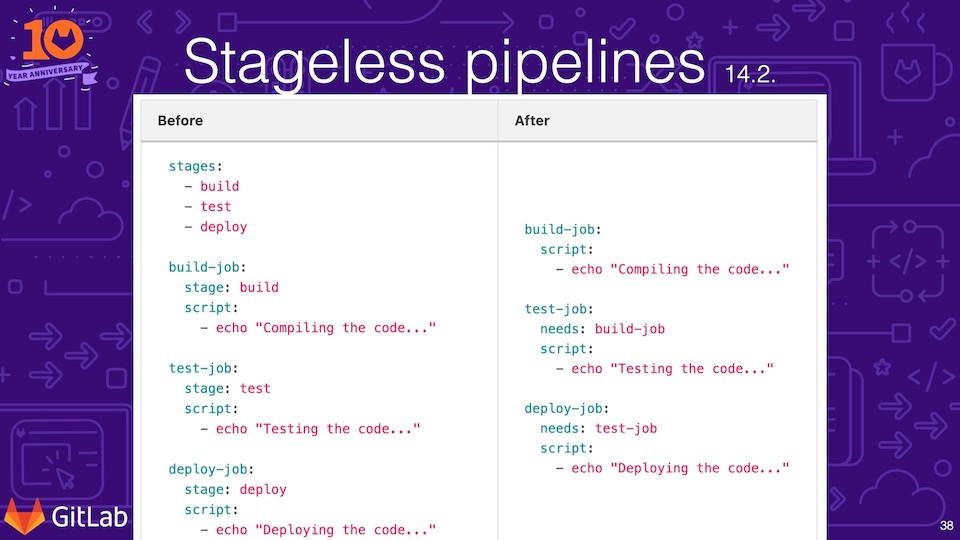
    <content type="html"><![CDATA[<p><img src="/Publication/GitLab/20211008-gitlab-version-13-to-14-ci-cd-configuration-highlight/CICD_HighLight_001.jpg" loading="lazy"></p><h2 id="01-活動紀錄"><a href="#01-活動紀錄" class="headerlink" title="01 - 活動紀錄"></a>01 - 活動紀錄</h2><ul><li>活動方：GitLab Taipei User Group</li><li>名稱：GitLab 13.0 到 14.3 版關於 CICD 設定的功能亮點</li><li>基本介紹：</li></ul><p>這份簡報主要是搭配 GitLab 10 週年活動的分享，針對 GitLab 13.0 ~ 14.3 其中的 GitLab CICD 設定檔新增功能及變更所做的亮點整理。</p><span id="more"></span><p>在 GitLab 13.0 ~ 14.3 的版本更新及變更中，橫跨了 17 個版本，其關於 CICD 的設定變更幅度非常的多，因此在整理之後，又再次過濾及挑選一次。</p><p><img src="/Publication/GitLab/20211008-gitlab-version-13-to-14-ci-cd-configuration-highlight/CICD_HighLight_054.jpg" loading="lazy"></p><p>這次整理的亮點主要包誇五大方向，分別是 Pipeline Editor、Include、Reference、Parallel With Matrix 以及 Directed Acyclic Graph (DAG) 的 Needs 功能。</p><h2 id="02-GitLab-CI-CD-設定檔-Pipeline-Editor-線上編輯器"><a href="#02-GitLab-CI-CD-設定檔-Pipeline-Editor-線上編輯器" class="headerlink" title="02 - GitLab CI&#x2F;CD 設定檔 Pipeline Editor 線上編輯器"></a>02 - GitLab CI&#x2F;CD 設定檔 Pipeline Editor 線上編輯器</h2><p>在 GitLab 13.8 版開始，GitLab 在介面上增加了 Pipeline 的編輯器，在這個編輯器上，除了可以做 CICD 設定檔的文字編輯外，也可以直接在編輯器上看到編輯後的 Pipeline 視覺化關卡規劃，更可以直接線上做語法檢查 (Lint)，甚至，如果有使用到 extends, include 等語法時，還可以透過最後一個「View merged YAML」來查看合併之後的語法。到了 14.1 版，也開始支援可以在編輯器上選擇要編輯 CICD 設定檔的專案分支。</p><p><img src="/Publication/GitLab/20211008-gitlab-version-13-to-14-ci-cd-configuration-highlight/CICD_HighLight_012.jpg" loading="lazy"></p><p>有 Pipeline Editor 線上編輯器之後，大幅度的改善以往在 local 端透過編輯器撰寫後，還必須複製到線上透過 Lint 工具才能知道語法是否正確的繁瑣，因為這個功能的新增，也改變了我個人的開發流程。</p><h2 id="03-Include"><a href="#03-Include" class="headerlink" title="03 - Include"></a>03 - Include</h2><p>在 GitLab CICD 設定檔的語法中 <a href="https://docs.gitlab.com/ee/ci/yaml/#include">Include</a> 是很早就提供的功能，只是早期必須要付費版本才能使用，直到 GitLab 11.4 版開始下放到了免費版，從此讓 GitLab 變得很好用，也讓團隊的共用變得很有可能。</p><p><img src="/Publication/GitLab/20211008-gitlab-version-13-to-14-ci-cd-configuration-highlight/CICD_HighLight_022.jpg" loading="lazy"></p><p>在最初開放給免費版本的 Include 語法中，包含四種格式，分別是 <code>include:local:</code>、<code>include:remote</code>、<code>include:project</code> 以及 <code>include:template</code>。</p><ul><li><code>include:local:</code>：載入同專案中的其他 YAML 檔案，如果只有一個也可以直接簡短為 <code>include: &#39;file-name.yml&#39;</code></li><li><code>include:remote</code>：載入遠端公開路徑的 YAML 檔案</li><li><code>include:project</code>：載入其他專案中的 YAML 檔，可以透過 <code>ref</code> 設定是什麼分支以及透過 <code>file</code> 設定要載入的檔案路徑</li><li><code>include:template</code>：載入 GitLab 官方提供的 GitLab CICD Template</li></ul><p>以上的功能在後續的版本中有一系列的變化，首先是載入其他專案的 YAML 檔，以往的語法一次只能載入一個專案中的一個檔案，在 13.6 之後開始，允許開發者在同一個專案宣告中，載入多個 YAML 檔案，範例語法如下：</p><figure class="highlight yaml"><table><tr><td class="gutter"><pre><span class="line">1</span><br><span class="line">2</span><br><span class="line">3</span><br><span class="line">4</span><br><span class="line">5</span><br><span class="line">6</span><br></pre></td><td class="code"><pre><span class="line"><span class="attr">include:</span></span><br><span class="line">  <span class="bullet">-</span> <span class="attr">project:</span> <span class="string">&#x27;my-group/my-project&#x27;</span></span><br><span class="line">    <span class="attr">ref:</span> <span class="string">main</span></span><br><span class="line">    <span class="attr">file:</span></span><br><span class="line">      <span class="bullet">-</span> <span class="string">&#x27;/template/.build.yml&#x27;</span></span><br><span class="line">      <span class="bullet">-</span> <span class="string">&#x27;/template/.tests.yml&#x27;</span></span><br></pre></td></tr></table></figure><p>到了 13.8 以及 14.2 甚至開始提供在專案路徑上可以使用變數。這些變數可以是專案、群組甚至是 GitLab 服務層級。範例語法：</p><figure class="highlight yaml"><table><tr><td class="gutter"><pre><span class="line">1</span><br><span class="line">2</span><br><span class="line">3</span><br></pre></td><td class="code"><pre><span class="line"><span class="attr">include:</span></span><br><span class="line">  <span class="bullet">-</span> <span class="attr">project:</span> <span class="string">&#x27;$CI_PROJECT_PATH&#x27;</span></span><br><span class="line">    <span class="attr">file:</span> <span class="string">&#x27;.compliance-gitlab-ci.yml&#x27;</span></span><br></pre></td></tr></table></figure><p>以往載入同專案底下的專案必須要一個一個的載入，到了 13.11 版本後，可以使用 wildcard 的特性如：</p><figure class="highlight yaml"><table><tr><td class="gutter"><pre><span class="line">1</span><br><span class="line">2</span><br></pre></td><td class="code"><pre><span class="line"><span class="attr">include:</span> <span class="string">&#x27;configs/*.yml&#x27;</span></span><br><span class="line"><span class="attr">include:</span> <span class="string">&#x27;configs/**/*.yml&#x27;</span></span><br></pre></td></tr></table></figure><p>到了 14.2 版之後，開始提供可以針對同專案底下的 include 撰寫 <code>rules</code> 條件語法，透過條件來決定要不要載入，如：</p><figure class="highlight yaml"><table><tr><td class="gutter"><pre><span class="line">1</span><br><span class="line">2</span><br><span class="line">3</span><br><span class="line">4</span><br><span class="line">5</span><br><span class="line">6</span><br><span class="line">7</span><br><span class="line">8</span><br></pre></td><td class="code"><pre><span class="line"><span class="attr">include:</span></span><br><span class="line">  <span class="bullet">-</span> <span class="attr">local:</span> <span class="string">builds.yml</span></span><br><span class="line">    <span class="attr">rules:</span></span><br><span class="line">      <span class="bullet">-</span> <span class="attr">if:</span> <span class="string">&#x27;$INCLUDE_BUILDS == &quot;true&quot;&#x27;</span></span><br><span class="line"></span><br><span class="line"><span class="attr">test:</span></span><br><span class="line">  <span class="attr">stage:</span> <span class="string">test</span></span><br><span class="line">  <span class="attr">script:</span> <span class="string">exit</span> <span class="number">0</span></span><br></pre></td></tr></table></figure><h2 id="04-reference-tags-重複使用"><a href="#04-reference-tags-重複使用" class="headerlink" title="04 - !reference tags 重複使用"></a>04 - !reference tags 重複使用</h2><p><img src="/Publication/GitLab/20211008-gitlab-version-13-to-14-ci-cd-configuration-highlight/CICD_HighLight_033.jpg" loading="lazy"></p><p>以為，提供重複使用的語法僅有 include、extends 以及 anchors 語法，在 GitLab 13.9 之後，提供了 <code>!reference</code> tags 的語法工載入特定工作中的特定內容，如底下的範例：</p><figure class="highlight yaml"><table><tr><td class="gutter"><pre><span class="line">1</span><br><span class="line">2</span><br><span class="line">3</span><br><span class="line">4</span><br><span class="line">5</span><br></pre></td><td class="code"><pre><span class="line"><span class="comment"># setup.yml</span></span><br><span class="line"></span><br><span class="line"><span class="string">.setup:</span></span><br><span class="line">    <span class="attr">script:</span></span><br><span class="line">      <span class="bullet">-</span> <span class="string">echo</span> <span class="string">creating</span> <span class="string">environment</span></span><br></pre></td></tr></table></figure><figure class="highlight yaml"><table><tr><td class="gutter"><pre><span class="line">1</span><br><span class="line">2</span><br><span class="line">3</span><br><span class="line">4</span><br><span class="line">5</span><br><span class="line">6</span><br><span class="line">7</span><br><span class="line">8</span><br><span class="line">9</span><br><span class="line">10</span><br><span class="line">11</span><br><span class="line">12</span><br><span class="line">13</span><br><span class="line">14</span><br><span class="line">15</span><br></pre></td><td class="code"><pre><span class="line"><span class="comment"># .gitlab-ci.yml</span></span><br><span class="line"></span><br><span class="line"><span class="attr">include:</span></span><br><span class="line">  <span class="bullet">-</span> <span class="attr">local:</span> <span class="string">setup.yml</span></span><br><span class="line"></span><br><span class="line"><span class="string">.teardown:</span></span><br><span class="line">  <span class="attr">after_script:</span></span><br><span class="line">    <span class="bullet">-</span> <span class="string">echo</span> <span class="string">deleting</span> <span class="string">environment</span></span><br><span class="line"></span><br><span class="line"><span class="attr">test:</span></span><br><span class="line">  <span class="attr">script:</span></span><br><span class="line">    <span class="bullet">-</span> <span class="type">!reference</span> [<span class="string">.setup</span>, <span class="string">script</span>]</span><br><span class="line">    <span class="bullet">-</span> <span class="string">echo</span> <span class="string">running</span> <span class="string">my</span> <span class="string">own</span> <span class="string">command</span></span><br><span class="line">  <span class="attr">after_script:</span></span><br><span class="line">    <span class="bullet">-</span> <span class="type">!reference</span> [<span class="string">.teardown</span>, <span class="string">after_script</span>]</span><br></pre></td></tr></table></figure><p>以上的 !reference 語法，經過 GitLab 的語法解析之後，會轉變為：</p><figure class="highlight yaml"><table><tr><td class="gutter"><pre><span class="line">1</span><br><span class="line">2</span><br><span class="line">3</span><br><span class="line">4</span><br><span class="line">5</span><br><span class="line">6</span><br><span class="line">7</span><br><span class="line">8</span><br><span class="line">9</span><br><span class="line">10</span><br><span class="line">11</span><br><span class="line">12</span><br><span class="line">13</span><br><span class="line">14</span><br><span class="line">15</span><br><span class="line">16</span><br></pre></td><td class="code"><pre><span class="line"><span class="comment"># .gitlab-ci.yml</span></span><br><span class="line"></span><br><span class="line"><span class="string">.setup:</span></span><br><span class="line">    <span class="attr">script:</span></span><br><span class="line">      <span class="bullet">-</span> <span class="string">echo</span> <span class="string">creating</span> <span class="string">environment</span></span><br><span class="line"></span><br><span class="line"><span class="string">.teardown:</span></span><br><span class="line">  <span class="attr">after_script:</span></span><br><span class="line">    <span class="bullet">-</span> <span class="string">echo</span> <span class="string">deleting</span> <span class="string">environment</span></span><br><span class="line"></span><br><span class="line"><span class="attr">test:</span></span><br><span class="line">  <span class="attr">script:</span></span><br><span class="line">    <span class="bullet">-</span> <span class="string">echo</span> <span class="string">creating</span> <span class="string">environment</span></span><br><span class="line">    <span class="bullet">-</span> <span class="string">echo</span> <span class="string">running</span> <span class="string">my</span> <span class="string">own</span> <span class="string">command</span></span><br><span class="line">  <span class="attr">after_script:</span></span><br><span class="line">    <span class="bullet">-</span> <span class="string">echo</span> <span class="string">deleting</span> <span class="string">environment</span></span><br></pre></td></tr></table></figure><p>其中需要特別注意到的地方是 <code>test</code> 的這個工作。<code>script</code> 及 <code>after_script</code> 兩個部分，除了同一份 yaml 檔案的重複使用外，連 include 進來的 yaml 也可以透過 !reference tags 進行重複使用。</p><p>到了 GitLab 14.3 版中，甚是也提供了 rules 條件式的重複使用。</p><h2 id="05-Parallel-With-Matrix"><a href="#05-Parallel-With-Matrix" class="headerlink" title="05 - Parallel With Matrix"></a>05 - Parallel With Matrix</h2><p><img src="/Publication/GitLab/20211008-gitlab-version-13-to-14-ci-cd-configuration-highlight/CICD_HighLight_038.jpg" loading="lazy"></p><p><code>parallel</code> 語法是在 GitLab 11.5 版本中提供的，其讓工作可以透過平行化處理加快工作完成的時間，但並不是大部分的工作都可以支援平行化，因此對於大部分的使用者來說，幫助似乎不大。但到了 13.3 的版本，開始提供 <code>parallel:matrix</code> 工作，這個支援就讓很多只是變數不一樣的工作得以更加的精簡，如下的範例：</p><figure class="highlight yaml"><table><tr><td class="gutter"><pre><span class="line">1</span><br><span class="line">2</span><br><span class="line">3</span><br><span class="line">4</span><br><span class="line">5</span><br><span class="line">6</span><br><span class="line">7</span><br><span class="line">8</span><br><span class="line">9</span><br><span class="line">10</span><br><span class="line">11</span><br></pre></td><td class="code"><pre><span class="line"><span class="attr">deploystacks:</span></span><br><span class="line">  <span class="attr">stage:</span> <span class="string">deploy</span></span><br><span class="line">  <span class="attr">stript:</span></span><br><span class="line">    <span class="bullet">-</span> <span class="string">bin/deploy</span></span><br><span class="line">  <span class="attr">parallel:</span></span><br><span class="line">    <span class="attr">matrix:</span></span><br><span class="line">      <span class="bullet">-</span> <span class="attr">PROVIDER:</span> <span class="string">aws</span></span><br><span class="line">        <span class="attr">STACK:</span></span><br><span class="line">          <span class="bullet">-</span> <span class="string">monitoring</span></span><br><span class="line">          <span class="bullet">-</span> <span class="string">app1</span></span><br><span class="line">          <span class="bullet">-</span> <span class="string">app2</span></span><br></pre></td></tr></table></figure><p>如上一個工作，在 GitLab 解析之後就可以變成三個工作，其三個工作的變數分別是為：</p><ul><li>PROVIDER: aws, STACK: monitoring</li><li>PROVIDER: aws, STACK: app1</li><li>PROVIDER: aws, STACK: app2</li></ul><p>而到了 13.5 版，調整了規格變成可以支援一維陣列的支援。在到了 13.10 版本，則開始支援把 <code>parallel:matrix</code> 變數，帶到預計要 trigger 的工作中。</p><h2 id="06-Directed-Acyclic-Graph-DAG-的-Needs-功能"><a href="#06-Directed-Acyclic-Graph-DAG-的-Needs-功能" class="headerlink" title="06 - Directed Acyclic Graph (DAG) 的 Needs 功能"></a>06 - Directed Acyclic Graph (DAG) 的 Needs 功能</h2><p>Directed Acyclic Graph 中文通常被翻譯為「有向無環圖」，在 <a href="https://zh.wikipedia.org/zh-tw/%E6%9C%89%E5%90%91%E6%97%A0%E7%8E%AF%E5%9B%BE">wiki</a> 的解釋中是這樣說明的：在圖論中，如果一個有向圖從任意頂點出發無法經過若干條邊回到該點，則這個圖是一個有向無環圖。而在 GitLab 12.2 版本中開始支援 Pipeline 的有向無環圖，代表著 Pipeline <code>不必再一個一個關卡的進行，當一個工作完成，後續需要該工作完成後才能進行的工作可以直接開始進行</code>。</p><p>以底下的範例中，設定結尾為 a 的個關卡工作，後續的工作都需要前面工作先完成，如 test_a 需要 build_a，test_b 需要 build_b：</p><p><img src="/Publication/GitLab/20211008-gitlab-version-13-to-14-ci-cd-configuration-highlight/CICD_HighLight_046.jpg" loading="lazy"></p><p>在還沒有支援 DAG 的環境中，如過 Build 的這個關卡中，build_b 這個工作會執行的特別慢，則會導致 Test 關卡中的工作一直無法進行。</p><p><img src="/Publication/GitLab/20211008-gitlab-version-13-to-14-ci-cd-configuration-highlight/CICD_HighLight_049.jpg" loading="lazy"></p><p>當有 DAG 的機制導入後，因為後續的工作可以直接開始進行，可能就會看到如上的範例，a 系列的工作一路執行到 Deploy 關卡了 build_b 工作還在進行。</p><p>這項特性，到了 GitLab 13.12 的 Pipeline 圖片中，讓 Pipeline 的檢視中，更加的有感覺，如下影片：</p><div class="video-container"><iframe src="https://www.youtube.com/embed/hNBb_ykwJB8" frameborder="0" loading="lazy" allowfullscreen></iframe></div><h3 id="Stageless-pipelines-14-2"><a href="#Stageless-pipelines-14-2" class="headerlink" title="Stageless pipelines 14.2"></a>Stageless pipelines 14.2</h3><p>GitLab 14.2 版中，提供了新的 Stageless pipelines 的特性，這可以讓 GitLab CICD 設定檔的內容更加的精簡，如下範例的變化：</p><p><img src="/Publication/GitLab/20211008-gitlab-version-13-to-14-ci-cd-configuration-highlight/CICD_HighLight_052.jpg" loading="lazy"></p><p>以往必須要特別宣告 stage 才能更進行，現在透過 needs 的語法，只需要把需求相依設定好，也就可以進行了。</p><h2 id="「GitLab-13-0-到-14-3-版關於-CICD-設定的功能亮點」簡報分享"><a href="#「GitLab-13-0-到-14-3-版關於-CICD-設定的功能亮點」簡報分享" class="headerlink" title="「GitLab 13.0 到 14.3 版關於 CICD 設定的功能亮點」簡報分享"></a>「GitLab 13.0 到 14.3 版關於 CICD 設定的功能亮點」簡報分享</h2>    <script async class="speakerdeck-embed"      data-slide="1"      data-id="a7ca2c5efe844e5180349aa442a3f6ef"      data-ratio="1.77777777777778"      src="//speakerdeck.com/assets/embed.js">    </script><p>簡報連結：<a href="https://speakerdeck.com/mouson/gitlab-13-14cicdgong-neng-liang-dian-ti-shi-gitlab-10zhou-nian-xian-shang-ju-hui">GitLab 13~14CICD功能亮點提示-GitLab 10週年線上聚會 - Speaker Deck</a></p><h2 id="結論："><a href="#結論：" class="headerlink" title="結論："></a>結論：</h2><p>GitLab 每個月的 22 日都會釋出一個版本，從 13.0 到 14.3 中共經歷了 17 次的釋出，期間新增的功能其實非常的多，在這次的簡報中，我取了其中我個人認為比較特別的特性，主要是可以幫助讓 GitLab CICD 設定檔的內容更加簡潔、更有重複使用性的特性，也希望這分享對於近期了解 GitLab CICD 的特性發展有幫助。</p><h2 id="參考連結："><a href="#參考連結：" class="headerlink" title="參考連結："></a>參考連結：</h2><ul><li><a href="https://docs.gitlab.com/ee/ci/pipeline_editor/#pipeline-editor">Pipeline Editor | GitLab</a></li><li><a href="https://docs.gitlab.com/ee/ci/yaml/#include">Keyword reference for the <code>.gitlab-ci.yml</code> file | GitLab</a></li></ul>]]></content>
    
    
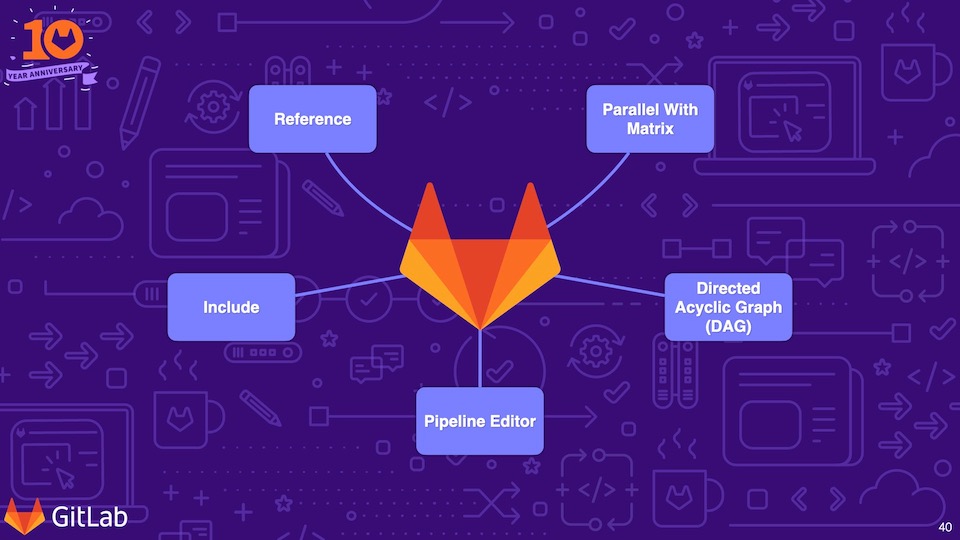
    <summary type="html">這份簡報中主要整理 GitLab CICI 設定在 13.0 到 14.3 版更新中的功能亮點</summary>


    <category term="Publication" scheme="https://mouson.im/categories/Publication/"/>
    
    <category term="GitLab" scheme="https://mouson.im/categories/Publication/GitLab/"/>
    
    
    <category term="GitLab" scheme="https://mouson.im/tags/GitLab/"/>
    
    <category term="GitLabCI" scheme="https://mouson.im/tags/GitLabCI/"/>
    
    <category term="Publication" scheme="https://mouson.im/tags/Publication/"/>
    
    <category term="演講" scheme="https://mouson.im/tags/%E6%BC%94%E8%AC%9B/"/>
    
    <category term="Speak" scheme="https://mouson.im/tags/Speak/"/>
    
    <category term="Slide" scheme="https://mouson.im/tags/Slide/"/>
    
  </entry>
  
  <entry>
    <title>2021-08-16 個人書籤及剪輯</title>
    <link href="https://mouson.im/Snippets/2021/2021-08-16-bookmarks/"/>
    <id>https://mouson.im/Snippets/2021/2021-08-16-bookmarks/</id>
    <published>2021-08-17T05:04:29.000Z</published>
    <updated>2021-08-17T05:04:29.000Z</updated>
    
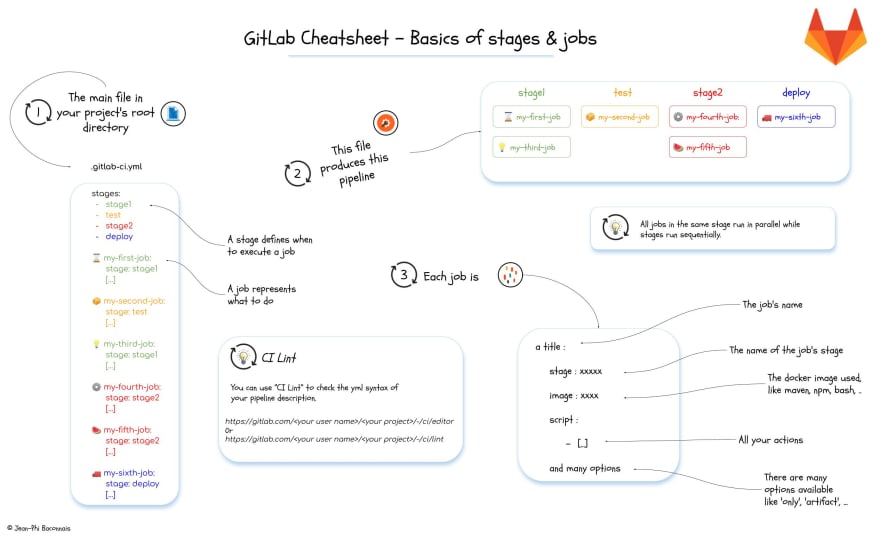
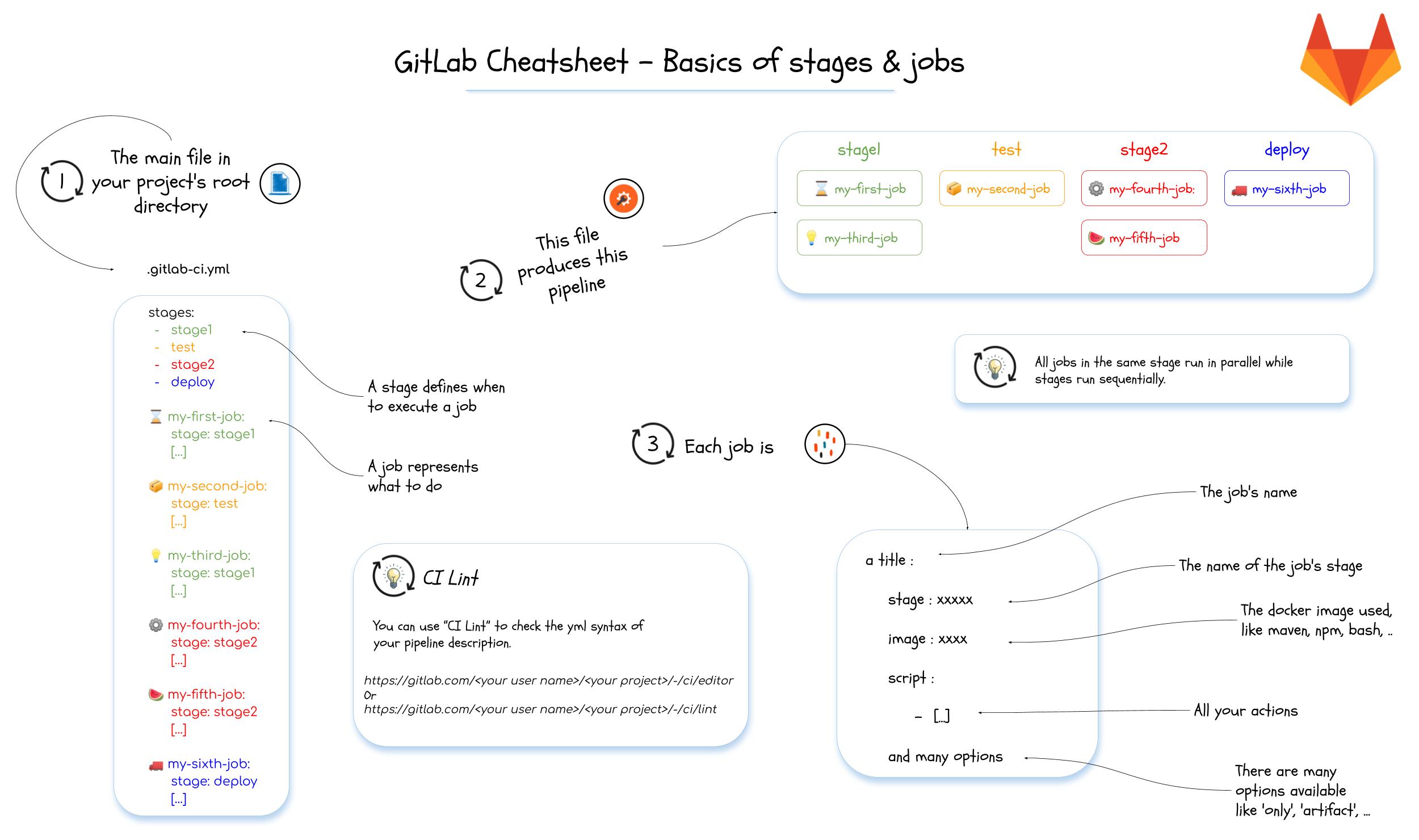
    <content type="html"><![CDATA[<p>蒐集個人覺得有幫助的文章及連結甚至是小範例。本次內容包含：GitLab、Git、軟體開發、網站開發等內容。</p><p><img src="/Snippets/2021/2021-08-16-bookmarks/GitLabCheatsheet-1-Basics_of_stages_and_jobs.jpg" loading="lazy"></p><blockquote><p>圖片取自：<a href="https://dev.to/zenika/gitlab-cheatsheet-1-basics-of-stages-and-jobs-14p0">🦊GitLab Cheatsheet - 1 - Basics of Stages and Jobs - DEV Community</a> </p></blockquote><span id="more"></span><h2 id="GitLab"><a href="#GitLab" class="headerlink" title="GitLab"></a>GitLab</h2><ul><li><p><a href="https://about.gitlab.com/blog/2021/06/21/how-to-become-more-productive-with-gitlab-ci/">How to become more productive with Gitlab CI | GitLab</a></p><ul><li>GitLab 官方的部落格文章，提到讓 GitLab CI 更有簡潔有效率的一些方法，總共提到六個方法：<ol><li>使用 Directed Acyclic Graphs(DAG) 的機制，讓工作可以更快速地執行運作。</li><li>利用並行運算如 <code>parallel.matrix</code> 的機制</li><li>利用 parent&#x2F;child pipelines 原理在於當研發團隊採用 mono-repo 策略時，<code>.gitlab-ci.yml</code> 可能越來越胖，也因此 .gitlab-ci.yml 可能因為業務需求內容越來越複雜。這時候就可以把一些功能拆出作為子項工作，利用 <code>trigger.include</code> 子工作的 .gitlab-ci.yml 檔案來減少衝突。</li><li>利用 <a href="https://docs.gitlab.com/ee/ci/merge_request_pipelines/pipelines_for_merged_results/merge_trains/">Merge Trains</a> 機制(Premium)</li><li>利用 Multiple Cache 的機制：以往，一個 Job 只能建立一種 caches 在 <a href="https://about.gitlab.com/releases/2021/04/22/gitlab-13-11-released/#use-multiple-caches-in-the-same-job">GitLab 13.11</a> 之後，提供了 <code>multiple caches</code> 的機制，讓一個 Job 可以針對多個目錄建立快取，並且使用不一樣的特徵值。個人覺得這功能在 mono-repo 的專案中會特別有效益。</li></ol></li><li>文中提到的其他參考連結：<ul><li><a href="https://docs.gitlab.com/ee/ci/runners/configure_runners.html#artifact-and-cache-settings">Artifact and cache settings</a></li><li><a href="https://docs.gitlab.com/ee/ci/large_repositories/">Optimizing GitLab for large repositories</a></li></ul></li></ul></li><li><p><a href="https://about.gitlab.com/blog/2021/07/29/how-orange-uses-gitlab-ci-cd-for-modern-devops/">How Orange made a first step toward CI&#x2F;CD standardization with GitLab | GitLab</a></p><blockquote><p>Orange 這家公司推出了他們維護的 GitLab CI&#x2F;CD 模板供社群直接引入使用，裡頭提供了大量的支援，如 docker, terraform, k8s, php, helm, python, angular, k6 openshift, s3, anbible, maven 等等，對於想更深入學習 GitLab CI&#x2F;CD 的人還蠻值得一看的。</p></blockquote><ul><li>GitLab Link: <a href="https://gitlab.com/to-be-continuous">https://gitlab.com/to-be-continuous</a></li><li>Orange Docs: <a href="https://to-be-continuous.gitlab.io/doc/">https://to-be-continuous.gitlab.io/doc/</a></li></ul></li><li><p>這一系列共八張 Cheatsheet ，對於剛開始使用 GitLab CI 學著撰寫 .gitlab-ci.yml 的使用者挺有幫助的。值得一看。</p><ul><li><a href="https://dev.to/zenika/gitlab-cheatsheet-1-basics-of-stages-and-jobs-14p0">🦊GitLab Cheatsheet - 1 - Basics of Stages and Jobs - DEV Community</a></li><li><a href="https://dev.to/zenika/gitlab-cheatsheet-2-runners-2ib">🦊GitLab Cheatsheet - 2 - Runners - DEV Community</a></li><li><a href="https://dev.to/zenika/gitlab-cheatsheet-3-gitlabci-rules-1340">🦊 GitLab Cheatsheet - 3 - GitLabCI Rules - DEV Community</a></li><li><a href="https://dev.to/zenika/gitlab-cheatsheet-4-gitlabci-jobs-call-sequence-o1c">🦊 GitLab Cheatsheet - 4 - GitLabCI - Jobs call sequence - DEV Community</a></li><li><a href="https://dev.to/zenika/gitlabcheatsheet-5-gitlabci-order-optimize-jobs-2646">🦊 GitLabCheatsheet - 5 -GitLabCI - Order &amp; optimize jobs - DEV Community</a></li><li><a href="https://dev.to/zenika/gitlabcheatsheet-6-registry-2bjo">🦊 GitLabCheatsheet - 6 - Registry - DEV Community</a></li><li><a href="https://dev.to/zenika/gitlabcheatsheet-7-service-desk-3iae">🦊 GitLabCheatsheet - 7 - Service Desk - DEV Community</a></li><li><a href="https://dev.to/zenika/gitlabcheatsheet-8-gitlabci-cache-15fe">🦊 GitLabCheatsheet - 8 - GitlabCI - Cache &amp; artifacts - DEV Community</a></li><li><a href="https://dev.to/zenika/gitlabcheatsheet-9-api-2848">🦊 GitLab Cheatsheet - 9 - GitLab API - DEV Community</a></li><li><a href="https://dev.to/zenika/gitlab-cheatsheet-10-templates-and-quick-actions-2doh">🦊 GitLab Cheatsheet - 10 - Templates and Quick actions - DEV Community</a></li></ul></li><li><p>Commit Virtual 2021: Using CI Templates for Speed and Consistency</p><ul><li>GitLab Commit 2021 上的議程，講到如何建立團隊可以快速使用的 CI 模板</li><li>Speaker: Natalia Khodiakova</li><li>Video: <a href="https://www.youtube.com/watch?v=sNK_aVuvC6A">https://www.youtube.com/watch?v=sNK_aVuvC6A</a></li><li><div class="video-container"><iframe src="https://www.youtube.com/embed/sNK_aVuvC6A" frameborder="0" loading="lazy" allowfullscreen></iframe></div></li></ul></li></ul><h2 id="GIT"><a href="#GIT" class="headerlink" title="GIT"></a>GIT</h2><p><a href="https://dev.to/lydiahallie/cs-visualized-useful-git-commands-37p1">🌳🚀 CS Visualized: Useful Git Commands - DEV Community</a></p><h2 id="網站開發"><a href="#網站開發" class="headerlink" title="網站開發"></a>網站開發</h2><ul><li>關於 Content Security Policy (CSP) 一系列的紀錄及筆記<ul><li><a href="https://hackmd.io/@Eotones/BkOX6u5kX">Content Security Policy (CSP) 筆記 - HackMD</a></li><li><a href="https://developer.mozilla.org/en-US/docs/Web/HTTP/CSP#violation_report_syntax">Content Security Policy (CSP) - HTTP | MDN</a></li><li><a href="https://securityheaders.com/">Analyse your HTTP response headers</a></li><li><a href="https://medium.com/starbugs/must-know-security-http-headers-be78aeb93200">你不能不知道的安全性 HTTP headers. 隨著網路上的 Web 應用程式越來越多，為了提升安全性，現在跟安全性有關的… | by Larry Lu | Starbugs Weekly 星巴哥技術專欄 | Aug, 2021 | Medium</a></li></ul></li></ul>]]></content>
    
    
    <summary type="html">&lt;p&gt;蒐集個人覺得有幫助的文章及連結甚至是小範例。本次內容包含：GitLab、Git、軟體開發、網站開發等內容。&lt;/p&gt;
&lt;p&gt;&lt;img src=&quot;/Snippets/2021/2021-08-16-bookmarks/GitLabCheatsheet-1-Basics_of_stages_and_jobs.jpg&quot; loading=&quot;lazy&quot;&gt;&lt;/p&gt;
&lt;blockquote&gt;
&lt;p&gt;圖片取自：&lt;a href=&quot;https://dev.to/zenika/gitlab-cheatsheet-1-basics-of-stages-and-jobs-14p0&quot;&gt;🦊GitLab Cheatsheet - 1 - Basics of Stages and Jobs - DEV Community&lt;/a&gt; &lt;/p&gt;
&lt;/blockquote&gt;</summary>


    <category term="Snippets" scheme="https://mouson.im/categories/Snippets/"/>
    
    <category term="2021" scheme="https://mouson.im/categories/Snippets/2021/"/>
    
    
    <category term="Note" scheme="https://mouson.im/tags/Note/"/>
    
    <category term="GIT" scheme="https://mouson.im/tags/GIT/"/>
    
    <category term="GitLab" scheme="https://mouson.im/tags/GitLab/"/>
    
    <category term="Snippet" scheme="https://mouson.im/tags/Snippet/"/>
    
    <category term="軟體開發" scheme="https://mouson.im/tags/%E8%BB%9F%E9%AB%94%E9%96%8B%E7%99%BC/"/>
    
    <category term="網站開發" scheme="https://mouson.im/tags/%E7%B6%B2%E7%AB%99%E9%96%8B%E7%99%BC/"/>
    
  </entry>
  
  <entry>
    <title>2021-07-30 個人書籤及剪輯</title>
    <link href="https://mouson.im/Snippets/2021/2021-07-30-bookmarks/"/>
    <id>https://mouson.im/Snippets/2021/2021-07-30-bookmarks/</id>
    <published>2021-07-30T06:16:04.000Z</published>
    <updated>2021-07-30T06:16:04.000Z</updated>
    
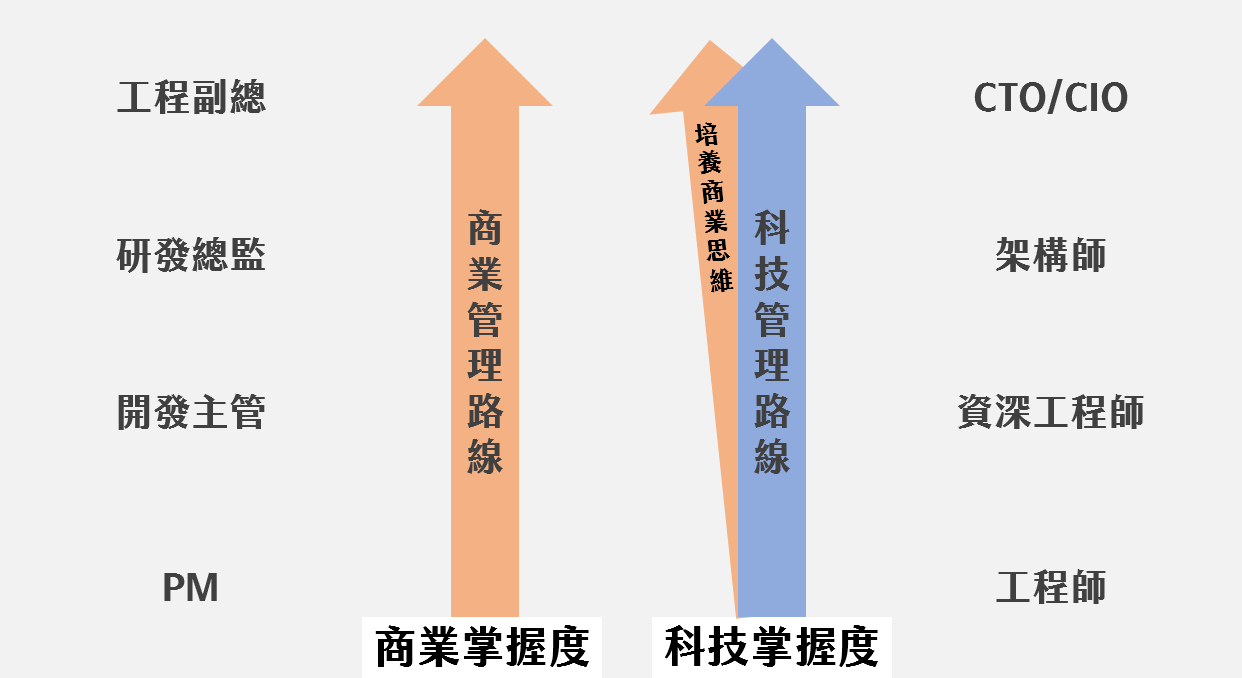
    <content type="html"><![CDATA[<p>蒐集個人覺得有幫助的文章及連結甚至是小範例。本次內容包含：工具、DevOps、生活、PHP、Laravel。</p><p><img src="/Snippets/2021/2021-07-30-bookmarks/image-4.png" loading="lazy"></p><blockquote><p>圖片取自：<a href="https://bizthinking.com.tw/2021/07/01/business-challenge-2/">未來 10 年，企業經營上的重大挑戰 - 5 大因應方針 - 商業思維學院</a></p></blockquote><span id="more"></span><h2 id="生活"><a href="#生活" class="headerlink" title="生活"></a>生活</h2><ul><li><p><a href="https://www.ithome.com.tw/news/145660">Dropbox公開自家工程師職務能力框架，不同類型技術職人技能和職涯發展階梯大公開 | iThome</a></p><ul><li><a href="https://dropbox.github.io/dbx-career-framework/overview.html">Overview - Engineering Career Framework</a></li></ul></li><li><p>超多知名網站的 pitch 簡報，包含 YouTube, Foursquare, facebook 等：<a href="https://www.pitchdeckhunt.com/">The Best Pitch Deck Examples | Pitch Deck Hunt</a></p></li><li><p>FIDO</p><ul><li><a href="https://www.ithome.com.tw/news/128566">【全面解析FIDO網路身分識別】無密碼新時代將至！解決網路密碼遭竊與盜用問題 | iThome</a></li><li><a href="https://fido.moi.gov.tw/">TAIWAN FidO 臺灣行動身分識別</a></li><li><a href="https://www.webcomm.com.tw/blog/285/fido-introduction1/">網路時代的最佳資安解決方案 1：FIDO的深入解析 (上) – 偉康科技洞察室</a></li><li><a href="https://www.webcomm.com.tw/blog/290/fido-introduction2/">網路時代的最佳資安解決方案 1：FIDO的深入解析 (下) – 偉康科技洞察室</a></li></ul></li><li><p><a href="https://bizthinking.com.tw/2021/06/24/business-challenge/">未來 10 年，企業經營上的重大挑戰</a></p></li><li><p><a href="https://bizthinking.com.tw/2021/07/01/business-challenge-2/">未來 10 年，企業經營上的重大挑戰 - 5 大因應方針</a></p></li><li><p><a href="https://mp.weixin.qq.com/s?__biz=MzU2MTgxODgwNA==&mid=2247483782&idx=1&sn=bfa7b47303dd113d3d84aa908683220f&chksm=fc73bc5dcb04354ba3c359ed36ac9e3a116e7cda2bec7a78f8f8791349fbceaca201a02b12e7&token=494556039&lang=zh_CN#rd">創業者需要知道的 13 種思維模型</a></p><ul><li>RMF（遺憾最小化框架，Regret Minimization Framework）</li><li>創意迷宮（The Idea Maze)</li><li>厭惡性盲區（Schlep Blindness）</li><li>JTBD（Jobs to be Done）</li><li>MVP（最小可行產品，Minimum Viable Product）</li><li>確認偏誤（Confirmation Bias）</li><li>PMF（Product Market Fit）</li><li>100 人原則（100 People Love）</li><li>AARRR（海盜指標）</li><li>網絡效應（Network Effects）</li><li>規模經濟（Economies of Scale）</li><li>顛覆式創新（Disruptive Innovation）</li><li>CToS（Conjoined Triangles of Success）</li></ul></li><li><p><a href="https://4jolintsai.medium.com/%E6%80%8E%E9%BA%BC%E9%9D%A0%E5%BD%B1%E9%9F%BF%E5%9C%B0%E5%9C%96%E9%80%B2%E8%A1%8C%E9%9C%80%E6%B1%82%E5%88%86%E6%9E%90-94f6e376b4df">如何靠「影響地圖 Impact Mapping 」進行需求分析？ | Medium</a></p></li><li><p><a href="https://medium.com/%E6%96%87%E6%80%9D%E4%B8%8D%E8%97%8F%E7%A7%81/%E6%96%87%E6%80%9D%E4%B8%8D%E8%97%8F%E7%A7%81-orid-%E9%9D%A2%E8%A9%A6%E6%8A%80%E5%B7%A7-b7737bf41897">【文思不藏私】ORID 面試技巧. 最近正好想整理一下如何用 ORID… | by Vince Huang | 【文思不藏私】 | Medium</a></p></li></ul><h2 id="工具"><a href="#工具" class="headerlink" title="工具"></a>工具</h2><ul><li><p><a href="https://sourceforge.net/projects/impressive/">Impressive download | SourceForge.net</a></p><blockquote><p>Impressive is a program that displays PDF presentation slides with style. Smooth alpha-blended slide transitions are provided for the sake of eye candy, but in addition to this, Impressive offers some unique tools that are very useful for presentations.<br>在簡報播放時 Highlight 畫面</p></blockquote></li><li><p><a href="https://github.com/bitwarden/cli#downloadinstall">bitwarden&#x2F;cli: The command line vault (Windows, macOS, &amp; Linux).</a></p><ul><li>Open Source 的密碼管控工具，提供了各種平台的 APP，可以自己架在自己的環境中</li><li><a href="https://hub.docker.com/r/vaultwarden/server">vaultwarden&#x2F;server - Docker Image | Docker Hub</a></li><li><a href="https://github.com/dani-garcia/vaultwarden">dani-garcia&#x2F;vaultwarden: Unofficial Bitwarden compatible server written in Rust, formerly known as bitwarden_rs</a></li><li><a href="https://github.com/blacs30/bitwarden-alfred-workflow">blacs30&#x2F;bitwarden-alfred-workflow: Simple Bitwarden Workflow for Alfred</a> #Alfred</li></ul></li><li><p><a href="https://alfred-spotify-mini-player.com/">Alfred Spotify Mini Player</a> #Alfred #Spotify</p></li><li><p>一套可以快速掌握網站數據的服務(付費的)，KKDay 團隊有在使用：<a href="https://amplitude.com/">Amplitude | The Digital Optimization System</a></p></li></ul><h2 id="DevOps"><a href="#DevOps" class="headerlink" title="DevOps"></a>DevOps</h2><ul><li>在 Shell 環境下轉換字母大小寫 <a href="https://stackoverflow.com/questions/2264428/how-to-convert-a-string-to-lower-case-in-bash">How to convert a string to lower case in Bash? - Stack Overflow</a></li></ul><figure class="highlight shell"><table><tr><td class="gutter"><pre><span class="line">1</span><br><span class="line">2</span><br><span class="line">3</span><br><span class="line">4</span><br><span class="line">5</span><br><span class="line">6</span><br></pre></td><td class="code"><pre><span class="line">A=ABCDEFGHIJK</span><br><span class="line"><span class="meta prompt_">$</span><span class="language-bash">&#123;A^^&#125; 轉大寫</span></span><br><span class="line"><span class="meta prompt_">$</span><span class="language-bash">&#123;A^&#125; 第一碼轉大寫</span></span><br><span class="line"><span class="meta prompt_">$</span><span class="language-bash">&#123;A,,&#125; 轉小寫</span></span><br><span class="line"><span class="meta prompt_">$</span><span class="language-bash">&#123;A,&#125; 第一碼轉小寫</span></span><br><span class="line">echo $&#123;A:0:7&#125;</span><br></pre></td></tr></table></figure><ul><li><p><a href="https://yungke.me/linux-ncdu-instead-du/">Linux 使用 NCDU 替代 DU 來檢視資料夾大小 - Helloyungke</a></p></li><li><p><a href="https://mp.weixin.qq.com/s?__biz=MzA4MTc4NTUxNQ==&mid=2650524634&idx=1&sn=4177f88b530ecbcf73769720d7831aa9&chksm=8780cc1eb0f74508ded84aa6d863fc7f641daed4b7e3a460ef7e04ca2f5062576751dc401be1&token=666324596&lang=zh_CN#rd">docker概念很亂？俺來替你理一下！</a></p></li><li><p><a href="https://speakerdeck.com/pichuang/20210824-yun-yuan-sheng-ren-cai-xun-zhao-de-nan-chu-ji-chang-jian-wu-qu-tan-tao">20210824 雲原生人才尋找的難處及常見誤區探討 - Speaker Deck</a></p></li></ul><h2 id="PHP-Laravel"><a href="#PHP-Laravel" class="headerlink" title="PHP&#x2F;Laravel"></a>PHP&#x2F;Laravel</h2><ul><li><p>透過 PHP 產出 Excel 格式檔案的幾個 Library</p><ul><li><a href="https://github.com/PHPOffice/PhpSpreadsheet">PHPOffice&#x2F;PhpSpreadsheet: A pure PHP library for reading and writing spreadsheet files</a></li><li><a href="https://opensource.box.com/spout/">Spout - Read and write spreadsheets, quickly and at scale</a></li><li><a href="https://github.com/rap2hpoutre/fast-excel">rap2hpoutre&#x2F;fast-excel: 🦉 Fast Excel import&#x2F;export for Laravel</a></li></ul></li><li><p>當代 PHP 開發者在除錯時必須要知道的工具</p><ul><li><a href="https://www.cloudways.com/blog/php-debugging-tools/">Best 6 PHP Debugging Tools of 2021 For Developers</a></li><li><a href="https://kint-php.github.io/kint/">Kint</a></li><li><a href="http://krumo.kaloyan.info/">Krumo</a></li><li><a href="http://phpdebugbar.com/">PHPDebugBar</a></li><li><a href="http://pinba.org/">Pinba</a></li><li><a href="https://xdebug.org/">Xdebug</a></li><li><a href="http://filp.github.io/whoops/">Whoops</a></li></ul></li><li><p>當在必須要知道的 12 個 PHP 測試工具：<a href="https://www.cloudways.com/blog/php-testing-tools/">Ultimate List of Best PHP Testing Tools of 2021</a></p></li><li><p>PHP 版本相容測試工具：<a href="https://github.com/PHPCompatibility/PHPCompatibility">PHPCompatibility&#x2F;PHPCompatibility: PHP Compatibility check for PHP_CodeSniffer</a></p></li><li><p>Laravel 在 Console 底下呈現 spinner 的方法及 Library：<a href="https://laravel-news.com/laravel-console-spinner">Laravel Console Spinner | Laravel News</a></p></li><li><p>模組化 Laravel <a href="https://dev.to/keljtanoski/modular-laravel-3dkf">Modular Laravel - DEV Community</a></p></li><li><p>從 Laravel 的一個 SQL injection 漏洞查看如何追底層的 code：<a href="https://www.leavesongs.com/PENETRATION/cachet-from-laravel-sqli-to-bug-bounty.html">CVE-2021-39165: 从一个Laravel SQL注入漏洞开始的Bug Bounty之旅 | 离别歌</a></p></li><li><p>使用 Laravel 製作的 CRM 工具：<a href="https://github.com/krayin/laravel-crm">krayin&#x2F;laravel-crm: Free &amp; Opensource Laravel CRM solution for SMEs and Enterprises for complete customer lifecycle management.</a></p></li><li><p><a href="https://laraveldaily.com/larger-laravel-projects-12-things-to-take-care-of/">Larger Laravel Projects: 12 Things to Take Care Of - Laravel Daily</a></p><ol><li>Automated Tests</li><li>Architecture and Project Structure</li><li>“Fake Data” with Factories and Seeds</li><li>Database structure</li><li>External Packages and Laravel Upgrades</li><li>Performance of everything</li><li>Deployment Process and Downtime</li><li>Hardware Infrastructure for Scaling</li><li>Backups and Recovery Strategy</li><li>Bug Monitoring Process</li><li>Security</li><li>Docs for onboarding new devs</li></ol></li></ul>]]></content>
    
    
    <summary type="html">&lt;p&gt;蒐集個人覺得有幫助的文章及連結甚至是小範例。本次內容包含：工具、DevOps、生活、PHP、Laravel。&lt;/p&gt;
&lt;p&gt;&lt;img src=&quot;/Snippets/2021/2021-07-30-bookmarks/image-4.png&quot; loading=&quot;lazy&quot;&gt;&lt;/p&gt;
&lt;blockquote&gt;
&lt;p&gt;圖片取自：&lt;a href=&quot;https://bizthinking.com.tw/2021/07/01/business-challenge-2/&quot;&gt;未來 10 年，企業經營上的重大挑戰 - 5 大因應方針 - 商業思維學院&lt;/a&gt;&lt;/p&gt;
&lt;/blockquote&gt;</summary>


    <category term="Snippets" scheme="https://mouson.im/categories/Snippets/"/>
    
    <category term="2021" scheme="https://mouson.im/categories/Snippets/2021/"/>
    
    
    <category term="Note" scheme="https://mouson.im/tags/Note/"/>
    
    <category term="PHP" scheme="https://mouson.im/tags/PHP/"/>
    
    <category term="Laravel" scheme="https://mouson.im/tags/Laravel/"/>
    
    <category term="Snippet" scheme="https://mouson.im/tags/Snippet/"/>
    
    <category term="DevOps" scheme="https://mouson.im/tags/DevOps/"/>
    
    <category term="工具" scheme="https://mouson.im/tags/%E5%B7%A5%E5%85%B7/"/>
    
    <category term="生活" scheme="https://mouson.im/tags/%E7%94%9F%E6%B4%BB/"/>
    
  </entry>
  
  <entry>
    <title>2021 06 15 個人書籤及剪輯</title>
    <link href="https://mouson.im/Snippets/2021/2021-06-15-bookmarks/"/>
    <id>https://mouson.im/Snippets/2021/2021-06-15-bookmarks/</id>
    <published>2021-06-16T06:16:04.000Z</published>
    <updated>2021-06-15T06:16:04.000Z</updated>
    
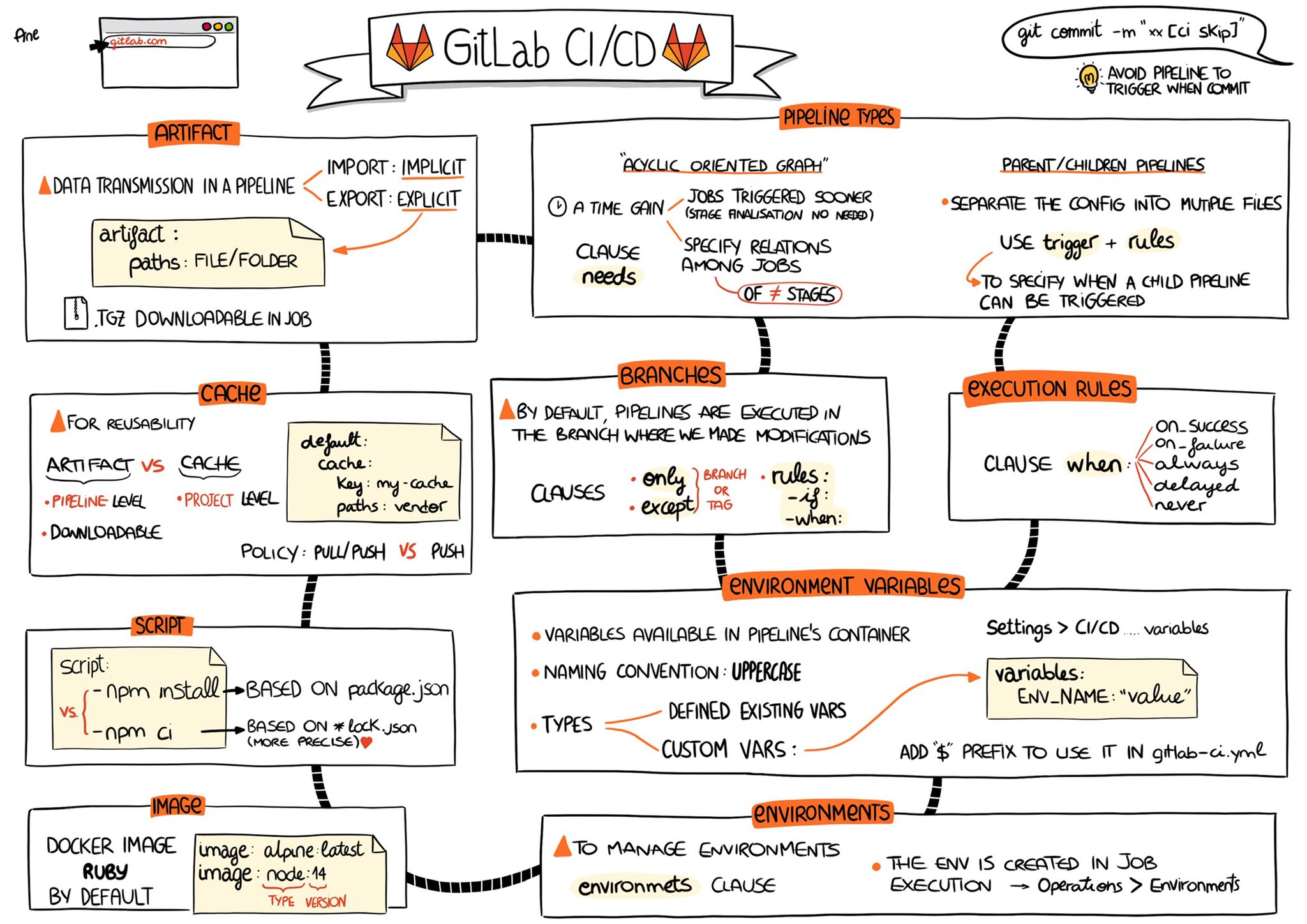
    <content type="html"><![CDATA[<p>蒐集個人覺得有幫助的文章及連結甚至是小範例。本次內容包含：PHP、Laravel、DevOps、GitLab、軟體工程等內容。</p><p><img src="/Snippets/2021/2021-06-15-bookmarks/gitlab-ci-cd-notes.jpg" alt="GitLab CI CD Note" loading="lazy"><br>本次選圖取自：<a href="(https://twitter.com/ane_naiz/status/1396775879099944966?s=21)">GitLab CI CD Note</a></p><span id="more"></span><h2 id="PHP-Laravel"><a href="#PHP-Laravel" class="headerlink" title="PHP&#x2F;Laravel"></a>PHP&#x2F;Laravel</h2><ul><li><a href="https://rappasoft.com/blog/15-random-laravel-snippets-methods">Rappasoft | Blog | 15 Random Laravel Snippets &amp; Methods</a></li></ul><p>裡頭放了很多好用的 Laravel Snippets 及 Method，像 <code>wasRecentlyCreated()</code> 可以用在 <code>firstOrCreate</code> 之後做判斷到底是新增還是修改。</p><ul><li><a href="https://php.watch/articles/php-regex-readability">Writing better Regular Expressions in PHP • PHP.Watch</a></li></ul><figure class="highlight php"><table><tr><td class="gutter"><pre><span class="line">1</span><br><span class="line">2</span><br></pre></td><td class="code"><pre><span class="line">- /^https:\/\/example.com\/path/i</span><br><span class="line">+ <span class="comment">#^https://example.com/path#i</span></span><br></pre></td></tr></table></figure><figure class="highlight php"><table><tr><td class="gutter"><pre><span class="line">1</span><br><span class="line">2</span><br></pre></td><td class="code"><pre><span class="line">- <span class="title function_ invoke__">preg_match</span>(<span class="string">&#x27;/^https:\/\/example.com\/path/i&#x27;</span>, <span class="variable">$uri</span>);</span><br><span class="line">+ <span class="title function_ invoke__">preg_match</span>(<span class="string">&#x27;#^https://example.com/path#i&#x27;</span>, <span class="variable">$uri</span>);</span><br></pre></td></tr></table></figure><ul><li><p><a href="https://segmentfault.com/a/1190000040084826?utm_source=sf-homepage">分享一些 PHP 中有用的知识和坑 - SegmentFault 思否</a></p><p> <img src="/Snippets/2021/2021-06-15-bookmarks/php-array-merge-replace.png" alt="PHP Array Merge Replace ADD" loading="lazy"></p></li><li><p><a href="https://stackoverflow.com/questions/2473989/list-of-big-o-for-php-functions/2484455#2484455">performance - List of Big-O for PHP functions - Stack Overflow</a></p><blockquote><p>PHP 原生的 function 的效能上 Big-O 列表</p></blockquote></li></ul><h2 id="GitLab"><a href="#GitLab" class="headerlink" title="GitLab"></a>GitLab</h2><ul><li>在 Twitter 上看到的 GitLab CI&#x2F;CD 圖像筆記</li></ul><p><img src="/Snippets/2021/2021-06-15-bookmarks/gitlab-ci-cd-notes.jpg" alt="GitLab CI CD Note" loading="lazy"></p><blockquote><p><a href="https://twitter.com/ane_naiz/status/1396775879099944966?s=21">Ane 在 Twitter 上：”I took some notes of my 3-day Gitlab CI&#x2F;CD training. It’s not exhaustive but I hope it’ll be helpful 😊 @gitlab #cicd #devOps #learn #sketchnotes #Doodles #visual #draw https://t.co/MQcg1b9NgZ" / Twitter</a></p></blockquote><p><img src="/Snippets/2021/2021-06-15-bookmarks/GitLabCheatsheet-1-Basics_of_stages_jobs.jpg" alt="basics stages" loading="lazy"></p><blockquote><p><a href="https://twitter.com/JPhi_Baconnais/status/1399603230313693185">Jean-Phi Baconnais 🦎 在 Twitter 上：”I’ve just started creating a set of GitLab Cheatsheet 🦊. The first one speaks about basics of stages and jobs. https://t.co/G7e3wi713A @gitlab #gitlabheroes https://t.co/6cMYc8VhpU" / Twitter</a></p></blockquote><ul><li><a href="https://gitlab-workshop.gitlab.io/gitlab-workshop/gitlab-workshop/1.0.0/introduction.html">GITLAB WORKSHOP :: GITLAB WORKSHOP</a><ul><li>對應的簡報：<a href="https://docs.google.com/presentation/d/1kvjJFFGq9oMk3eAdutCkMejNxCayMjeaCfGRPAfXtEc/edit#slide=id.g422a8a8e92_0_69">Una-gitlab - Google 簡報</a><blockquote><p>GitLab 官方認證的講者所建立的 GitLab Workshop，是個入門 GitLab CI&#x2F;CD 可以嘗試參考的內容。</p></blockquote></li></ul></li></ul><h2 id="軟體工程"><a href="#軟體工程" class="headerlink" title="軟體工程"></a>軟體工程</h2><ul><li><a href="https://xie.infoq.cn/article/13c3e0c83634bea31b4ab574c">为啥你写的代码总是这么复杂？ - InfoQ 写作平台</a></li></ul><h2 id="DevOps"><a href="#DevOps" class="headerlink" title="DevOps"></a>DevOps</h2><ul><li><p><a href="https://medium.com/starbugs/do-you-understand-htop-ffb72b3d5629">你一定用過 htop，但你有看懂每個欄位嗎？. 身為一個工程師，不管你寫的是前端、後端、全端還是什麼端，一定多少用過… | by Larry Lu | Starbugs Weekly 星巴哥技術專欄 | May, 2021 | Medium</a></p><blockquote><p>這這篇文章中幫 htop 這個好用的工具做了一次完整的介紹，包含畫面中的每個欄位的意義。</p></blockquote></li><li><p><a href="https://larry850806.medium.com/why-do-os-need-virtual-memory-b47d6eeecbce">從作業系統的角度來談為什麼需要「虛擬記憶體」. 上個月的專欄「你一定用過… | by Larry Lu | Jun, 2021 | Medium</a></p><blockquote><p>這篇延伸自上一篇，增加描述了許多什麼是虛擬記憶體，為什麼需要虛擬記憶體的說明。</p></blockquote></li></ul>]]></content>
    
    
    <summary type="html">&lt;p&gt;蒐集個人覺得有幫助的文章及連結甚至是小範例。本次內容包含：PHP、Laravel、DevOps、GitLab、軟體工程等內容。&lt;/p&gt;
&lt;p&gt;&lt;img src=&quot;/Snippets/2021/2021-06-15-bookmarks/gitlab-ci-cd-notes.jpg&quot; alt=&quot;GitLab CI CD Note&quot; loading=&quot;lazy&quot;&gt;&lt;br&gt;本次選圖取自：&lt;a href=&quot;(https://twitter.com/ane_naiz/status/1396775879099944966?s=21)&quot;&gt;GitLab CI CD Note&lt;/a&gt;&lt;/p&gt;</summary>


    <category term="Snippets" scheme="https://mouson.im/categories/Snippets/"/>
    
    <category term="2021" scheme="https://mouson.im/categories/Snippets/2021/"/>
    
    
    <category term="Note" scheme="https://mouson.im/tags/Note/"/>
    
    <category term="GitLab" scheme="https://mouson.im/tags/GitLab/"/>
    
    <category term="PHP" scheme="https://mouson.im/tags/PHP/"/>
    
    <category term="Laravel" scheme="https://mouson.im/tags/Laravel/"/>
    
    <category term="Snippet" scheme="https://mouson.im/tags/Snippet/"/>
    
    <category term="DevOps" scheme="https://mouson.im/tags/DevOps/"/>
    
  </entry>
  
  <entry>
    <title>GitLab CI - 在 Merge Request(MR) 中檢視 PHP 測試代碼覆蓋 (Code Coverage) 情況</title>
    <link href="https://mouson.im/Notes/GitLab/gitlab-show-php-code-coverage-in-merge-request/"/>
    <id>https://mouson.im/Notes/GitLab/gitlab-show-php-code-coverage-in-merge-request/</id>
    <published>2021-06-14T09:17:29.000Z</published>
    <updated>2022-07-01T09:17:29.000Z</updated>
    
    <content type="html"><![CDATA[<h2 id="2022-06-30-Update"><a href="#2022-06-30-Update" class="headerlink" title="2022.06.30 Update"></a>2022.06.30 Update</h2><p>於<a href="https://docs.gitlab.com/ee/ci/yaml/artifacts_reports.html#artifactsreportscobertura-removed">GitLab CI&#x2F;CD 手冊上</a>發現 <code>artifacts:reports:cobertura</code> 在 GitLab 15.0 中移除，替換為 <code>artifacts:reports:coverage_report</code>，因此更新底下內容。</p><h2 id="2021-06-14-Update"><a href="#2021-06-14-Update" class="headerlink" title="2021.06.14 Update"></a>2021.06.14 Update</h2><p>在上一篇 <a href="https://mouson.im/Notes/GitLab/gitlab-show-phpunit-report-in-pipeline/">在 Pipeline 檢視 PHPUnit 單元測試報告</a>，透過 <code>artifacts:reports:junit</code> 的機制，使每次 Pipeline 執行後，就能馬上看到單元測試報告，有了測試報告之後，可能就會開始思考，那 Code Coverage 測試代碼覆蓋的狀況，是不是也可以在 Merge Request 的過程中就看到呢？</p><p>答案是可以的，而且在 GitLab CI&#x2F;CD 的免費版本中就有這個功能。在 GitLab 12.9 版後，只需要透過 <code>artifacts:reports:coverage_report</code> 並作相關設定，就可以搜集 <a href="https://cobertura.github.io/cobertura/">Cobertura XML</a> 格式的報表就可以完成。這部分與 <code>artifacts:reports:junit</code> 的原理是一樣的，只需要讓 Pipeline 的工作可以產出所需要的格式的檔案，透過 <code>artifacts:reports:coverage_report</code> 將檔案搜集起來，就可以在 Merge Request 的畫面中看到視覺化的測試代碼覆蓋情況。</p><p><img src="/Notes/GitLab/gitlab-show-php-code-coverage-in-merge-request/test_coverage_visualization_v12_9.png" alt="Test Coverage Visualization" loading="lazy"></p><p>那麼，在 PHP 該怎麼做出符合<a href="https://cobertura.github.io/cobertura/">Cobertura XML</a>格式的測試程式碼覆蓋狀況檔案呢？</p><span id="more"></span><p>如上圖(取自官方<a href="https://docs.gitlab.com/ee/user/project/merge_requests/test_coverage_visualization.html">Test coverage visualization</a>文件圖片)，在圖片中，呈現<code>綠色</code>線條的部分，代表測試有執行到的部分，而<code>橘色</code>的部分則代表沒有測試程式覆蓋到。</p><p>在 GitLab 官方文件上提到了幾個語言及其支援的工具或外掛，如：</p><ul><li>Ruby - <a href="https://rubygems.org/gems/simplecov-cobertura">simplecov-cobertura</a></li><li>Golang - <a href="https://github.com/boumenot/gocover-cobertura">gocover-cobertura</a></li><li>JavaScript - <a href="https://istanbul.js.org/docs/advanced/alternative-reporters/#cobertura">Istanbul</a></li><li>Python - <a href="https://coverage.readthedocs.io/en/coverage-5.0.4/cmd.html#xml-reporting">Coverage.py</a></li></ul><p>在 PHP 搭配 PHPUnit 該如何產出 Cobertura XML 呢？</p><h2 id="一、讓-PHPUnit-輸出-Coverage-Cobertura-XML-格式的報表"><a href="#一、讓-PHPUnit-輸出-Coverage-Cobertura-XML-格式的報表" class="headerlink" title="一、讓 PHPUnit 輸出 Coverage Cobertura XML 格式的報表"></a>一、讓 PHPUnit 輸出 Coverage Cobertura XML 格式的報表</h2><p>在 PHPUnit 9.5 版的手冊中，<a href="https://phpunit.readthedocs.io/en/9.5/configuration.html#the-coverage-element">關於 coverage 的章節</a>中，可以看到，目前手冊上顯示如果要輸出報表，總共支援了底下的六種格式：</p><ul><li>clover</li><li>crap4j</li><li>html</li><li>php</li><li>text</li><li>xml</li></ul><p>其中，並沒有提到 GitLab CI&#x2F;CD 要使用的 Cobertura XML 格式，因此甚至有人寫了轉換工具<a href="https://packagist.org/packages/soyhuce/phpunit-to-cobertura">soyhuce&#x2F;phpunit-to-cobertura</a>，但仔細探究 PHPUnit 的原始碼，搜尋「cobertura」後發現了一道曙光<a href="https://github.com/sebastianbergmann/phpunit/blob/0b13879b81be04ab76a95d318f56dd6f39f6a715/src/TextUI/CliArguments/Builder.php#L43">phpunit&#x2F;Builder.php at sebastianbergmann&#x2F;phpunit</a>)，在 phpunit 的指令中，支援了 <code>coverage-cobertura</code> 關鍵字。</p><p>於是實際驗證，在已經開啟 xdebug 的 PHP 環境中，執行：</p><figure class="highlight shell"><table><tr><td class="gutter"><pre><span class="line">1</span><br></pre></td><td class="code"><pre><span class="line">php vendor/bin/phpunit --coverage-cobertura=cobertura.xml</span><br></pre></td></tr></table></figure><p>真的順利產出 Cobertura XML 格式的報表，樣式如下：</p><figure class="highlight xml"><table><tr><td class="gutter"><pre><span class="line">1</span><br><span class="line">2</span><br><span class="line">3</span><br><span class="line">4</span><br><span class="line">5</span><br><span class="line">6</span><br><span class="line">7</span><br><span class="line">8</span><br><span class="line">9</span><br><span class="line">10</span><br><span class="line">11</span><br><span class="line">12</span><br><span class="line">13</span><br><span class="line">14</span><br><span class="line">15</span><br><span class="line">16</span><br><span class="line">17</span><br><span class="line">18</span><br><span class="line">19</span><br><span class="line">20</span><br><span class="line">21</span><br><span class="line">22</span><br><span class="line">23</span><br><span class="line">24</span><br><span class="line">25</span><br><span class="line">26</span><br><span class="line">27</span><br><span class="line">28</span><br><span class="line">29</span><br><span class="line">30</span><br><span class="line">31</span><br></pre></td><td class="code"><pre><span class="line"><span class="meta">&lt;?xml version=<span class="string">&quot;1.0&quot;</span> encoding=<span class="string">&quot;UTF-8&quot;</span>?&gt;</span></span><br><span class="line"><span class="meta">&lt;!DOCTYPE <span class="keyword">coverage</span> <span class="keyword">SYSTEM</span> <span class="string">&quot;http://cobertura.sourceforge.net/xml/coverage-04.dtd&quot;</span>&gt;</span></span><br><span class="line"><span class="tag">&lt;<span class="name">coverage</span> <span class="attr">line-rate</span>=<span class="string">&quot;0.5&quot;</span> <span class="attr">branch-rate</span>=<span class="string">&quot;0&quot;</span> <span class="attr">lines-covered</span>=<span class="string">&quot;1&quot;</span> <span class="attr">lines-valid</span>=<span class="string">&quot;2&quot;</span> <span class="attr">branches-covered</span>=<span class="string">&quot;0&quot;</span> <span class="attr">branches-valid</span>=<span class="string">&quot;0&quot;</span> <span class="attr">complexity</span>=<span class="string">&quot;2&quot;</span> <span class="attr">version</span>=<span class="string">&quot;0.4&quot;</span> <span class="attr">timestamp</span>=<span class="string">&quot;1623610530&quot;</span>&gt;</span></span><br><span class="line">  <span class="tag">&lt;<span class="name">sources</span>&gt;</span></span><br><span class="line">    <span class="tag">&lt;<span class="name">source</span>&gt;</span>/Users/mouson/GitFolder/GitLabCI-Playground/GitLab-CodeCoverage-Report-Demo/src<span class="tag">&lt;/<span class="name">source</span>&gt;</span></span><br><span class="line">  <span class="tag">&lt;/<span class="name">sources</span>&gt;</span></span><br><span class="line">  <span class="tag">&lt;<span class="name">packages</span>&gt;</span></span><br><span class="line">    <span class="tag">&lt;<span class="name">package</span> <span class="attr">name</span>=<span class="string">&quot;&quot;</span> <span class="attr">line-rate</span>=<span class="string">&quot;0.5&quot;</span> <span class="attr">branch-rate</span>=<span class="string">&quot;0&quot;</span> <span class="attr">complexity</span>=<span class="string">&quot;2&quot;</span>&gt;</span></span><br><span class="line">      <span class="tag">&lt;<span class="name">classes</span>&gt;</span></span><br><span class="line">        <span class="tag">&lt;<span class="name">class</span> <span class="attr">name</span>=<span class="string">&quot;Mouson\Template\Sample&quot;</span> <span class="attr">filename</span>=<span class="string">&quot;Sample.php&quot;</span> <span class="attr">line-rate</span>=<span class="string">&quot;0.5&quot;</span> <span class="attr">branch-rate</span>=<span class="string">&quot;0&quot;</span> <span class="attr">complexity</span>=<span class="string">&quot;2&quot;</span>&gt;</span></span><br><span class="line">          <span class="tag">&lt;<span class="name">methods</span>&gt;</span></span><br><span class="line">            <span class="tag">&lt;<span class="name">method</span> <span class="attr">name</span>=<span class="string">&quot;isTrue&quot;</span> <span class="attr">signature</span>=<span class="string">&quot;&quot;</span> <span class="attr">line-rate</span>=<span class="string">&quot;0&quot;</span> <span class="attr">branch-rate</span>=<span class="string">&quot;0&quot;</span> <span class="attr">complexity</span>=<span class="string">&quot;1&quot;</span>&gt;</span></span><br><span class="line">              <span class="tag">&lt;<span class="name">lines</span>&gt;</span></span><br><span class="line">                <span class="tag">&lt;<span class="name">line</span> <span class="attr">number</span>=<span class="string">&quot;9&quot;</span> <span class="attr">hits</span>=<span class="string">&quot;0&quot;</span>/&gt;</span></span><br><span class="line">              <span class="tag">&lt;/<span class="name">lines</span>&gt;</span></span><br><span class="line">            <span class="tag">&lt;/<span class="name">method</span>&gt;</span></span><br><span class="line">            <span class="tag">&lt;<span class="name">method</span> <span class="attr">name</span>=<span class="string">&quot;not&quot;</span> <span class="attr">signature</span>=<span class="string">&quot;bool $bool&quot;</span> <span class="attr">line-rate</span>=<span class="string">&quot;1&quot;</span> <span class="attr">branch-rate</span>=<span class="string">&quot;0&quot;</span> <span class="attr">complexity</span>=<span class="string">&quot;1&quot;</span>&gt;</span></span><br><span class="line">              <span class="tag">&lt;<span class="name">lines</span>&gt;</span></span><br><span class="line">                <span class="tag">&lt;<span class="name">line</span> <span class="attr">number</span>=<span class="string">&quot;14&quot;</span> <span class="attr">hits</span>=<span class="string">&quot;1&quot;</span>/&gt;</span></span><br><span class="line">              <span class="tag">&lt;/<span class="name">lines</span>&gt;</span></span><br><span class="line">            <span class="tag">&lt;/<span class="name">method</span>&gt;</span></span><br><span class="line">          <span class="tag">&lt;/<span class="name">methods</span>&gt;</span></span><br><span class="line">          <span class="tag">&lt;<span class="name">lines</span>&gt;</span></span><br><span class="line">            <span class="tag">&lt;<span class="name">line</span> <span class="attr">number</span>=<span class="string">&quot;9&quot;</span> <span class="attr">hits</span>=<span class="string">&quot;0&quot;</span>/&gt;</span></span><br><span class="line">            <span class="tag">&lt;<span class="name">line</span> <span class="attr">number</span>=<span class="string">&quot;14&quot;</span> <span class="attr">hits</span>=<span class="string">&quot;1&quot;</span>/&gt;</span></span><br><span class="line">          <span class="tag">&lt;/<span class="name">lines</span>&gt;</span></span><br><span class="line">        <span class="tag">&lt;/<span class="name">class</span>&gt;</span></span><br><span class="line">      <span class="tag">&lt;/<span class="name">classes</span>&gt;</span></span><br><span class="line">    <span class="tag">&lt;/<span class="name">package</span>&gt;</span></span><br><span class="line">  <span class="tag">&lt;/<span class="name">packages</span>&gt;</span></span><br><span class="line"><span class="tag">&lt;/<span class="name">coverage</span>&gt;</span></span><br></pre></td></tr></table></figure><p>這代表至少在 PHPUnit 9.x 的版本中，可以支援 <code>--coverage-cobertura</code> 來產出 Cobertura XML 格式報表。</p><h2 id="二、如何在-phpunit-xml-中宣告要產出-Cobertura-XML-格式的報表呢？"><a href="#二、如何在-phpunit-xml-中宣告要產出-Cobertura-XML-格式的報表呢？" class="headerlink" title="二、如何在 phpunit.xml 中宣告要產出 Cobertura XML 格式的報表呢？"></a>二、如何在 phpunit.xml 中宣告要產出 Cobertura XML 格式的報表呢？</h2><p>同樣的，在 PHPUnit 的官方手冊中，是沒辦法找到在 PHPUnit 設定檔中應該如何產出 Cobertura XML 格式報表的，但如同在第一章中驗證的方法，在 coverage 的 report 做了 cobertura 的宣告：</p><figure class="highlight xml"><table><tr><td class="gutter"><pre><span class="line">1</span><br><span class="line">2</span><br><span class="line">3</span><br><span class="line">4</span><br><span class="line">5</span><br><span class="line">6</span><br><span class="line">7</span><br><span class="line">8</span><br></pre></td><td class="code"><pre><span class="line"><span class="tag">&lt;<span class="name">coverage</span> <span class="attr">processUncoveredFiles</span>=<span class="string">&quot;true&quot;</span>&gt;</span></span><br><span class="line">  <span class="tag">&lt;<span class="name">include</span>&gt;</span></span><br><span class="line">    <span class="tag">&lt;<span class="name">directory</span> <span class="attr">suffix</span>=<span class="string">&quot;.php&quot;</span>&gt;</span>./src<span class="tag">&lt;/<span class="name">directory</span>&gt;</span></span><br><span class="line">  <span class="tag">&lt;/<span class="name">include</span>&gt;</span></span><br><span class="line">  <span class="tag">&lt;<span class="name">report</span>&gt;</span></span><br><span class="line">    <span class="tag">&lt;<span class="name">cobertura</span> <span class="attr">outputFile</span>=<span class="string">&quot;build/cobertura.xml&quot;</span>/&gt;</span></span><br><span class="line">  <span class="tag">&lt;/<span class="name">report</span>&gt;</span></span><br><span class="line"><span class="tag">&lt;/<span class="name">coverage</span>&gt;</span></span><br></pre></td></tr></table></figure><p>同樣產出了 Cobertura XML 格式報表，因此這在 <code>phpunit.xml</code> 或 <code>phpunit.xml.dist</code> 是可行的。</p><h2 id="三、如何在-GitLab-CI-CD-中整合，讓PHPUnit-產出-Cobertura-XML-報表格式"><a href="#三、如何在-GitLab-CI-CD-中整合，讓PHPUnit-產出-Cobertura-XML-報表格式" class="headerlink" title="三、如何在 GitLab CI&#x2F;CD 中整合，讓PHPUnit 產出 Cobertura XML 報表格式"></a>三、如何在 GitLab CI&#x2F;CD 中整合，讓PHPUnit 產出 Cobertura XML 報表格式</h2><p>在這次的範例，直接取用中上一篇<a href="https://mouson.im/Notes/GitLab/gitlab-show-phpunit-report-in-pipeline/">在 Pipeline 檢視 PHPUnit 單元測試報告</a>相同的原始碼，但由於 PHPUnit 要產出 Code Coverage 相關的資訊時，必須搭配 xdebug 使用，因此這邊改採 <code>jorge07/alpine-php:8.0-dev</code> docker image 作為執行環境，同樣以 PHP 8.0 作為 PHP 的版本。</p><h3 id="1-GitLab-CI-執行環境"><a href="#1-GitLab-CI-執行環境" class="headerlink" title="1. GitLab CI 執行環境"></a>1. GitLab CI 執行環境</h3><ul><li>PHP 8.0</li><li>Docker Image <a href="https://hub.docker.com/r/jorge07/alpine-php">jorge07&#x2F;alpine-php:8.0-dev</a></li><li>GitLab 13.12</li><li>GitLab Runner 13.12</li><li>範例原始碼 <a href="https://gitlab.com/mouson-gitlab-playground/feature-demo/gitlab-codecoverage-report-demo">GitLab CodeCoverage Report Demo</a><ul><li>可參考對應的 Merge Request: <a href="https://gitlab.com/mouson-gitlab-playground/feature-demo/gitlab-codecoverage-report-demo/-/merge_requests/1/diffs#26372268ce75895339729a221f2e67f53ef70899">Demo Cobertura Code Coverage Format (!1) · Merge requests · GitLab PlayGround &#x2F; Feature Demo &#x2F; GitLab CodeCoverage Report Demo · GitLab</a></li></ul></li></ul><h3 id="2-在-GitLab-共用的模板"><a href="#2-在-GitLab-共用的模板" class="headerlink" title="2. 在 GitLab 共用的模板"></a>2. 在 GitLab 共用的模板</h3><figure class="highlight yaml"><table><tr><td class="gutter"><pre><span class="line">1</span><br><span class="line">2</span><br><span class="line">3</span><br><span class="line">4</span><br><span class="line">5</span><br><span class="line">6</span><br><span class="line">7</span><br></pre></td><td class="code"><pre><span class="line"><span class="string">.test_template:</span></span><br><span class="line">  <span class="attr">stage:</span> <span class="string">test</span></span><br><span class="line">  <span class="attr">image:</span> <span class="string">&quot;jorge07/alpine-php:8.0-dev&quot;</span></span><br><span class="line">  <span class="attr">before_script:</span></span><br><span class="line">    <span class="bullet">-</span> <span class="string">export</span> <span class="string">XDEBUG_MODE=coverage</span></span><br><span class="line">    <span class="bullet">-</span> <span class="string">export</span> <span class="string">COMPOSER_ALLOW_XDEBUG=1</span></span><br><span class="line">    <span class="bullet">-</span> <span class="string">composer</span> <span class="string">install</span> <span class="string">--prefer-dist</span> <span class="string">&gt;</span> <span class="string">/dev/null</span></span><br></pre></td></tr></table></figure><p>在底下的範例中，使用的模板都使用以上的共用安裝過程及共用的 docker image <code>jorge07/alpine-php:8.0-dev</code>。值得一提的地方是，在 PHP 8.0 搭配 XDebug 3.0 後，在取得 Coverage 時，必須讓 XDebug 知道 <code>XDEBUG_MODE</code> 為 <code>coverage</code>。</p><h2 id="四、在-GitLab-CI-中執行-PHPUnit-的-Coverage-檢查，並產出-Cobertura-XML-格式報表"><a href="#四、在-GitLab-CI-中執行-PHPUnit-的-Coverage-檢查，並產出-Cobertura-XML-格式報表" class="headerlink" title="四、在 GitLab CI 中執行 PHPUnit 的 Coverage 檢查，並產出 Cobertura XML 格式報表"></a>四、在 GitLab CI 中執行 PHPUnit 的 Coverage 檢查，並產出 Cobertura XML 格式報表</h2><h3 id="1-在-PHPUnit-Command-Line-執行指令中設定-Cobertura-XML-Report-格式"><a href="#1-在-PHPUnit-Command-Line-執行指令中設定-Cobertura-XML-Report-格式" class="headerlink" title="1. 在 PHPUnit Command Line 執行指令中設定 Cobertura XML Report 格式"></a>1. 在 PHPUnit Command Line 執行指令中設定 Cobertura XML Report 格式</h3><p>如前面所提到的，在 Command Line 中要得到 Cobertura XML 格式的報表，必須在 PHPUnit 執行的指令中加上 <code>--coverage-cobertura filePath</code> 參數，在 <code>.gitlab-ci.yml</code> 中，根據 <a href="https://mouson.im/Notes/GitLab/gitlab-show-phpunit-report-in-pipeline/">上一篇</a> 的範例原始碼，<code>script</code> 的部分必須再增加 <code>--coverage-cobertura</code>，增加後的 .gitlab-ci.yml 如下： </p><figure class="highlight yaml"><table><tr><td class="gutter"><pre><span class="line">1</span><br><span class="line">2</span><br><span class="line">3</span><br><span class="line">4</span><br><span class="line">5</span><br><span class="line">6</span><br><span class="line">7</span><br><span class="line">8</span><br><span class="line">9</span><br><span class="line">10</span><br></pre></td><td class="code"><pre><span class="line"><span class="attr">test:phpunit-with-command-line:</span></span><br><span class="line">  <span class="attr">extends:</span> <span class="string">.test_template</span></span><br><span class="line">  <span class="attr">script:</span></span><br><span class="line">    <span class="bullet">-</span> <span class="string">php</span> <span class="string">vendor/bin/phpunit</span> <span class="string">--coverage-cobertura</span> <span class="string">build/cobertura.xml</span> <span class="string">--log-junit</span> <span class="string">build/junit.xml</span></span><br><span class="line">  <span class="attr">artifacts:</span></span><br><span class="line">    <span class="attr">reports:</span></span><br><span class="line">      <span class="attr">junit:</span> <span class="string">build/junit.xml</span></span><br><span class="line">      <span class="attr">coverage_report:</span> </span><br><span class="line">        <span class="attr">coverage_format:</span> <span class="string">cobertura</span></span><br><span class="line">        <span class="attr">path:</span> <span class="string">build/cobertura.xml</span></span><br></pre></td></tr></table></figure><p>如上，再增加後，可以在對應的 <a href="https://gitlab.com/mouson-gitlab-playground/feature-demo/gitlab-codecoverage-report-demo/-/merge_requests/1/diffs#26372268ce75895339729a221f2e67f53ef70899">Merge Request</a> 馬上看到成果：</p><p><img src="/Notes/GitLab/gitlab-show-php-code-coverage-in-merge-request/php_coverage_visualization_01.png" alt="coverage visualization" loading="lazy"></p><p>如上圖，在範例的 PHP 程式碼中，刻意的不測試 <code>isFalse</code> 這個方法，因此方法中的原始碼呈現 No test coverage。 </p><h3 id="2-透過-phpunit-xml-dist-或-phpunit-xml-設定-Cobertura-XML-格式-Coverage-報表"><a href="#2-透過-phpunit-xml-dist-或-phpunit-xml-設定-Cobertura-XML-格式-Coverage-報表" class="headerlink" title="2. 透過 phpunit.xml.dist 或 phpunit.xml 設定 Cobertura XML 格式 Coverage 報表"></a>2. 透過 <code>phpunit.xml.dist</code> 或 <code>phpunit.xml</code> 設定 Cobertura XML 格式 Coverage 報表</h3><p>同樣的在第二段中，有提到如果要將 Cobertura XML 設定在 <code>phpunit.xml</code> 中，則 Coverage 的部分必須增加 report 並且增加 cobertura 的段落，範例如下：</p><figure class="highlight xml"><table><tr><td class="gutter"><pre><span class="line">1</span><br><span class="line">2</span><br><span class="line">3</span><br><span class="line">4</span><br><span class="line">5</span><br><span class="line">6</span><br><span class="line">7</span><br><span class="line">8</span><br></pre></td><td class="code"><pre><span class="line"><span class="tag">&lt;<span class="name">coverage</span> <span class="attr">processUncoveredFiles</span>=<span class="string">&quot;true&quot;</span>&gt;</span></span><br><span class="line">  <span class="tag">&lt;<span class="name">include</span>&gt;</span></span><br><span class="line">    <span class="tag">&lt;<span class="name">directory</span> <span class="attr">suffix</span>=<span class="string">&quot;.php&quot;</span>&gt;</span>./src<span class="tag">&lt;/<span class="name">directory</span>&gt;</span></span><br><span class="line">  <span class="tag">&lt;/<span class="name">include</span>&gt;</span></span><br><span class="line">  <span class="tag">&lt;<span class="name">report</span>&gt;</span></span><br><span class="line">    <span class="tag">&lt;<span class="name">cobertura</span> <span class="attr">outputFile</span>=<span class="string">&quot;build/report.cobertura.xml&quot;</span>/&gt;</span></span><br><span class="line">  <span class="tag">&lt;/<span class="name">report</span>&gt;</span></span><br><span class="line"><span class="tag">&lt;/<span class="name">coverage</span>&gt;</span></span><br></pre></td></tr></table></figure><p>這邊的 phpunit.xml 將 Cobertura 格式的檔案輸出到 <code>build/report.cobertura.xml</code> 這個檔案路徑。因此對應的 GitLab CI Pipeline 描述，也需要針對報表的路徑做調整，如下：</p><figure class="highlight yaml"><table><tr><td class="gutter"><pre><span class="line">1</span><br><span class="line">2</span><br><span class="line">3</span><br><span class="line">4</span><br><span class="line">5</span><br><span class="line">6</span><br><span class="line">7</span><br><span class="line">8</span><br><span class="line">9</span><br><span class="line">10</span><br></pre></td><td class="code"><pre><span class="line"><span class="attr">test:phpunit-with-phpunit-file:</span></span><br><span class="line">  <span class="attr">extends:</span> <span class="string">.test_template</span></span><br><span class="line">  <span class="attr">script:</span></span><br><span class="line">    <span class="bullet">-</span> <span class="string">php</span> <span class="string">vendor/bin/phpunit</span></span><br><span class="line">  <span class="attr">artifacts:</span></span><br><span class="line">    <span class="attr">reports:</span></span><br><span class="line">      <span class="attr">junit:</span> <span class="string">build/report.junit.xml</span></span><br><span class="line">      <span class="attr">coverage_report:</span> </span><br><span class="line">        <span class="attr">coverage_format:</span> <span class="string">cobertura</span></span><br><span class="line">        <span class="attr">path:</span> <span class="string">build/report.cobertura.xml</span></span><br></pre></td></tr></table></figure><h3 id="3-在-ParaTest-中產出-Cobertura-XML-格式-Coverage-報表"><a href="#3-在-ParaTest-中產出-Cobertura-XML-格式-Coverage-報表" class="headerlink" title="3. 在 ParaTest 中產出 Cobertura XML 格式 Coverage 報表"></a>3. 在 ParaTest 中產出 Cobertura XML 格式 Coverage 報表</h3><p>在 PHP 語言中，為了讓 PHPUnit 可以執行的更快，開始有一些加強的方案，如很多人常用的平行化處理方案，透過多執行序來同時執行 PHP 的單元測試以加快完成速度，其中 ParaTest <a href="https://github.com/paratestphp/paratest">paratestphp&#x2F;paratest: Parallel testing for PHPUnit</a> 就是這中間很有名的一個工具。如上一篇提到 ParaTest 大部分的指令都可以與 PHPUnit 支援的相容，在經過測試後，發現 Coverage Report 產出 Cobertura XML 格式報表的部分，是相容的，因此幾乎不太需要更動。如下是在 ParaTest 的指令模式中產出 Cobertura XML 格式報表：</p><figure class="highlight yaml"><table><tr><td class="gutter"><pre><span class="line">1</span><br><span class="line">2</span><br><span class="line">3</span><br><span class="line">4</span><br><span class="line">5</span><br><span class="line">6</span><br><span class="line">7</span><br><span class="line">8</span><br><span class="line">9</span><br><span class="line">10</span><br><span class="line">11</span><br></pre></td><td class="code"><pre><span class="line"><span class="attr">test:paratest-with-phpunit-file:</span></span><br><span class="line">  <span class="attr">extends:</span> <span class="string">.test_template</span></span><br><span class="line">  <span class="attr">script:</span></span><br><span class="line">    <span class="bullet">-</span> <span class="string">mkdir</span> <span class="string">-p</span> <span class="string">build</span></span><br><span class="line">    <span class="bullet">-</span> <span class="string">vendor/bin/paratest</span> <span class="string">--colors</span> <span class="string">--processes</span> <span class="number">2</span> <span class="string">--runner=WrapperRunner</span></span><br><span class="line">  <span class="attr">artifacts:</span></span><br><span class="line">    <span class="attr">reports:</span></span><br><span class="line">      <span class="attr">junit:</span> <span class="string">build/report.junit.xml</span></span><br><span class="line">      <span class="attr">coverage_report:</span> </span><br><span class="line">        <span class="attr">coverage_format:</span> <span class="string">cobertura</span></span><br><span class="line">        <span class="attr">path:</span> <span class="string">build/report.cobertura.xml</span></span><br></pre></td></tr></table></figure><p>上面內容與上一篇一樣 <code>mkdir -p build</code> 是為了避免無法寫入檔案造成無法產出報表。其他的如 PHPUnit 產出 Cobertura XML 格式報表，僅加入了 <code>artifacts:reports:cobertura</code> 來取得 Cobertura XML 格式報表對應的檔案。</p><h3 id="4-接下來就是使用-Command-Line-產出報表的範例："><a href="#4-接下來就是使用-Command-Line-產出報表的範例：" class="headerlink" title="4. 接下來就是使用 Command Line 產出報表的範例："></a>4. 接下來就是使用 Command Line 產出報表的範例：</h3><figure class="highlight yaml"><table><tr><td class="gutter"><pre><span class="line">1</span><br><span class="line">2</span><br><span class="line">3</span><br><span class="line">4</span><br><span class="line">5</span><br><span class="line">6</span><br><span class="line">7</span><br><span class="line">8</span><br><span class="line">9</span><br><span class="line">10</span><br><span class="line">11</span><br><span class="line">12</span><br></pre></td><td class="code"><pre><span class="line"><span class="attr">test:paratest-with-command-line:</span></span><br><span class="line">  <span class="attr">extends:</span> <span class="string">.test_template</span></span><br><span class="line">  <span class="attr">script:</span></span><br><span class="line">    <span class="bullet">-</span> <span class="string">mkdir</span> <span class="string">-p</span> <span class="string">build</span></span><br><span class="line">    <span class="bullet">-</span> <span class="string">vendor/bin/paratest</span> <span class="string">--colors</span> <span class="string">--processes</span> <span class="number">2</span> <span class="string">--runner=WrapperRunner</span> <span class="string">--coverage-cobertura</span> <span class="string">build/cobertura.xml</span> <span class="string">--log-junit</span> <span class="string">build/junit.xml</span></span><br><span class="line">  <span class="attr">artifacts:</span></span><br><span class="line">    <span class="attr">reports:</span></span><br><span class="line">      <span class="attr">junit:</span> <span class="string">build/junit.xml</span></span><br><span class="line">      <span class="attr">coverage_report:</span> </span><br><span class="line">        <span class="attr">coverage_format:</span> <span class="string">cobertura</span></span><br><span class="line">        <span class="attr">path:</span> <span class="string">build/cobertura.xml</span></span><br><span class="line"></span><br></pre></td></tr></table></figure><p>同上一個範例中，也同樣有 <code>mkdir -p build</code> 這段產出 build 資料夾的部分。其它的如 PHPUnit 在 Command Line 一樣，要產出 Cobertura XML 格式的報表必須要透過 <code>--coverage-cobertura build/cobertura.xml</code> 參數。</p><h2 id="五、結論"><a href="#五、結論" class="headerlink" title="五、結論"></a>五、結論</h2><p>在 GitLab CI 中使 PHP 的測試工作 PHPUnit 執行後產出 JUnit XML 格式的報表，主要倚靠 PHPUnit 自身的功能搭配 GitLab CI <code>artifacts:reports:junit</code> 機制來完成，而，如果需要更有效的看到視覺化的 Code Coverage 則可以透過 <code>artifacts:reports:cobertura</code>，在 PHP 的環境中，透過小祕技產出 Cobertura XML 其實只是增加一兩段指令，不會太難，最難的部分反而是從 PHPUnit 原始法中找到 <code>coverage-cobertura</code> 這個宣告。</p><p>希望這篇文章，希望對大家有幫助。</p><h2 id="六、參考連結"><a href="#六、參考連結" class="headerlink" title="六、參考連結"></a>六、參考連結</h2><ul><li>對應之範例 GitLab Repo <a href="https://gitlab.com/mouson-gitlab-playground/feature-demo/gitlab-codecoverage-report-demo">GitLab PlayGround &#x2F; Feature Demo &#x2F; GitLab CodeCoverage Report Demo · GitLab</a></li><li>可查看視覺化 Code Coverage 效果的 <a href="https://gitlab.com/mouson-gitlab-playground/feature-demo/gitlab-codecoverage-report-demo/-/merge_requests/1/diffs#26372268ce75895339729a221f2e67f53ef70899">Demo Cobertura Code Coverage Format (!1) · Merge requests · GitLab PlayGround &#x2F; Feature Demo &#x2F; GitLab CodeCoverage Report Demo · GitLab</a></li><li><a href="https://docs.gitlab.com/ee/user/project/merge_requests/test_coverage_visualization.html">Test coverage visualization | GitLab</a></li><li><a href="https://docs.gitlab.com/ee/ci/yaml/README.html#artifactsreportscobertura">GitLab CI - Cobertura coverage XML files</a></li><li><a href="https://phpunit.readthedocs.io/en/9.5/configuration.html#id5">PHPUnit 的手冊 The XML Configuration File</a></li><li><a href="https://github.com/paratestphp/paratest">paratestphp&#x2F;paratest: Parallel testing for PHPUnit</a></li></ul>]]></content>
    
    
    <summary type="html">GitLab CI - 在 Merge Request(MR) 中檢視 PHP 測試代碼覆蓋 Code Coverage</summary>


    <category term="Notes" scheme="https://mouson.im/categories/Notes/"/>
    
    <category term="GitLab" scheme="https://mouson.im/categories/Notes/GitLab/"/>
    
    
    <category term="Note" scheme="https://mouson.im/tags/Note/"/>
    
    <category term="GitLab" scheme="https://mouson.im/tags/GitLab/"/>
    
    <category term="PHP" scheme="https://mouson.im/tags/PHP/"/>
    
    <category term="PHPUnit" scheme="https://mouson.im/tags/PHPUnit/"/>
    
    <category term="ParaTest" scheme="https://mouson.im/tags/ParaTest/"/>
    
    <category term="GitLabCI" scheme="https://mouson.im/tags/GitLabCI/"/>
    
    <category term="Pipeline" scheme="https://mouson.im/tags/Pipeline/"/>
    
    <category term="CICD" scheme="https://mouson.im/tags/CICD/"/>
    
  </entry>
  
  <entry>
    <title>GitLab CI - 在 Pipeline 檢視 PHPUnit 單元測試報告</title>
    <link href="https://mouson.im/Notes/GitLab/gitlab-show-phpunit-report-in-pipeline/"/>
    <id>https://mouson.im/Notes/GitLab/gitlab-show-phpunit-report-in-pipeline/</id>
    <published>2021-05-30T09:17:29.000Z</published>
    <updated>2021-05-30T09:17:29.000Z</updated>
    
    <content type="html"><![CDATA[<p><img src="/Notes/GitLab/gitlab-show-phpunit-report-in-pipeline/gitlab-phpunit-report-show.png" alt="GitLab CI Report Demo" loading="lazy"></p><p>許多使用 GitLab 作為版本控制工具的使用者，要開始搭配 GitLab CI&#x2F;CD 建立專案的持續整合流程時，一開始通常是從專案既有的測試開始著手，讓「測試」在每次原始碼 commit 後就自動執行，進而增加原始碼的品質。</p><p>在 GitLab 版本 11.2 之後，GitLab CI 開始提供了讓使用者可以簡便的在 Pipeline 中就看到 Pipeline 過程中產出的報表功能。其主要是透過 <code>artifacts</code> 夾帶 Pipeline 工作中產出的報表。</p><p>在 GitLab CI 提供的眾多報表功能中，<code>artifacts:reports:junit</code> 主要是用來搜集並呈現「單元測試」執行結果的報表，使用<a href="https://www.ibm.com/support/knowledgecenter/en/SSQ2R2_14.1.0/com.ibm.rsar.analysis.codereview.cobol.doc/topics/cac_useresults_junit.html">JUnit report format XML files</a>，看到 JUnit 熟悉的朋友可能知道，這是 Java 語言在撰寫單元測試常用的工具。那麼，在 PHP 語言中，如果也要產出同樣的報表，應該要怎麼產生呢？</p><span id="more"></span><h2 id="一、初探-artifacts-reports-junit"><a href="#一、初探-artifacts-reports-junit" class="headerlink" title="一、初探 artifacts:reports:junit"></a>一、初探 <code>artifacts:reports:junit</code></h2><p>在 GitLab 的 <code>artifacts:reports:junit</code> 的<a href="https://docs.gitlab.com/ee/ci/yaml/README.html#artifactsreportsjunit">文件中</a>，提供了如下的 JUnit 報表範例：</p><figure class="highlight yaml"><table><tr><td class="gutter"><pre><span class="line">1</span><br><span class="line">2</span><br><span class="line">3</span><br><span class="line">4</span><br><span class="line">5</span><br><span class="line">6</span><br><span class="line">7</span><br><span class="line">8</span><br></pre></td><td class="code"><pre><span class="line"><span class="attr">rspec:</span></span><br><span class="line">  <span class="attr">stage:</span> <span class="string">test</span></span><br><span class="line">  <span class="attr">script:</span></span><br><span class="line">    <span class="bullet">-</span> <span class="string">bundle</span> <span class="string">install</span></span><br><span class="line">    <span class="bullet">-</span> <span class="string">rspec</span> <span class="string">--format</span> <span class="string">RspecJunitFormatter</span> <span class="string">--out</span> <span class="string">rspec.xml</span></span><br><span class="line">  <span class="attr">artifacts:</span></span><br><span class="line">    <span class="attr">reports:</span></span><br><span class="line">      <span class="attr">junit:</span> <span class="string">rspec.xml</span></span><br></pre></td></tr></table></figure><p>在這段範例中，主要看兩段關鍵重點：</p><figure class="highlight yaml"><table><tr><td class="gutter"><pre><span class="line">1</span><br><span class="line">2</span><br><span class="line">3</span><br></pre></td><td class="code"><pre><span class="line"><span class="attr">script:</span></span><br><span class="line">  <span class="bullet">-</span> <span class="string">bundle</span> <span class="string">install</span></span><br><span class="line">  <span class="bullet">-</span> <span class="string">rspec</span> <span class="string">--format</span> <span class="string">RspecJunitFormatter</span> <span class="string">--out</span> <span class="string">rspec.xml</span></span><br></pre></td></tr></table></figure><p>首先是 Script 的部分，這段範例中以 Ruby 的 <code>rspce</code> 為產出 JUnit 格式的展示，在 <code>rspec</code> 中，使用 <code>--format</code> 來宣告要輸出的報表格式，這邊使用 <code>RspecJunitFormatter</code> 也就是 <code>artifacts:reports:junit</code> 需要的 <code>JUnit XML</code> 格式，並透過 <code>--out</code> 設定要輸出的檔案格式為何，這邊使用 <code>rspec.xml</code>，因此執行後，會在本地端產出一個名稱為 <code>rspec.xml</code> 的檔案。</p><figure class="highlight yaml"><table><tr><td class="gutter"><pre><span class="line">1</span><br><span class="line">2</span><br><span class="line">3</span><br></pre></td><td class="code"><pre><span class="line"><span class="attr">artifacts:</span></span><br><span class="line">  <span class="attr">reports:</span></span><br><span class="line">    <span class="attr">junit:</span> <span class="string">rspec.xml</span></span><br></pre></td></tr></table></figure><p>在 GitLab CI 中 <code>artifacts</code> 通常是用來搜集 GitLab CI Job (工作)，所產出的產出物，在 <code>artifacts:reports:junit</code> 裡，即透過宣告為 <code>reports</code> 中的 <code>junit</code> 格式，來取得上一段 <code>rspec</code> 所產出的 <code>rspec.xml</code> 檔案，使其作為 JUnit 報表。</p><h2 id="二、PHPUnit-產出-JUnit-報表格式"><a href="#二、PHPUnit-產出-JUnit-報表格式" class="headerlink" title="二、PHPUnit 產出 JUnit 報表格式"></a>二、PHPUnit 產出 JUnit 報表格式</h2><p>在這次的範例中，直接使用 composer 官方所提供的 docker image 作為執行環境，因此預設使用了 PHP 8.0。</p><h3 id="1-GitLab-CI-執行環境"><a href="#1-GitLab-CI-執行環境" class="headerlink" title="1. GitLab CI 執行環境"></a>1. GitLab CI 執行環境</h3><ul><li>PHP 8.0</li><li>Docker Image <a href="https://hub.docker.com/_/composer">composer</a></li><li>GitLab 13.12</li><li>GitLab Runner 13.12</li><li>範例原始碼 <a href="https://gitlab.com/mouson-gitlab-playground/feature-demo/gitlab-phpunit-gen-junit-report-demo">GitLab PHPUnit Gen JUnit Report Demo</a></li></ul><h3 id="2-在-GitLab-共用的模板"><a href="#2-在-GitLab-共用的模板" class="headerlink" title="2. 在 GitLab 共用的模板"></a>2. 在 GitLab 共用的模板</h3><figure class="highlight yaml"><table><tr><td class="gutter"><pre><span class="line">1</span><br><span class="line">2</span><br><span class="line">3</span><br><span class="line">4</span><br><span class="line">5</span><br><span class="line">6</span><br></pre></td><td class="code"><pre><span class="line"><span class="string">.test_template:</span></span><br><span class="line">  <span class="attr">stage:</span> <span class="string">test</span></span><br><span class="line">  <span class="attr">image:</span> <span class="string">&quot;composer&quot;</span></span><br><span class="line">  <span class="attr">before_script:</span></span><br><span class="line">    <span class="bullet">-</span> <span class="string">export</span> <span class="string">COMPOSER_ALLOW_XDEBUG=1</span></span><br><span class="line">    <span class="bullet">-</span> <span class="string">composer</span> <span class="string">install</span> <span class="string">--prefer-dist</span> <span class="string">&gt;</span> <span class="string">/dev/null</span></span><br></pre></td></tr></table></figure><p>在底下的範例中，使用的模板都使用以上的共用安裝過程及共用的 docker image <code>composer</code>。</p><h2 id="三、在-GitLab-CI-中執行-PHPUnit-並產出-JUnit-XML-格式報表"><a href="#三、在-GitLab-CI-中執行-PHPUnit-並產出-JUnit-XML-格式報表" class="headerlink" title="三、在 GitLab CI 中執行 PHPUnit 並產出 JUnit XML 格式報表"></a>三、在 GitLab CI 中執行 PHPUnit 並產出 JUnit XML 格式報表</h2><h3 id="1-在-PHPUnit-Command-Line-執行指令中設定-JUnit-XML-Report-格式"><a href="#1-在-PHPUnit-Command-Line-執行指令中設定-JUnit-XML-Report-格式" class="headerlink" title="1. 在 PHPUnit Command Line 執行指令中設定 JUnit XML Report 格式"></a>1. 在 PHPUnit Command Line 執行指令中設定 JUnit XML Report 格式</h3><p>在第一段中有提到要在 GitLab CI 的 Pipeline 顯示報表，最重要的是要在測試的過程中，產出 JUnit 格式的報表，在<a href="https://phpunit.readthedocs.io/en/9.5/textui.html">PHPUnit 官方手冊</a> 中，提到如果要產出 JUnit 格式的紀錄，可以在執行 PHPUnit 的過程中加上 <code>--log-junit &lt;file&gt;</code>，那麼，在 GitLab CI 的 Pipeline 設定中，要怎麼設定呢？</p><figure class="highlight yaml"><table><tr><td class="gutter"><pre><span class="line">1</span><br><span class="line">2</span><br><span class="line">3</span><br><span class="line">4</span><br><span class="line">5</span><br><span class="line">6</span><br><span class="line">7</span><br></pre></td><td class="code"><pre><span class="line"><span class="attr">test:phpunit-with-command-line:</span></span><br><span class="line">  <span class="attr">extends:</span> <span class="string">.test_template</span></span><br><span class="line">  <span class="attr">script:</span></span><br><span class="line">    <span class="bullet">-</span> <span class="string">php</span> <span class="string">vendor/bin/phpunit</span> <span class="string">--log-junit</span> <span class="string">build/junit.xml</span></span><br><span class="line">  <span class="attr">artifacts:</span></span><br><span class="line">    <span class="attr">reports:</span></span><br><span class="line">      <span class="attr">junit:</span> <span class="string">build/junit.xml</span></span><br></pre></td></tr></table></figure><p>如上原始碼，在 script 的區段中，使用 <code>--log-junit &lt;file&gt;</code> 語法，使其產出 JUnit 格式的報表到檔案路徑 <code>build/junit.xml</code>，接著透過 <code>artifacts:reports:junit</code> 語法，直接取得產出物 <code>build/junit.xml</code> 作為報表。執行後，可以在 Pipeline 中看到 Tests 的內容已經有一些數字呈現，點入後可以看到直接顯示在這個測試中有多少執行錯誤、跳過及通過等資訊：</p><p><img src="/Notes/GitLab/gitlab-show-phpunit-report-in-pipeline/gitlab-phpunit-report-show.png" alt="GitLab CI Report Demo" loading="lazy"></p><p>點入後，可以在看到更詳細的內容描述，如每個測試案例的執行狀況、細節等：</p><p><img src="/Notes/GitLab/gitlab-show-phpunit-report-in-pipeline/pipeline-test-report-detail.png" alt="Pipeline Test Report Detail" loading="lazy"></p><h3 id="2-在-PHPUnit-的-phpunit-xml-中設定-JUnit-XML-Report-格式"><a href="#2-在-PHPUnit-的-phpunit-xml-中設定-JUnit-XML-Report-格式" class="headerlink" title="2. 在 PHPUnit 的 phpunit.xml 中設定 JUnit XML Report 格式"></a>2. 在 PHPUnit 的 phpunit.xml 中設定 JUnit XML Report 格式</h3><p>一般在使用 PHPUnit 的時候，會把常常需要使用的指令透過 <code>phpunit.xml</code> 或 <code>phpunit.xml.dist</code> 作為設定值，這樣每次在執行 PHPUnit 的時候，只要直接執行 <code>php vendor/bin/phpunit</code> 而不用再透過指令參數做設定。那麼在 <code>phpunix.xml</code> 中，要怎麼設定 JUnit 格式的報表呢？</p><p>在 <a href="https://phpunit.readthedocs.io/en/9.5/configuration.html#id5">PHPUnit 的手冊</a>中關於 XML 設定檔的部分有提到，可以透過 <code>&lt;junit&gt;</code> 及其參數 <code>outputFile</code> 來做設定。如底下的範例：</p><figure class="highlight xml"><table><tr><td class="gutter"><pre><span class="line">1</span><br><span class="line">2</span><br><span class="line">3</span><br></pre></td><td class="code"><pre><span class="line"><span class="tag">&lt;<span class="name">logging</span>&gt;</span></span><br><span class="line">  <span class="tag">&lt;<span class="name">junit</span> <span class="attr">outputFile</span>=<span class="string">&quot;build/report.junit.xml&quot;</span>/&gt;</span></span><br><span class="line"><span class="tag">&lt;/<span class="name">logging</span>&gt;</span></span><br></pre></td></tr></table></figure><p>上面的原始碼宣告將 JUnit 格式的檔案輸出到 <code>build/report.junit.xml</code> 這個檔案路徑。因此對應的 GitLab CI Pipeline 描述，也只需要如底下原始碼：</p><figure class="highlight yaml"><table><tr><td class="gutter"><pre><span class="line">1</span><br><span class="line">2</span><br><span class="line">3</span><br><span class="line">4</span><br><span class="line">5</span><br><span class="line">6</span><br><span class="line">7</span><br></pre></td><td class="code"><pre><span class="line"><span class="attr">test:phpunit-with-phpunit-file:</span></span><br><span class="line">  <span class="attr">extends:</span> <span class="string">.test_template</span></span><br><span class="line">  <span class="attr">script:</span></span><br><span class="line">    <span class="bullet">-</span> <span class="string">php</span> <span class="string">vendor/bin/phpunit</span></span><br><span class="line">  <span class="attr">artifacts:</span></span><br><span class="line">    <span class="attr">reports:</span></span><br><span class="line">      <span class="attr">junit:</span> <span class="string">build/report.junit.xml</span></span><br></pre></td></tr></table></figure><p>在上面的原始碼中，因為已經將 JUnit 格式的報表宣告放在 <code>build/report.junit.xml</code>，因此 <code>script</code> 中執行 PHPUnit 的部分僅剩下 <code>php vendor/bin/phpunit</code>，而 <code>artifacts:reports:junit</code> 的部分則維持不變。</p><h3 id="3-在-ParaTest-中使用-JUnit-XML-格式報表"><a href="#3-在-ParaTest-中使用-JUnit-XML-格式報表" class="headerlink" title="3. 在 ParaTest 中使用 JUnit XML 格式報表"></a>3. 在 ParaTest 中使用 JUnit XML 格式報表</h3><p>在 PHP 語言中，為了讓 PHPUnit 可以執行的更快，開始有一些加強的方案，如很多人常用的平行化處理方案，透過多執行序來同時執行 PHP 的單元測試以加快完成速度，其中 ParaTest <a href="https://github.com/paratestphp/paratest">paratestphp&#x2F;paratest: Parallel testing for PHPUnit</a> 就是這中間很有名的一個工具。</p><p>在 ParaTest 中，要怎麼樣宣告產出 JUnit XML 格式的報表呢？在 ParaTest 的手冊中提到，原本在 PHPUnit 中使用的語法，在 ParaTest 基本上都是可以直接相容的，其中 JUnit XML 格式的報表就是相容的項目之一。因此無論是使用 <code>phpunit.xml</code> 宣告，或者是直接使用 Command Line 搭配參數指令執行的方法都是一樣的。如下，首先是使用 <code>phpunit.xml</code> 宣告的方法：</p><figure class="highlight yaml"><table><tr><td class="gutter"><pre><span class="line">1</span><br><span class="line">2</span><br><span class="line">3</span><br><span class="line">4</span><br><span class="line">5</span><br><span class="line">6</span><br><span class="line">7</span><br><span class="line">8</span><br></pre></td><td class="code"><pre><span class="line"><span class="attr">test:paratest-with-phpunit-file:</span></span><br><span class="line">  <span class="attr">extends:</span> <span class="string">.test_template</span></span><br><span class="line">  <span class="attr">script:</span></span><br><span class="line">    <span class="bullet">-</span> <span class="string">mkdir</span> <span class="string">-p</span> <span class="string">build</span></span><br><span class="line">    <span class="bullet">-</span> <span class="string">vendor/bin/paratest</span> <span class="string">--colors</span> <span class="string">--processes</span> <span class="number">2</span> <span class="string">--runner=WrapperRunner</span></span><br><span class="line">  <span class="attr">artifacts:</span></span><br><span class="line">    <span class="attr">reports:</span></span><br><span class="line">      <span class="attr">junit:</span> <span class="string">build/report.junit.xml</span></span><br></pre></td></tr></table></figure><p>上面的原始碼中，比較需要注意的地方是 <code>mkdir -p build</code> 產出資料夾的部分，在目前範例中使用的 ParaTest 6.3 版本中，如果宣告產出報表所在的「資料夾不存在」，那麼在執行 ParaTest 的過程中換產生一段警告，顯示無法寫入檔案。(如下)</p><figure class="highlight stata"><table><tr><td class="gutter"><pre><span class="line">1</span><br></pre></td><td class="code"><pre><span class="line">Warning: file_put_contents(/builds/mouson-gitlab-playground/feature-demo/gitlab-phpunit-<span class="keyword">gen</span>-junit-<span class="keyword">report</span>-demo/build/<span class="keyword">report</span>.junit.xml): Failed to <span class="keyword">open</span> stream: <span class="keyword">No</span> such <span class="keyword">file</span> or directory <span class="keyword">in</span> /builds/mouson-gitlab-playground/feature-demo/gitlab-phpunit-<span class="keyword">gen</span>-junit-<span class="keyword">report</span>-demo/vendor/brianium/paratest/src/Logging/JUnit/Writer.php <span class="keyword">on</span> <span class="keyword">line</span> 99</span><br></pre></td></tr></table></figure><p>進而造成 GitLab 工作完成後，要打包產出物時，找不到檔案而產出另外一個警告。(如下)</p><figure class="highlight asciidoc"><table><tr><td class="gutter"><pre><span class="line">1</span><br><span class="line">2</span><br><span class="line">3</span><br></pre></td><td class="code"><pre><span class="line">Uploading artifacts...</span><br><span class="line"><span class="symbol">WARNING: </span>build/report.junit.xml: no matching files </span><br><span class="line">ERROR: No files to upload</span><br></pre></td></tr></table></figure><p>因此在範例中，需要特別執行 <code>mkdir -p build</code> 來建立 build 資料夾。</p><p>接下來就是使用 Command Line 產出報表的範例：</p><figure class="highlight yaml"><table><tr><td class="gutter"><pre><span class="line">1</span><br><span class="line">2</span><br><span class="line">3</span><br><span class="line">4</span><br><span class="line">5</span><br><span class="line">6</span><br><span class="line">7</span><br><span class="line">8</span><br></pre></td><td class="code"><pre><span class="line"><span class="attr">test:paratest-with-command-line:</span></span><br><span class="line">  <span class="attr">extends:</span> <span class="string">.test_template</span></span><br><span class="line">  <span class="attr">script:</span></span><br><span class="line">    <span class="bullet">-</span> <span class="string">mkdir</span> <span class="string">-p</span> <span class="string">build</span></span><br><span class="line">    <span class="bullet">-</span> <span class="string">vendor/bin/paratest</span> <span class="string">--colors</span> <span class="string">--processes</span> <span class="number">2</span> <span class="string">--runner=WrapperRunner</span> <span class="string">--log-junit</span> <span class="string">build/junit.xml</span></span><br><span class="line">  <span class="attr">artifacts:</span></span><br><span class="line">    <span class="attr">reports:</span></span><br><span class="line">      <span class="attr">junit:</span> <span class="string">build/junit.xml</span></span><br></pre></td></tr></table></figure><p>同上一個範例中，也同樣有 <code>mkdir -p build</code> 這段產出 build 資料夾的部分。其它的如 PHPUnit 在 Command Line 一樣，要產出 JUnit XML 格式的報表必須要透過 <code>--log-junit &lt;file&gt;</code> 參數。</p><h2 id="四、結論"><a href="#四、結論" class="headerlink" title="四、結論"></a>四、結論</h2><p>在 GitLab CI 中使 PHP 的測試工作 PHPUnit 執行後產出 JUnit XML 格式的報表，主要倚靠 PHPUnit 自身的功能搭配 GitLab CI <code>artifacts:reports:junit</code> 機制來完成，其實不難，但因為可以直接在 Pipeline 中直接查看到執行結果，在單元測試發生錯誤時，就可以馬上透過 Pipeline 中提供的報表直接查看到出錯的位置，減少了好幾個步驟，是個值得增加的設定。</p><h2 id="五、參考連結"><a href="#五、參考連結" class="headerlink" title="五、參考連結"></a>五、參考連結</h2><ul><li>完成範例原始碼：<a href="https://gitlab.com/mouson-gitlab-playground/feature-demo/gitlab-phpunit-gen-junit-report-demo/-/snippets/2128304">在 GitLab CI 環境中使 PHPUnit 執行產出 JUnit XML 格式報表 ($2128304) · Snippets · GitLab PlayGround &#x2F; Feature Demo &#x2F; GitLab PHPUnit Gen JUnit Report Demo · GitLab</a></li><li>對應之範例 GitLab Repo <a href="https://gitlab.com/mouson-gitlab-playground/feature-demo/gitlab-phpunit-gen-junit-report-demo">GitLab PlayGround &#x2F; Feature Demo &#x2F; GitLab PHPUnit Gen JUnit Report Demo · GitLab</a></li><li><a href="https://docs.gitlab.com/ee/ci/yaml/README.html#artifactsreportsjunit">GitLab CI - JUnit Report</a></li><li><a href="https://phpunit.readthedocs.io/en/9.5/textui.html">PHPUnit 手冊 Command-Line Test Runner</a> </li><li><a href="https://phpunit.readthedocs.io/en/9.5/configuration.html#id5">PHPUnit 的手冊 The XML Configuration File</a></li><li><a href="https://github.com/paratestphp/paratest">paratestphp&#x2F;paratest: Parallel testing for PHPUnit</a></li></ul>]]></content>
    
    
    <summary type="html">GitLab CI - 在 Pipeline 透過 PHPUnit 產出 JUnit XML 格式的報告</summary>


    <category term="Notes" scheme="https://mouson.im/categories/Notes/"/>
    
    <category term="GitLab" scheme="https://mouson.im/categories/Notes/GitLab/"/>
    
    
    <category term="Note" scheme="https://mouson.im/tags/Note/"/>
    
    <category term="GitLab" scheme="https://mouson.im/tags/GitLab/"/>
    
    <category term="PHP" scheme="https://mouson.im/tags/PHP/"/>
    
    <category term="PHPUnit" scheme="https://mouson.im/tags/PHPUnit/"/>
    
    <category term="ParaTest" scheme="https://mouson.im/tags/ParaTest/"/>
    
    <category term="GitLabCI" scheme="https://mouson.im/tags/GitLabCI/"/>
    
    <category term="Pipeline" scheme="https://mouson.im/tags/Pipeline/"/>
    
    <category term="CICD" scheme="https://mouson.im/tags/CICD/"/>
    
  </entry>
  
  <entry>
    <title>GitLab 13.12 釋出 - 其中跟 GitLab CI 有關的部分</title>
    <link href="https://mouson.im/Notes/GitLab/2021-05-22-gitlab-13-12-release/"/>
    <id>https://mouson.im/Notes/GitLab/2021-05-22-gitlab-13-12-release/</id>
    <published>2021-05-23T11:36:31.000Z</published>
    <updated>2021-05-23T11:36:31.000Z</updated>
    
    <content type="html"><![CDATA[<p><img src="/Notes/GitLab/2021-05-22-gitlab-13-12-release/gitlab-13-12-release.png" loading="lazy"></p><p>GitLab 官方固定在每個月 22 日釋出新的版本，也會針對該次的釋出提供一則圖文並茂的說明；而由於墨嗓我個人對於 GitLab CI&#x2F;CD 的部分相對有興趣，因此對於每次釋出的內容中，關於 GitLab CI&#x2F;CD 的部分會看得特別仔細，甚至會做一些實驗。</p><p>既然做了，那就多做一點點，記錄下來，跟大家一起分享，希望對大家有些幫助。這是第一次的嘗試，沒意外的話會持續做下去。</p><p>這個月釋出的是 <a href="https://about.gitlab.com/releases/2021/05/22/gitlab-13-12-released" title="GitLab 13.12 Release">GitLab 13.12 版</a>。</p><span id="more"></span><h2 id="1-Useful-GitLab-CI-CD-information-in-the-pipeline-editor"><a href="#1-Useful-GitLab-CI-CD-information-in-the-pipeline-editor" class="headerlink" title="1. Useful GitLab CI&#x2F;CD information in the pipeline editor"></a>1. Useful GitLab CI&#x2F;CD information in the pipeline editor</h2><p>在 pipeline 編輯器裡頭增加更多有用的 GitLab CI&#x2F;CD 的資訊。如下圖，在 GitLab CI&#x2F;CD 的 Editor 畫面裡，增加了右邊的這個區塊，看起來對於剛開始接觸 GitLab CI&#x2F;CD 的使用者來說，提供了很多怎麼開始的訊息。<br><img src="/Notes/GitLab/2021-05-22-gitlab-13-12-release/gitlar-more-useful-info.png" alt="more useful gitlab ci cd information" loading="lazy"></p><h2 id="2-Support-wildcards-when-including-YAML-CI-CD-configuration-files"><a href="#2-Support-wildcards-when-including-YAML-CI-CD-configuration-files" class="headerlink" title="2. Support wildcards when including YAML CI&#x2F;CD configuration files"></a>2. Support wildcards when including YAML CI&#x2F;CD configuration files</h2><p>在 <code>include</code> 語法中，支援 wildcards，原本類似的名稱需要寫很多次，現在可以透過 <code>*</code> 號直接一次性的載入，讓 .gitlab-ci.yml 更加的簡潔。範例如下圖：</p><p><img src="/Notes/GitLab/2021-05-22-gitlab-13-12-release/wildcard1.png" loading="lazy"><br>更多的細節可以參考官方的 <a href="https://docs.gitlab.com/ee/ci/yaml/README.html#includelocal-with-wildcard-file-paths">include 說明文件</a>。</p><h2 id="3-Show-job-dependencies-in-the-pipeline-graph"><a href="#3-Show-job-dependencies-in-the-pipeline-graph" class="headerlink" title="3. Show job dependencies in the pipeline graph"></a>3. Show job dependencies in the pipeline graph</h2><p>DAG 的功能讓 GitLab CI&#x2F;CD 的工作可以不用一個 stage 一個 stage 的執行工作，讓不同 stage 之間的 job 彼此有了關聯。但在觀看 Pipeline 執行的時候，卻沒辦法看到這些工作中的關聯。在 GitLab 13.12 版中，讓 Pipeline 執行的時候也可以看到彼此的關聯性了。如下圖或<a href="https://www.youtube.com/watch?v=hNBb_ykwJB8">影片</a>的呈現。</p><p><img src="/Notes/GitLab/2021-05-22-gitlab-13-12-release/pipelines_graph_dependency_view_hover_v13_12.png" loading="lazy"></p><div class="video-container"><iframe src="https://www.youtube.com/embed/hNBb_ykwJB8" frameborder="0" loading="lazy" allowfullscreen></iframe></div><h2 id="4-Failed-test-screenshots-in-test-report"><a href="#4-Failed-test-screenshots-in-test-report" class="headerlink" title="4. Failed test screenshots in test report"></a>4. Failed test screenshots in test report</h2><p>在 GitLab CI 的過程中，當測試發生失敗時，如果可以從 Pipeline 的執行畫面中，就可以看到什麼地方錯誤，就可以減少一些查看錯誤點的時間。但如果是執行 E2E 的測試時，可能就沒辦法直接看到是什麼樣的測試情境、動作下發生錯誤。</p><p>在 GitLab 13.12 的這版本中，延伸 test report 的功能，開始支援 JUnit report 中使用 <code>attachment</code> 這個標籤，讓縮圖等圖像檔案可以包含在其中。</p><figure class="highlight xml"><table><tr><td class="gutter"><pre><span class="line">1</span><br><span class="line">2</span><br><span class="line">3</span><br></pre></td><td class="code"><pre><span class="line"><span class="tag">&lt;<span class="name">testcase</span> <span class="attr">time</span>=<span class="string">&quot;1.00&quot;</span> <span class="attr">name</span>=<span class="string">&quot;Test&quot;</span>&gt;</span></span><br><span class="line">  <span class="tag">&lt;<span class="name">system-out</span>&gt;</span>[[ATTACHMENT|/absolute/path/to/some/file]]<span class="tag">&lt;/<span class="name">system-out</span>&gt;</span></span><br><span class="line"><span class="tag">&lt;/<span class="name">testcase</span>&gt;</span></span><br></pre></td></tr></table></figure><p>讓 test report 的內容可以直接呈現發生失敗時的畫面，使開發者可以快速的掌握到出錯的原因，加速確認問題。</p><p>Ref:</p><ul><li><a href="https://about.gitlab.com/releases/2021/05/22/gitlab-13-12-released/#failed-test-screenshots-in-test-report">Failed test screenshots in test report</a></li><li><a href="https://docs.gitlab.com/ee/ci/unit_test_reports.html#viewing-junit-screenshots-on-gitlab">Viewing JUnit screenshots on GitLab</a></li></ul><h2 id="5-Code-quality-violation-notices-in-MR-diffs-Ultimate"><a href="#5-Code-quality-violation-notices-in-MR-diffs-Ultimate" class="headerlink" title="5. Code quality violation notices in MR diffs (Ultimate)"></a>5. Code quality violation notices in MR diffs (Ultimate)</h2><p>在 Ultimate 版本的 GitLab 中，在 Pipeline 執行過程中可以直接產出 Code Quality Report 並且呈現在 Pipeline 上，而有許多的功能，現在又更近一步的在觀看 MR 的過程中，就讓使用者可以直接看到違反原則的地方。</p><h2 id="6-Group-level-deployment-frequency-CI-CD-chart-Ultimate"><a href="#6-Group-level-deployment-frequency-CI-CD-chart-Ultimate" class="headerlink" title="6. Group-level deployment frequency CI&#x2F;CD chart (Ultimate)"></a>6. Group-level deployment frequency CI&#x2F;CD chart (Ultimate)</h2><p>直接呈現 Group 層級的部署頻率的圖表。如下圖：</p><p><img src="/Notes/GitLab/2021-05-22-gitlab-13-12-release/group_deployment_frequency.png" loading="lazy"></p><h2 id="7-Support-variables-in-CI-CD-pipeline-‘workflow-rules’"><a href="#7-Support-variables-in-CI-CD-pipeline-‘workflow-rules’" class="headerlink" title="7. Support variables in CI&#x2F;CD pipeline ‘workflow:rules’"></a>7. Support variables in CI&#x2F;CD pipeline ‘workflow:rules’</h2><p>在 .gitlab-ci.yml 中，開始支援 <code>workflow</code> 語法裡頭建立自訂變數。用法如下：</p><figure class="highlight yaml"><table><tr><td class="gutter"><pre><span class="line">1</span><br><span class="line">2</span><br><span class="line">3</span><br><span class="line">4</span><br><span class="line">5</span><br><span class="line">6</span><br><span class="line">7</span><br></pre></td><td class="code"><pre><span class="line"><span class="attr">workflow:</span></span><br><span class="line">  <span class="attr">variables:</span></span><br><span class="line">    <span class="attr">MY_VAR:</span> <span class="string">&quot;initial value&quot;</span></span><br><span class="line">  <span class="attr">rules:</span></span><br><span class="line">    <span class="bullet">-</span> <span class="attr">if:</span> <span class="string">$CI_MERGE_REQUEST_TARGET_BRANCH_NAME&quot;</span> <span class="string">==</span> <span class="string">&quot;master&quot;</span></span><br><span class="line">      <span class="attr">variables:</span></span><br><span class="line">        <span class="attr">MY_VAR:</span> <span class="string">&quot;hello&quot;</span></span><br></pre></td></tr></table></figure><p>如上，當 Merge Request 的目標分支是 <code>master</code> 的時候，變數 <code>MY_VAR</code> 的值為 <code>hello</code> 否則為 workflow 中初始的 <code>initial value</code>。</p><p>Ref:</p><ul><li><a href="https://docs.gitlab.com/ee/ci/yaml/#workflowrulesvariables">workflow:rules:variables</a></li></ul><h2 id="8-Pipeline-status-widget-in-the-pipeline-editor"><a href="#8-Pipeline-status-widget-in-the-pipeline-editor" class="headerlink" title="8. Pipeline status widget in the pipeline editor"></a>8. Pipeline status widget in the pipeline editor</h2><p>原本 pipeline 編輯器中，無法很明確地顯示執行狀況，現在可以直接向 MR 裡頭一樣，呈現該 pipeline 的執行狀態了</p><h2 id="9-release-keyword-supports-asset-links"><a href="#9-release-keyword-supports-asset-links" class="headerlink" title="9. release: keyword supports asset links"></a>9. release: keyword supports asset links</h2><p>在 .gitlab-ci.yml 中 <code>release</code> 這個關鍵字開始支援輸出連結。範例語法如下：</p><figure class="highlight yaml"><table><tr><td class="gutter"><pre><span class="line">1</span><br><span class="line">2</span><br><span class="line">3</span><br><span class="line">4</span><br><span class="line">5</span><br><span class="line">6</span><br><span class="line">7</span><br><span class="line">8</span><br><span class="line">9</span><br><span class="line">10</span><br><span class="line">11</span><br><span class="line">12</span><br><span class="line">13</span><br></pre></td><td class="code"><pre><span class="line"><span class="attr">release:</span></span><br><span class="line">  <span class="attr">stage:</span> <span class="string">release</span></span><br><span class="line">  <span class="attr">only:</span> <span class="string">tags</span></span><br><span class="line">  <span class="attr">script:</span></span><br><span class="line">    <span class="bullet">-</span> <span class="string">make</span> <span class="string">changelog</span> <span class="string">|</span> <span class="string">tee</span> <span class="string">release_changelog.txt</span></span><br><span class="line">  <span class="attr">release:</span></span><br><span class="line">    <span class="attr">name:</span> <span class="string">Release</span> <span class="string">$CI_TAG_NAME</span></span><br><span class="line">    <span class="attr">description:</span> <span class="string">./release_changelog.txt</span></span><br><span class="line">    <span class="attr">assets:</span></span><br><span class="line">      <span class="attr">links:</span></span><br><span class="line">        <span class="bullet">-</span> <span class="attr">name:</span> <span class="string">cool-app.zip</span></span><br><span class="line">          <span class="attr">url:</span> <span class="string">http://my.link/1.0-$CI_COMMIT_SHORT_SHA.zip</span></span><br><span class="line">        <span class="bullet">-</span> <span class="attr">url:</span> <span class="string">http://my.link/cool-app.exe</span></span><br></pre></td></tr></table></figure><p>Ref: <a href="https://docs.gitlab.com/ee/ci/yaml/README.html#releaseassetslinks">release:assets:links</a></p><h2 id="參考連結"><a href="#參考連結" class="headerlink" title="參考連結"></a>參考連結</h2><ul><li><a href="https://about.gitlab.com/releases/2021/05/22/gitlab-13-12-released/">GitLab 13.12 released with On-Demand DAST and Deployment Frequency Chart | GitLab</a></li></ul>]]></content>
    
    
    <summary type="html">GitLab 13.12 釋出 - 其中跟 GitLab CI 有關的部分</summary>


    <category term="Notes" scheme="https://mouson.im/categories/Notes/"/>
    
    <category term="GitLab" scheme="https://mouson.im/categories/Notes/GitLab/"/>
    
    
    <category term="GitLab" scheme="https://mouson.im/tags/GitLab/"/>
    
    <category term="Release" scheme="https://mouson.im/tags/Release/"/>
    
    <category term="每月22日" scheme="https://mouson.im/tags/%E6%AF%8F%E6%9C%8822%E6%97%A5/"/>
    
    <category term="GitLab-Release" scheme="https://mouson.im/tags/GitLab-Release/"/>
    
  </entry>
  
  <entry>
    <title>Laravel - 筆記：在 Migration 的過程中使用進度條 (ProgressBar) 顯示更新進度</title>
    <link href="https://mouson.im/Notes/Laravel/laravel-migrate-with-progress-bar/"/>
    <id>https://mouson.im/Notes/Laravel/laravel-migrate-with-progress-bar/</id>
    <published>2021-05-18T08:27:59.000Z</published>
    <updated>2021-05-18T08:27:59.000Z</updated>
    
    <content type="html"><![CDATA[<h2 id="零、背景"><a href="#零、背景" class="headerlink" title="零、背景"></a>零、背景</h2><p>建立 Laravel Migration 時，有時候必須要根據現有資料庫中的資料逐筆更新，像是資料庫欄位轉移、變換等等的，當資料庫數據數量不多時，這樣的更新可能一下就完成了，但如果資料庫的資料很多時，會發現執行 <code>php artisan migrate</code> 時，會出現「等待該 <code>migration</code> 執行，但卻不知道目前執行狀況」的情境。</p><p>這時候如果這個資料庫更新，可以加上「進度條」呈現，就可以讓維運人員可以得到回應，相對了解當下的狀況，進而做出更好的狀態判斷。</p><p>那麼，該怎麼在 Laravel Migration 的過程中加上進度條 (Progress Bar) 呢？</p><p><img src="/Notes/Laravel/laravel-migrate-with-progress-bar/demo-progressbar.gif" alt="進度條" loading="lazy"></p><span id="more"></span><h2 id="一、在-migration-中使用進度條"><a href="#一、在-migration-中使用進度條" class="headerlink" title="一、在 migration 中使用進度條"></a>一、在 migration 中使用進度條</h2><h3 id="環境版本"><a href="#環境版本" class="headerlink" title="環境版本"></a>環境版本</h3><ul><li>PHP 7.4</li><li>Laravel 8.5</li><li>Symfony 5.2</li></ul><h3 id="範例原始碼"><a href="#範例原始碼" class="headerlink" title="範例原始碼"></a>範例原始碼</h3><p>如下為完整的範例原始碼：</p><figure class="highlight php"><table><tr><td class="gutter"><pre><span class="line">1</span><br><span class="line">2</span><br><span class="line">3</span><br><span class="line">4</span><br><span class="line">5</span><br><span class="line">6</span><br><span class="line">7</span><br><span class="line">8</span><br><span class="line">9</span><br><span class="line">10</span><br><span class="line">11</span><br><span class="line">12</span><br><span class="line">13</span><br><span class="line">14</span><br><span class="line">15</span><br><span class="line">16</span><br><span class="line">17</span><br><span class="line">18</span><br><span class="line">19</span><br><span class="line">20</span><br><span class="line">21</span><br><span class="line">22</span><br><span class="line">23</span><br><span class="line">24</span><br><span class="line">25</span><br><span class="line">26</span><br><span class="line">27</span><br></pre></td><td class="code"><pre><span class="line"><span class="keyword">use</span> <span class="title">Illuminate</span>\<span class="title">Database</span>\<span class="title">Migrations</span>\<span class="title">Migration</span>;</span><br><span class="line"><span class="keyword">use</span> <span class="title">Symfony</span>\<span class="title">Component</span>\<span class="title">Console</span>\<span class="title">Helper</span>\<span class="title">ProgressBar</span>;</span><br><span class="line"><span class="keyword">use</span> <span class="title">Symfony</span>\<span class="title">Component</span>\<span class="title">Console</span>\<span class="title">Output</span>\<span class="title">ConsoleOutput</span>;</span><br><span class="line"></span><br><span class="line"><span class="class"><span class="keyword">class</span> <span class="title">SomeMigrate</span> <span class="keyword">extends</span> <span class="title">Migration</span></span></span><br><span class="line"><span class="class"></span>&#123;</span><br><span class="line">    <span class="keyword">public</span> <span class="function"><span class="keyword">function</span> <span class="title">up</span>(<span class="params"></span>)</span></span><br><span class="line"><span class="function">    </span>&#123;</span><br><span class="line">        <span class="variable">$count</span> = <span class="number">155</span>;</span><br><span class="line"></span><br><span class="line">        <span class="variable">$output</span> = <span class="keyword">new</span> <span class="title class_">ConsoleOutput</span>();</span><br><span class="line">        <span class="variable">$progressBar</span> = <span class="keyword">new</span> <span class="title class_">ProgressBar</span>(<span class="variable">$output</span>, <span class="variable">$count</span>);</span><br><span class="line">        <span class="variable">$progressBar</span>-&gt;<span class="title function_ invoke__">start</span>();</span><br><span class="line">        </span><br><span class="line">        <span class="variable">$i</span> = <span class="number">0</span>;</span><br><span class="line">        <span class="keyword">while</span> (<span class="variable">$i</span> &lt; <span class="variable">$count</span>) &#123;</span><br><span class="line">            <span class="comment">// do something</span></span><br><span class="line">            <span class="title function_ invoke__">usleep</span>(<span class="number">5000</span>);</span><br><span class="line"></span><br><span class="line">            <span class="variable">$i</span>++;</span><br><span class="line">            <span class="variable">$progressBar</span>-&gt;<span class="title function_ invoke__">advance</span>();</span><br><span class="line">        &#125;</span><br><span class="line"></span><br><span class="line">        <span class="variable">$progressBar</span>-&gt;<span class="title function_ invoke__">finish</span>();</span><br><span class="line">        <span class="variable">$output</span>-&gt;<span class="title function_ invoke__">write</span>(PHP_EOL);</span><br><span class="line">    &#125;</span><br><span class="line">&#125;</span><br></pre></td></tr></table></figure><h2 id="二、原始碼說明："><a href="#二、原始碼說明：" class="headerlink" title="二、原始碼說明："></a>二、原始碼說明：</h2><h3 id="1-Line-11-12"><a href="#1-Line-11-12" class="headerlink" title="1. Line 11-12"></a>1. Line 11-12</h3><figure class="highlight php"><table><tr><td class="gutter"><pre><span class="line">1</span><br><span class="line">2</span><br></pre></td><td class="code"><pre><span class="line"><span class="variable">$output</span> = <span class="keyword">new</span> <span class="title class_">ConsoleOutput</span>();</span><br><span class="line"><span class="variable">$progressBar</span> = <span class="keyword">new</span> <span class="title class_">ProgressBar</span>(<span class="variable">$output</span>, <span class="variable">$count</span>);</span><br></pre></td></tr></table></figure><p>在原始碼中的 Line 11-12 行使用了兩個 <code>Symfony</code> Framework 的工具，分別是 <code>ConsoleOutput</code> 以及 <code>ProgressBar</code>。</p><p>在 Line 11 中 <code>new ConsoleOutput()</code> 在取得 <code>CLI Console</code> 畫面輸出的資源，而 Line 12 的 <code>new ProgressBar($output, $count)</code> 則是在畫面輸出的資源上，建立一個進度條物件，並且宣告這個物件預計會有 <code>$count</code> 個「步驟」。</p><p>另外 <code>ProgressBar</code> 這個物件還提供了第三個參數 <code>$minSecondsBetweenRedraws</code> 預設為 <code>1/25</code> 秒(0.25秒)，如果遇到需要調整進度更新速度的情境，可以透過第三個參數做調整。</p><h3 id="2-Line-13-21-24"><a href="#2-Line-13-21-24" class="headerlink" title="2. Line 13, 21, 24"></a>2. Line 13, 21, 24</h3><figure class="highlight php"><table><tr><td class="gutter"><pre><span class="line">1</span><br><span class="line">2</span><br><span class="line">3</span><br></pre></td><td class="code"><pre><span class="line"><span class="variable">$progressBar</span>-&gt;<span class="title function_ invoke__">start</span>();</span><br><span class="line"><span class="variable">$progressBar</span>-&gt;<span class="title function_ invoke__">advance</span>();</span><br><span class="line"><span class="variable">$progressBar</span>-&gt;<span class="title function_ invoke__">finish</span>();</span><br></pre></td></tr></table></figure><p>這三行分別是進度條的「開始」、「前進」及「結束」：</p><ul><li><code>$progressBar-&gt;start()</code> 進度條開始。</li></ul><p>進度條開始呈現，這邊可以再次的設定這個進度條步驟總數，預設為 <code>null</code> 也就是沿用 <code>ProgressBar</code> 宣告時的進度步驟數，開始後 <code>ProgressBar</code> 本身的 <code>timer</code> 即開始作用，並在 Console 畫面上呈現進度條。</p><ul><li><code>$progressBar-&gt;advance()</code> 進度條步驟前進</li></ul><p>讓進度前進並呈現在畫面上。預設為增加一個步驟，也可以透過參數調整，如 <code>$progressBar-&gt;advance(4)</code> 就是前進四個步驟。</p><ul><li><code>$progressBar-&gt;finish()</code> 進度條完成</li></ul><p>完成整個進度條進度。就算目前進度尚未達到設定的最大值，依然直接呈現進度完成 100% 並且結束整個進度條。</p><h3 id="3-Line-25"><a href="#3-Line-25" class="headerlink" title="3. Line 25"></a>3. Line 25</h3><figure class="highlight php"><table><tr><td class="gutter"><pre><span class="line">1</span><br></pre></td><td class="code"><pre><span class="line"><span class="variable">$output</span>-&gt;<span class="title function_ invoke__">write</span>(PHP_EOL);</span><br></pre></td></tr></table></figure><p>讓進度條完成後可以換到下一行繼續顯示。如果沒有在 <code>ConsoleOutput</code> 輸出一個換行字元，則會發現後續的 <code>Migrated:  SomeMigrate</code> 換接續在進度條後面直接輸出。如下圖：</p><p><img src="/Notes/Laravel/laravel-migrate-with-progress-bar/progressbar-without-eol.png" alt="未輸出換行則會造成下一行輸出直接接續在進度條之後" loading="lazy"></p><h2 id="三、總結"><a href="#三、總結" class="headerlink" title="三、總結"></a>三、總結</h2><p>在 Symfony 提供的 Progress Bar 元件中，其實還有更多不一樣的用法，如自訂輸出格式，可以做出各種華麗的進度顯示，也可以同時呈現多條進度條，但對於一般的資料庫更新來說，預設值都還算夠用，有興趣也可以參考 Symfony 提供的 <a href="https://symfony.com/doc/current/components/console/helpers/progressbar.html">Progress Bar 文件</a> 看更進階的使用方法。</p><h2 id="四、參考連結"><a href="#四、參考連結" class="headerlink" title="四、參考連結"></a>四、參考連結</h2><ul><li><a href="https://symfony.com/doc/current/components/console/helpers/progressbar.html">Progress Bar (The Console Component - Symfony Docs)</a></li></ul>]]></content>
    
    
    <summary type="html">在 Laravel Migration 的過程中使用進度條顯示更新進度</summary>


    <category term="Notes" scheme="https://mouson.im/categories/Notes/"/>
    
    <category term="Laravel" scheme="https://mouson.im/categories/Notes/Laravel/"/>
    
    
    <category term="PHP" scheme="https://mouson.im/tags/PHP/"/>
    
    <category term="Notes" scheme="https://mouson.im/tags/Notes/"/>
    
    <category term="Laravel" scheme="https://mouson.im/tags/Laravel/"/>
    
    <category term="Symfony" scheme="https://mouson.im/tags/Symfony/"/>
    
    <category term="Snippet" scheme="https://mouson.im/tags/Snippet/"/>
    
  </entry>
  
  <entry>
    <title>PHP - each 與 foreach 操作 pointer 的版本地雷</title>
    <link href="https://mouson.im/Notes/PHP/php-each-and-foreach-cursor/"/>
    <id>https://mouson.im/Notes/PHP/php-each-and-foreach-cursor/</id>
    <published>2021-01-20T08:50:29.000Z</published>
    <updated>2021-01-20T08:50:29.000Z</updated>
    
    <content type="html"><![CDATA[<h2 id="零、前言"><a href="#零、前言" class="headerlink" title="零、前言"></a>零、前言</h2><p>這陣子在進行手邊 PHP 專案的版本升級，從 PHP 5.x 升級到 PHP 7.x ，由於專案裡大量的使用了 <code>while(list($key, $value) = each($items)) {}</code> 這樣的語法，而在 PHP 7.2 之後，官方直接標注不建議使用，因此升級的過程中，順帶轉換為 <code>foreach</code> 結構，在過程中踩到一些 PHP 5.x 升級到 PHP 7.x 之後的特性雷，因此寫下這篇作為紀錄。</p><p>PS. 現行 PHP 7.2 當未關閉警告的情況下，會提醒 <a href="http://php.net/manual/en/function.each.php">PHP: each - Manual</a> 不建議使用<a href="http://php.net/manual/en/migration72.deprecated.php#migration72.deprecated.each-function">¶</a>：</p><figure class="highlight pgsql"><table><tr><td class="gutter"><pre><span class="line">1</span><br><span class="line">2</span><br></pre></td><td class="code"><pre><span class="line">Deprecated: The <span class="keyword">each</span>() <span class="keyword">function</span> <span class="keyword">is</span> deprecated. </span><br><span class="line">This message will be suppressed <span class="keyword">on</span> further calls <span class="keyword">in</span> /xxxx.php <span class="keyword">on</span> <span class="type">line</span> xx</span><br></pre></td></tr></table></figure><span id="more"></span><h2 id="壹、測試資料"><a href="#壹、測試資料" class="headerlink" title="壹、測試資料"></a>壹、測試資料</h2><p>首先，測試資料的部分，全程使用底下的陣列內容。</p><figure class="highlight php"><table><tr><td class="gutter"><pre><span class="line">1</span><br></pre></td><td class="code"><pre><span class="line"><span class="variable">$items</span> = [<span class="number">1</span>, <span class="number">2</span>, <span class="number">3</span>, <span class="number">4</span>, <span class="number">5</span>, <span class="number">6</span>];</span><br></pre></td></tr></table></figure><p>在 Migrating from PHP 5.6.x to PHP 7.0.x 的文件 <a href="http://php.net/manual/en/migration70.incompatible.php#migration70.incompatible.foreach">PHP: Backward incompatible changes - Manual</a> 中，提到 <code>foreach no longer changes the internal array pointer</code> 在 PHP 7 之後 <code>foreach</code> 不會再改變 <code>array</code> 的內部指標。如下驗證測試碼，current 可以取得目前 items 這個 array 的指標位置，當超出範圍則顯示為 boolean 的 false 否則為 integer：</p><figure class="highlight php"><table><tr><td class="gutter"><pre><span class="line">1</span><br><span class="line">2</span><br><span class="line">3</span><br><span class="line">4</span><br><span class="line">5</span><br><span class="line">6</span><br><span class="line">7</span><br><span class="line">8</span><br></pre></td><td class="code"><pre><span class="line"><span class="variable">$items</span> = [<span class="number">1</span>, <span class="number">2</span>, <span class="number">3</span>, <span class="number">4</span>, <span class="number">5</span>, <span class="number">6</span>];</span><br><span class="line"></span><br><span class="line"><span class="keyword">echo</span> <span class="string">&quot;PHP version: &quot;</span> . <span class="title function_ invoke__">phpversion</span>() . PHP_EOL;</span><br><span class="line"><span class="keyword">echo</span> <span class="string">&quot;----&quot;</span> . PHP_EOL;</span><br><span class="line"></span><br><span class="line"><span class="keyword">foreach</span> (<span class="variable">$items</span> <span class="keyword">as</span> &amp;<span class="variable">$val</span>) &#123;</span><br><span class="line">    <span class="title function_ invoke__">var_dump</span>(<span class="title function_ invoke__">current</span>(<span class="variable">$items</span>));</span><br><span class="line">&#125;</span><br></pre></td></tr></table></figure><ul><li>PHP 7</li></ul><figure class="highlight stylus"><table><tr><td class="gutter"><pre><span class="line">1</span><br><span class="line">2</span><br><span class="line">3</span><br><span class="line">4</span><br><span class="line">5</span><br><span class="line">6</span><br><span class="line">7</span><br><span class="line">8</span><br></pre></td><td class="code"><pre><span class="line">PHP version: <span class="number">7.1</span>.<span class="number">8</span></span><br><span class="line">----</span><br><span class="line"><span class="function"><span class="title">int</span><span class="params">(<span class="number">1</span>)</span></span></span><br><span class="line"><span class="function"><span class="title">int</span><span class="params">(<span class="number">1</span>)</span></span></span><br><span class="line"><span class="function"><span class="title">int</span><span class="params">(<span class="number">1</span>)</span></span></span><br><span class="line"><span class="function"><span class="title">int</span><span class="params">(<span class="number">1</span>)</span></span></span><br><span class="line"><span class="function"><span class="title">int</span><span class="params">(<span class="number">1</span>)</span></span></span><br><span class="line"><span class="function"><span class="title">int</span><span class="params">(<span class="number">1</span>)</span></span></span><br></pre></td></tr></table></figure><ul><li>PHP 5</li></ul><figure class="highlight stylus"><table><tr><td class="gutter"><pre><span class="line">1</span><br><span class="line">2</span><br><span class="line">3</span><br><span class="line">4</span><br><span class="line">5</span><br><span class="line">6</span><br><span class="line">7</span><br><span class="line">8</span><br></pre></td><td class="code"><pre><span class="line">PHP version: <span class="number">5.6</span>.<span class="number">30</span></span><br><span class="line">----</span><br><span class="line"><span class="function"><span class="title">int</span><span class="params">(<span class="number">2</span>)</span></span></span><br><span class="line"><span class="function"><span class="title">int</span><span class="params">(<span class="number">3</span>)</span></span></span><br><span class="line"><span class="function"><span class="title">int</span><span class="params">(<span class="number">4</span>)</span></span></span><br><span class="line"><span class="function"><span class="title">int</span><span class="params">(<span class="number">5</span>)</span></span></span><br><span class="line"><span class="function"><span class="title">int</span><span class="params">(<span class="number">6</span>)</span></span></span><br><span class="line"><span class="function"><span class="title">bool</span><span class="params">(false)</span></span></span><br></pre></td></tr></table></figure><h2 id="貳、單獨獨立使用"><a href="#貳、單獨獨立使用" class="headerlink" title="貳、單獨獨立使用"></a>貳、單獨獨立使用</h2><h3 id="一、關於-foreach-實作"><a href="#一、關於-foreach-實作" class="headerlink" title="一、關於 foreach 實作"></a>一、關於 foreach 實作</h3><p>平常我們會如此的使用 foreach 做迴圈內容的操作，這邊為單純整個測試及紀錄，就不變動 array 的內容。</p><ul><li>程式碼:</li></ul><figure class="highlight php"><table><tr><td class="gutter"><pre><span class="line">1</span><br><span class="line">2</span><br><span class="line">3</span><br><span class="line">4</span><br><span class="line">5</span><br><span class="line">6</span><br><span class="line">7</span><br><span class="line">8</span><br><span class="line">9</span><br></pre></td><td class="code"><pre><span class="line"><span class="variable">$items</span> = [<span class="number">1</span>, <span class="number">2</span>, <span class="number">3</span>, <span class="number">4</span>, <span class="number">5</span>, <span class="number">6</span>];</span><br><span class="line"></span><br><span class="line"><span class="keyword">echo</span> <span class="string">&quot;PHP version: &quot;</span> . <span class="title function_ invoke__">phpversion</span>() . PHP_EOL;</span><br><span class="line"><span class="keyword">echo</span> <span class="string">&quot;----&quot;</span> . PHP_EOL;</span><br><span class="line"></span><br><span class="line"><span class="keyword">echo</span> <span class="string">&quot;foreach &quot;</span>;</span><br><span class="line"><span class="keyword">foreach</span> (<span class="variable">$items</span> <span class="keyword">as</span> <span class="variable">$foreach_key</span> =&gt; <span class="variable">$foreach_value</span>) &#123;</span><br><span class="line">    <span class="keyword">echo</span> <span class="variable">$foreach_value</span> . <span class="string">&quot; &quot;</span>;</span><br><span class="line">&#125;</span><br></pre></td></tr></table></figure><p>輸出：</p><figure class="highlight asciidoc"><table><tr><td class="gutter"><pre><span class="line">1</span><br><span class="line">2</span><br><span class="line">3</span><br></pre></td><td class="code"><pre><span class="line"><span class="section">PHP version: 5.6.30</span></span><br><span class="line"><span class="section">----</span></span><br><span class="line">foreach 1 2 3 4 5 6 </span><br></pre></td></tr></table></figure><h3 id="二、關於-while-each"><a href="#二、關於-while-each" class="headerlink" title="二、關於 while each"></a>二、關於 while each</h3><ul><li>程式碼:</li></ul><figure class="highlight php"><table><tr><td class="gutter"><pre><span class="line">1</span><br><span class="line">2</span><br><span class="line">3</span><br><span class="line">4</span><br><span class="line">5</span><br><span class="line">6</span><br><span class="line">7</span><br><span class="line">8</span><br><span class="line">9</span><br></pre></td><td class="code"><pre><span class="line"><span class="variable">$items</span> = [<span class="number">1</span>, <span class="number">2</span>, <span class="number">3</span>, <span class="number">4</span>, <span class="number">5</span>, <span class="number">6</span>];</span><br><span class="line"></span><br><span class="line"><span class="keyword">echo</span> <span class="string">&quot;PHP version: &quot;</span> . <span class="title function_ invoke__">phpversion</span>() . PHP_EOL;</span><br><span class="line"><span class="keyword">echo</span> <span class="string">&quot;----&quot;</span> . PHP_EOL;</span><br><span class="line"></span><br><span class="line"><span class="keyword">echo</span> <span class="string">&quot;while each &quot;</span>;</span><br><span class="line"><span class="keyword">while</span>(<span class="keyword">list</span>(<span class="variable">$list_key</span>, <span class="variable">$list_value</span>) = <span class="title function_ invoke__">each</span>(<span class="variable">$items</span>)) &#123;</span><br><span class="line">    <span class="keyword">echo</span> <span class="variable">$list_value</span> . <span class="string">&quot; &quot;</span>;</span><br><span class="line">&#125;</span><br></pre></td></tr></table></figure><p>輸出：</p><figure class="highlight asciidoc"><table><tr><td class="gutter"><pre><span class="line">1</span><br><span class="line">2</span><br><span class="line">3</span><br></pre></td><td class="code"><pre><span class="line"><span class="section">PHP version: 5.6.30</span></span><br><span class="line"><span class="section">----</span></span><br><span class="line">while each 1 2 3 4 5 6 </span><br></pre></td></tr></table></figure><p>目前為止無論是 each 或是 foreach 的操作，不論是 PHP 5.6 或是 PHP 7.1 兩者的輸出內容是一致的。</p><h2 id="參、當混合使用時"><a href="#參、當混合使用時" class="headerlink" title="參、當混合使用時"></a>參、當混合使用時</h2><h3 id="先-foreach-後使用-each-迴圈："><a href="#先-foreach-後使用-each-迴圈：" class="headerlink" title="先 foreach 後使用 each 迴圈："></a>先 foreach 後使用 each 迴圈：</h3><ul><li>程式碼:</li></ul><figure class="highlight php"><table><tr><td class="gutter"><pre><span class="line">1</span><br><span class="line">2</span><br><span class="line">3</span><br><span class="line">4</span><br><span class="line">5</span><br><span class="line">6</span><br><span class="line">7</span><br><span class="line">8</span><br><span class="line">9</span><br><span class="line">10</span><br><span class="line">11</span><br><span class="line">12</span><br><span class="line">13</span><br><span class="line">14</span><br><span class="line">15</span><br><span class="line">16</span><br><span class="line">17</span><br><span class="line">18</span><br><span class="line">19</span><br></pre></td><td class="code"><pre><span class="line"><span class="variable">$items</span> = [<span class="number">1</span>, <span class="number">2</span>, <span class="number">3</span>, <span class="number">4</span>, <span class="number">5</span>, <span class="number">6</span>];</span><br><span class="line"></span><br><span class="line"><span class="keyword">echo</span> <span class="string">&quot;PHP version: &quot;</span> . <span class="title function_ invoke__">phpversion</span>() . PHP_EOL;</span><br><span class="line"></span><br><span class="line"><span class="keyword">echo</span> <span class="string">&quot;----&quot;</span> . PHP_EOL;</span><br><span class="line"></span><br><span class="line"><span class="keyword">echo</span> <span class="string">&quot;foreach &quot;</span>;</span><br><span class="line"><span class="keyword">foreach</span> (<span class="variable">$items</span> <span class="keyword">as</span> <span class="variable">$foreach_key</span> =&gt; <span class="variable">$foreach_value</span>) &#123;</span><br><span class="line">    <span class="keyword">echo</span> <span class="variable">$foreach_value</span> . <span class="string">&quot; &quot;</span>;</span><br><span class="line">&#125;</span><br><span class="line"><span class="keyword">echo</span> PHP_EOL;</span><br><span class="line"></span><br><span class="line"><span class="keyword">echo</span> <span class="string">&quot;----&quot;</span> . PHP_EOL;</span><br><span class="line"></span><br><span class="line"><span class="keyword">echo</span> <span class="string">&quot;while each &quot;</span>;</span><br><span class="line"><span class="keyword">while</span>(<span class="keyword">list</span>(<span class="variable">$list_key</span>, <span class="variable">$list_value</span>) = <span class="title function_ invoke__">each</span>(<span class="variable">$items</span>)) &#123;</span><br><span class="line">    <span class="keyword">echo</span> <span class="variable">$list_value</span> . <span class="string">&quot; &quot;</span>;</span><br><span class="line">&#125;</span><br><span class="line"><span class="keyword">echo</span> PHP_EOL;</span><br></pre></td></tr></table></figure><ul><li>PHP 7</li></ul><figure class="highlight asciidoc"><table><tr><td class="gutter"><pre><span class="line">1</span><br><span class="line">2</span><br><span class="line">3</span><br><span class="line">4</span><br><span class="line">5</span><br></pre></td><td class="code"><pre><span class="line"><span class="section">PHP version: 7.1.8</span></span><br><span class="line"><span class="section">----</span></span><br><span class="line"><span class="section">foreach 1 2 3 4 5 6 </span></span><br><span class="line"><span class="section">----</span></span><br><span class="line">while each 1 2 3 4 5 6 </span><br></pre></td></tr></table></figure><ul><li>PHP 5</li></ul><figure class="highlight asciidoc"><table><tr><td class="gutter"><pre><span class="line">1</span><br><span class="line">2</span><br><span class="line">3</span><br><span class="line">4</span><br><span class="line">5</span><br></pre></td><td class="code"><pre><span class="line"><span class="section">PHP version: 5.6.30</span></span><br><span class="line"><span class="section">----</span></span><br><span class="line"><span class="section">foreach 1 2 3 4 5 6 </span></span><br><span class="line"><span class="section">----</span></span><br><span class="line">while each </span><br></pre></td></tr></table></figure><p>從上面的結果看到，PHP 5.6 的執行結果，在進行完 <code>foreach</code> 迴圈之後，再做一次同一陣列的 <code>while each</code> 迴圈，已經不會再印出任何內容。 <code>each</code> 迴圈在操作時，可以透過 <a href="http://php.net/manual/en/function.current.php">PHP: current - Manual</a> 來取得目前陣列的 <code>pointer</code> 指到 array 的哪一個 element，稍作修改，使上面的程式印出陣列目前所在的 pointer 位置。</p><h3 id="先-foreach-後使用-each-迴圈-增加顯示-pointer-位置-："><a href="#先-foreach-後使用-each-迴圈-增加顯示-pointer-位置-：" class="headerlink" title="先 foreach 後使用 each 迴圈 (增加顯示 pointer 位置)："></a>先 foreach 後使用 each 迴圈 (增加顯示 pointer 位置)：</h3><ul><li>程式碼:</li></ul><figure class="highlight php"><table><tr><td class="gutter"><pre><span class="line">1</span><br><span class="line">2</span><br><span class="line">3</span><br><span class="line">4</span><br><span class="line">5</span><br><span class="line">6</span><br><span class="line">7</span><br><span class="line">8</span><br><span class="line">9</span><br><span class="line">10</span><br><span class="line">11</span><br><span class="line">12</span><br><span class="line">13</span><br><span class="line">14</span><br><span class="line">15</span><br><span class="line">16</span><br><span class="line">17</span><br><span class="line">18</span><br><span class="line">19</span><br><span class="line">20</span><br><span class="line">21</span><br></pre></td><td class="code"><pre><span class="line"><span class="variable">$items</span> = [<span class="number">1</span>, <span class="number">2</span>, <span class="number">3</span>, <span class="number">4</span>, <span class="number">5</span>, <span class="number">6</span>];</span><br><span class="line"></span><br><span class="line"><span class="keyword">echo</span> <span class="string">&quot;PHP version: &quot;</span> . <span class="title function_ invoke__">phpversion</span>() . PHP_EOL;</span><br><span class="line"></span><br><span class="line"><span class="keyword">echo</span> <span class="string">&quot;----&quot;</span> . PHP_EOL;</span><br><span class="line"></span><br><span class="line"><span class="keyword">echo</span> <span class="string">&quot;foreach &quot;</span>;</span><br><span class="line"><span class="keyword">foreach</span> (<span class="variable">$items</span> <span class="keyword">as</span> <span class="variable">$foreach_key</span> =&gt; <span class="variable">$foreach_value</span>) &#123;</span><br><span class="line">    <span class="keyword">echo</span> <span class="variable">$foreach_value</span> . <span class="string">&quot; &quot;</span>;</span><br><span class="line">&#125;</span><br><span class="line"><span class="keyword">echo</span> PHP_EOL;</span><br><span class="line"><span class="keyword">echo</span> <span class="string">&quot;current pos = &quot;</span> . <span class="title function_ invoke__">current</span>(<span class="variable">$items</span>) . PHP_EOL;</span><br><span class="line"></span><br><span class="line"><span class="keyword">echo</span> <span class="string">&quot;----&quot;</span> . PHP_EOL;</span><br><span class="line"></span><br><span class="line"><span class="keyword">echo</span> <span class="string">&quot;while each &quot;</span>;</span><br><span class="line"><span class="keyword">while</span>(<span class="keyword">list</span>(<span class="variable">$list_key</span>, <span class="variable">$list_value</span>) = <span class="title function_ invoke__">each</span>(<span class="variable">$items</span>)) &#123;</span><br><span class="line">    <span class="keyword">echo</span> <span class="variable">$list_value</span> . <span class="string">&quot; &quot;</span>;</span><br><span class="line">&#125;</span><br><span class="line"><span class="keyword">echo</span> PHP_EOL;</span><br><span class="line"><span class="keyword">echo</span> <span class="string">&quot;current pos = &quot;</span> . <span class="title function_ invoke__">current</span>(<span class="variable">$items</span>) . PHP_EOL;</span><br></pre></td></tr></table></figure><ul><li>PHP 7</li></ul><figure class="highlight asciidoc"><table><tr><td class="gutter"><pre><span class="line">1</span><br><span class="line">2</span><br><span class="line">3</span><br><span class="line">4</span><br><span class="line">5</span><br><span class="line">6</span><br><span class="line">7</span><br></pre></td><td class="code"><pre><span class="line"><span class="section">PHP version: 7.1.8</span></span><br><span class="line"><span class="section">----</span></span><br><span class="line">foreach 1 2 3 4 5 6 </span><br><span class="line"><span class="section">current pos = 1</span></span><br><span class="line"><span class="section">----</span></span><br><span class="line">while each 1 2 3 4 5 6 </span><br><span class="line">current pos = </span><br></pre></td></tr></table></figure><ul><li>PHP 5</li></ul><figure class="highlight asciidoc"><table><tr><td class="gutter"><pre><span class="line">1</span><br><span class="line">2</span><br><span class="line">3</span><br><span class="line">4</span><br><span class="line">5</span><br><span class="line">6</span><br><span class="line">7</span><br></pre></td><td class="code"><pre><span class="line"><span class="section">PHP version: 5.6.30</span></span><br><span class="line"><span class="section">----</span></span><br><span class="line">foreach 1 2 3 4 5 6 </span><br><span class="line"><span class="section">current pos = </span></span><br><span class="line"><span class="section">----</span></span><br><span class="line">while each </span><br><span class="line">current pos = </span><br></pre></td></tr></table></figure><p>發現，在 PHP 7 版本中，pointer 並沒有轉變，而 PHP 5.x 版本則會隨著 <code>foreach</code> 操作，連帶變動到 each 使用的 pointer 指標。</p><h3 id="先-foreach-後使用-each-迴圈-foreach-到一半直接-break-掉-："><a href="#先-foreach-後使用-each-迴圈-foreach-到一半直接-break-掉-：" class="headerlink" title="先 foreach 後使用 each 迴圈 (foreach 到一半直接 break 掉)："></a>先 foreach 後使用 each 迴圈 (foreach 到一半直接 break 掉)：</h3><ul><li>程式碼:</li></ul><figure class="highlight php"><table><tr><td class="gutter"><pre><span class="line">1</span><br><span class="line">2</span><br><span class="line">3</span><br><span class="line">4</span><br><span class="line">5</span><br><span class="line">6</span><br><span class="line">7</span><br><span class="line">8</span><br><span class="line">9</span><br><span class="line">10</span><br><span class="line">11</span><br><span class="line">12</span><br><span class="line">13</span><br><span class="line">14</span><br><span class="line">15</span><br><span class="line">16</span><br><span class="line">17</span><br><span class="line">18</span><br><span class="line">19</span><br><span class="line">20</span><br><span class="line">21</span><br><span class="line">22</span><br><span class="line">23</span><br><span class="line">24</span><br></pre></td><td class="code"><pre><span class="line"><span class="variable">$items</span> = [<span class="number">1</span>, <span class="number">2</span>, <span class="number">3</span>, <span class="number">4</span>, <span class="number">5</span>, <span class="number">6</span>];</span><br><span class="line"></span><br><span class="line"><span class="keyword">echo</span> <span class="string">&quot;PHP version: &quot;</span> . <span class="title function_ invoke__">phpversion</span>() . PHP_EOL;</span><br><span class="line"></span><br><span class="line"><span class="keyword">echo</span> <span class="string">&quot;----&quot;</span> . PHP_EOL;</span><br><span class="line"></span><br><span class="line"><span class="keyword">echo</span> <span class="string">&quot;foreach &quot;</span>;</span><br><span class="line"><span class="keyword">foreach</span> (<span class="variable">$items</span> <span class="keyword">as</span> <span class="variable">$foreach_key</span> =&gt; <span class="variable">$foreach_value</span>) &#123;</span><br><span class="line">    <span class="keyword">echo</span> <span class="variable">$foreach_value</span> . <span class="string">&quot; &quot;</span>;</span><br><span class="line">    <span class="keyword">if</span> (<span class="variable">$foreach_value</span> &gt; <span class="number">2</span>) &#123;</span><br><span class="line">        <span class="keyword">break</span>;</span><br><span class="line">    &#125;</span><br><span class="line">&#125;</span><br><span class="line"><span class="keyword">echo</span> PHP_EOL;</span><br><span class="line"><span class="keyword">echo</span> <span class="string">&quot;current pos = &quot;</span> . <span class="title function_ invoke__">current</span>(<span class="variable">$items</span>) . PHP_EOL;</span><br><span class="line"></span><br><span class="line"><span class="keyword">echo</span> <span class="string">&quot;----&quot;</span> . PHP_EOL;</span><br><span class="line"></span><br><span class="line"><span class="keyword">echo</span> <span class="string">&quot;while each &quot;</span>;</span><br><span class="line"><span class="keyword">while</span>(<span class="keyword">list</span>(<span class="variable">$list_key</span>, <span class="variable">$list_value</span>) = <span class="title function_ invoke__">each</span>(<span class="variable">$items</span>)) &#123;</span><br><span class="line">    <span class="keyword">echo</span> <span class="variable">$list_value</span> . <span class="string">&quot; &quot;</span>;</span><br><span class="line">&#125;</span><br><span class="line"><span class="keyword">echo</span> PHP_EOL;</span><br><span class="line"><span class="keyword">echo</span> <span class="string">&quot;current pos = &quot;</span> . <span class="title function_ invoke__">current</span>(<span class="variable">$items</span>) . PHP_EOL;</span><br></pre></td></tr></table></figure><ul><li>PHP 7</li></ul><figure class="highlight asciidoc"><table><tr><td class="gutter"><pre><span class="line">1</span><br><span class="line">2</span><br><span class="line">3</span><br><span class="line">4</span><br><span class="line">5</span><br><span class="line">6</span><br><span class="line">7</span><br></pre></td><td class="code"><pre><span class="line"><span class="section">PHP version: 7.1.8</span></span><br><span class="line"><span class="section">----</span></span><br><span class="line">foreach 1 2 3 </span><br><span class="line"><span class="section">current pos = 1</span></span><br><span class="line"><span class="section">----</span></span><br><span class="line">while each 1 2 3 4 5 6 </span><br><span class="line">current pos = </span><br></pre></td></tr></table></figure><ul><li>PHP 5</li></ul><figure class="highlight asciidoc"><table><tr><td class="gutter"><pre><span class="line">1</span><br><span class="line">2</span><br><span class="line">3</span><br><span class="line">4</span><br><span class="line">5</span><br><span class="line">6</span><br><span class="line">7</span><br></pre></td><td class="code"><pre><span class="line"><span class="section">PHP version: 5.6.30</span></span><br><span class="line"><span class="section">----</span></span><br><span class="line">foreach 1 2 3 </span><br><span class="line"><span class="section">current pos = 4</span></span><br><span class="line"><span class="section">----</span></span><br><span class="line">while each 4 5 6 </span><br><span class="line">current pos = </span><br></pre></td></tr></table></figure><p>特性如同上一個小實驗，在 PHP 7 版本中，pointer 並沒有轉變，而 PHP 5 版本則會隨著 <code>foreach</code> 操作，連帶變動到 each 使用的 pointer 指標。</p><h3 id="多次-each-搭配-foreach-操作時"><a href="#多次-each-搭配-foreach-操作時" class="headerlink" title="多次 each 搭配 foreach 操作時"></a>多次 each 搭配 foreach 操作時</h3><p>先一次 each 操作，而後 foreach，接著使用 while each 迴圈，程式碼：</p><figure class="highlight php"><table><tr><td class="gutter"><pre><span class="line">1</span><br><span class="line">2</span><br><span class="line">3</span><br><span class="line">4</span><br><span class="line">5</span><br><span class="line">6</span><br><span class="line">7</span><br><span class="line">8</span><br><span class="line">9</span><br><span class="line">10</span><br><span class="line">11</span><br><span class="line">12</span><br><span class="line">13</span><br><span class="line">14</span><br><span class="line">15</span><br><span class="line">16</span><br><span class="line">17</span><br><span class="line">18</span><br><span class="line">19</span><br><span class="line">20</span><br><span class="line">21</span><br><span class="line">22</span><br><span class="line">23</span><br><span class="line">24</span><br><span class="line">25</span><br><span class="line">26</span><br><span class="line">27</span><br><span class="line">28</span><br><span class="line">29</span><br><span class="line">30</span><br><span class="line">31</span><br></pre></td><td class="code"><pre><span class="line"><span class="variable">$items</span> = [<span class="number">1</span>, <span class="number">2</span>, <span class="number">3</span>, <span class="number">4</span>, <span class="number">5</span>, <span class="number">6</span>];</span><br><span class="line"></span><br><span class="line"><span class="keyword">echo</span> <span class="string">&quot;PHP version: &quot;</span> . <span class="title function_ invoke__">phpversion</span>() . PHP_EOL;</span><br><span class="line"></span><br><span class="line"><span class="keyword">echo</span> <span class="string">&quot;----&quot;</span> . PHP_EOL;</span><br><span class="line"></span><br><span class="line"><span class="keyword">echo</span> <span class="string">&quot;each &quot;</span>;</span><br><span class="line"><span class="keyword">list</span>(<span class="variable">$each_key</span>, <span class="variable">$each_value</span>) = <span class="title function_ invoke__">each</span>(<span class="variable">$items</span>);</span><br><span class="line"><span class="keyword">echo</span> <span class="variable">$each_value</span>;</span><br><span class="line"><span class="keyword">echo</span> PHP_EOL . <span class="string">&quot;current pos = &quot;</span> . <span class="title function_ invoke__">current</span>(<span class="variable">$items</span>) . PHP_EOL;</span><br><span class="line"></span><br><span class="line"><span class="keyword">echo</span> <span class="string">&quot;----&quot;</span> . PHP_EOL;</span><br><span class="line"></span><br><span class="line"><span class="keyword">echo</span> <span class="string">&quot;foreach &quot;</span>;</span><br><span class="line"><span class="keyword">foreach</span> (<span class="variable">$items</span> <span class="keyword">as</span> <span class="variable">$foreach_key</span> =&gt; <span class="variable">$foreach_value</span>) &#123;</span><br><span class="line">    <span class="keyword">echo</span> <span class="variable">$foreach_value</span> . <span class="string">&quot; &quot;</span>;</span><br><span class="line">    <span class="keyword">if</span> (<span class="variable">$foreach_value</span> &gt; <span class="number">2</span>) &#123;</span><br><span class="line">        <span class="keyword">break</span>;</span><br><span class="line">    &#125;</span><br><span class="line">&#125;</span><br><span class="line"><span class="keyword">echo</span> PHP_EOL;</span><br><span class="line"><span class="keyword">echo</span> <span class="string">&quot;current pos = &quot;</span> . <span class="title function_ invoke__">current</span>(<span class="variable">$items</span>) . PHP_EOL;</span><br><span class="line"></span><br><span class="line"><span class="keyword">echo</span> <span class="string">&quot;----&quot;</span> . PHP_EOL;</span><br><span class="line"></span><br><span class="line"><span class="keyword">echo</span> <span class="string">&quot;while each &quot;</span>;</span><br><span class="line"><span class="keyword">while</span>(<span class="keyword">list</span>(<span class="variable">$list_key</span>, <span class="variable">$list_value</span>) = <span class="title function_ invoke__">each</span>(<span class="variable">$items</span>)) &#123;</span><br><span class="line">    <span class="keyword">echo</span> <span class="variable">$list_value</span> . <span class="string">&quot; &quot;</span>;</span><br><span class="line">&#125;</span><br><span class="line"><span class="keyword">echo</span> PHP_EOL;</span><br><span class="line"><span class="keyword">echo</span> <span class="string">&quot;current pos = &quot;</span> . <span class="title function_ invoke__">current</span>(<span class="variable">$items</span>) . PHP_EOL;</span><br></pre></td></tr></table></figure><ul><li>PHP 7</li></ul><figure class="highlight asciidoc"><table><tr><td class="gutter"><pre><span class="line">1</span><br><span class="line">2</span><br><span class="line">3</span><br><span class="line">4</span><br><span class="line">5</span><br><span class="line">6</span><br><span class="line">7</span><br><span class="line">8</span><br><span class="line">9</span><br><span class="line">10</span><br></pre></td><td class="code"><pre><span class="line"><span class="section">PHP version: 7.1.8</span></span><br><span class="line"><span class="section">----</span></span><br><span class="line">each 1</span><br><span class="line"><span class="section">current pos = 2</span></span><br><span class="line"><span class="section">----</span></span><br><span class="line">foreach 1 2 3 </span><br><span class="line"><span class="section">current pos = 2</span></span><br><span class="line"><span class="section">----</span></span><br><span class="line">while each 2 3 4 5 6 </span><br><span class="line">current pos = </span><br></pre></td></tr></table></figure><ul><li>PHP 5</li></ul><figure class="highlight asciidoc"><table><tr><td class="gutter"><pre><span class="line">1</span><br><span class="line">2</span><br><span class="line">3</span><br><span class="line">4</span><br><span class="line">5</span><br><span class="line">6</span><br><span class="line">7</span><br><span class="line">8</span><br><span class="line">9</span><br><span class="line">10</span><br></pre></td><td class="code"><pre><span class="line"><span class="section">PHP version: 5.6.30</span></span><br><span class="line"><span class="section">----</span></span><br><span class="line">each 1</span><br><span class="line"><span class="section">current pos = 2</span></span><br><span class="line"><span class="section">----</span></span><br><span class="line">foreach 1 2 3 </span><br><span class="line"><span class="section">current pos = 4</span></span><br><span class="line"><span class="section">----</span></span><br><span class="line">while each 4 5 6 </span><br><span class="line">current pos = </span><br></pre></td></tr></table></figure><p>這邊是第二個需要特別注意的地方，在 PHP 7 版本中，因為不再操作 array 內部的 pointer，因此就算在  foreach 操作前做了一次 each 操作，也不影響 foreach 的初始值，且來到 while each 迴圈中時，會從陣列的第二個位置開始。但…在 PHP 5 中，foreach 會重置 pointer，而後在結束 foreach 迴圈離開後， while each 直接接 foreach 結束之後的 pointer 繼續進行。</p><h2 id="總結"><a href="#總結" class="headerlink" title="總結"></a>總結</h2><ol><li>PHP 5 年代，會因為 foreach 迴圈而重置 array 的 pointer 但 PHP 7 不會。</li><li>升級到 PHP 7 之前，如果之前有做多次 foreach 或 each 的操作，則要謹記 pointer 操作的問題，必要時，可以使用 <a href="http://php.net/manual/en/function.reset.php">reset()</a> 進行 array 的 pointer 重置。</li><li>升級 PHP 至 PHP 7 版本，必須隨時注意，是否是有意義的在操作 array pointer，否則會因為 php array 操作特性改變，變得很難找出錯誤的原因。</li><li>當有使用 <code>foreach by-reference</code> 操作到 array 的內容時，那下一個地雷將會是這個：<a href="http://php.net/manual/en/migration70.incompatible.php#migration70.incompatible.foreach.by-ref">foreach by-reference has improved iteration behaviour</a> ，在 PHP 5 時，會操作到的指標僅陣列的原始範圍，但在 PHP 7 開始，則會動態的調整需要走訪的陣列範圍，如官方的範例：</li></ol><figure class="highlight php"><table><tr><td class="gutter"><pre><span class="line">1</span><br><span class="line">2</span><br><span class="line">3</span><br><span class="line">4</span><br><span class="line">5</span><br></pre></td><td class="code"><pre><span class="line"><span class="variable">$array</span> = [<span class="number">0</span>];</span><br><span class="line"><span class="keyword">foreach</span> (<span class="variable">$array</span> <span class="keyword">as</span> &amp;<span class="variable">$val</span>) &#123;</span><br><span class="line">    <span class="title function_ invoke__">var_dump</span>(<span class="variable">$val</span>);</span><br><span class="line">    <span class="variable">$array</span>[<span class="number">1</span>] = <span class="number">1</span>;</span><br><span class="line">&#125;</span><br></pre></td></tr></table></figure><ul><li>PHP 7</li></ul><figure class="highlight stylus"><table><tr><td class="gutter"><pre><span class="line">1</span><br><span class="line">2</span><br></pre></td><td class="code"><pre><span class="line"><span class="function"><span class="title">int</span><span class="params">(<span class="number">0</span>)</span></span></span><br><span class="line"><span class="function"><span class="title">int</span><span class="params">(<span class="number">1</span>)</span></span></span><br></pre></td></tr></table></figure><ul><li>PHP 5</li></ul><figure class="highlight stylus"><table><tr><td class="gutter"><pre><span class="line">1</span><br></pre></td><td class="code"><pre><span class="line"><span class="function"><span class="title">int</span><span class="params">(<span class="number">0</span>)</span></span></span><br></pre></td></tr></table></figure>]]></content>
    
    
    <summary type="html">Introduce tag plugins in freemind.</summary>


    <category term="Notes" scheme="https://mouson.im/categories/Notes/"/>
    
    <category term="PHP" scheme="https://mouson.im/categories/Notes/PHP/"/>
    
    
    <category term="Note" scheme="https://mouson.im/tags/Note/"/>
    
    <category term="PHP" scheme="https://mouson.im/tags/PHP/"/>
    
  </entry>
  
  <entry>
    <title>演講紀錄 - 深入GitLabCI-談描述檔重構與流水線加速</title>
    <link href="https://mouson.im/Publication/GitLab/20201128-slide-gitlab-ci-refactor-tuning/"/>
    <id>https://mouson.im/Publication/GitLab/20201128-slide-gitlab-ci-refactor-tuning/</id>
    <published>2020-11-28T14:42:45.000Z</published>
    <updated>2021-05-09T14:42:45.000Z</updated>
    
    <content type="html"><![CDATA[<h2 id="01-活動紀錄"><a href="#01-活動紀錄" class="headerlink" title="01 - 活動紀錄"></a>01 - 活動紀錄</h2><ul><li>活動：台中自由軟體愛好者社群</li><li>名稱：深入GitLabCI-談描述檔重構與流水線加速</li><li>內容介紹：本次的講題是在 「台中自由軟體愛好者社群」所做的分享，內容主要著重在 GitLab CI 在流水線加速與描述檔重構兩個部分。</li></ul><span id="more"></span><p><img src="/Publication/GitLab/20201128-slide-gitlab-ci-refactor-tuning/slide-gitlab-up-and-running-01.png" alt="插入封面圖片" loading="lazy"></p><h2 id="02-活動簡報"><a href="#02-活動簡報" class="headerlink" title="02 - 活動簡報"></a>02 - 活動簡報</h2>    <script async class="speakerdeck-embed"      data-slide="1"      data-id="8ddfa869b9de4319bee967d43d1edb5d"      data-ratio="1.77777777777778"      src="//speakerdeck.com/assets/embed.js">    </script><ul><li>簡報連結：<a href="https://speakerdeck.com/mouson/shen-ru-gitlabci-tan-miao-shu-dang-zhong-gou-yu-liu-shui-xian-jia-su">深入GitLabCI-談描述檔重構與流水線加速 - Speaker Deck</a></li><li>使用之 .gitlab-ci.yml 範例連結：<a href="https://gitlab.com/mouson-gitlab-playground/gitlab-ci-demo-sample/-/tree/refactor-gitlab-ci-sample-v3">https://gitlab.com/mouson-gitlab-playground/gitlab-ci-demo-sample/-/tree/refactor-gitlab-ci-sample-v3</a></li></ul><h2 id="03-活動影片"><a href="#03-活動影片" class="headerlink" title="03 - 活動影片"></a>03 - 活動影片</h2><div class="video-container"><iframe src="https://www.youtube.com/embed/8wLGw7oYJKg?start=2438" frameborder="0" loading="lazy" allowfullscreen></iframe></div><p>影片連結：<a href="https://www.youtube.com/watch?v=8wLGw7oYJKg">影片連結</a></p>]]></content>
    
    
    <summary type="html">本次的講題是在 「台中自由軟體愛好者社群」所做的分享，內容主要著重在 GitLab CI 在流水線加速與描述檔重構兩個部分。</summary>


    <category term="Publication" scheme="https://mouson.im/categories/Publication/"/>
    
    <category term="GitLab" scheme="https://mouson.im/categories/Publication/GitLab/"/>
    
    
    <category term="GitLab" scheme="https://mouson.im/tags/GitLab/"/>
    
    <category term="GitLabCI" scheme="https://mouson.im/tags/GitLabCI/"/>
    
    <category term="Publication" scheme="https://mouson.im/tags/Publication/"/>
    
    <category term="演講" scheme="https://mouson.im/tags/%E6%BC%94%E8%AC%9B/"/>
    
    <category term="Speak" scheme="https://mouson.im/tags/Speak/"/>
    
    <category term="Slide" scheme="https://mouson.im/tags/Slide/"/>
    
  </entry>
  
  <entry>
    <title>演講紀錄 - GitLab CI 從團隊導入到運用</title>
    <link href="https://mouson.im/Publication/GitLab/20200927-gitlab-ci-from-team-to-running/"/>
    <id>https://mouson.im/Publication/GitLab/20200927-gitlab-ci-from-team-to-running/</id>
    <published>2020-09-26T16:50:29.000Z</published>
    <updated>2021-05-09T16:50:29.000Z</updated>
    
    <content type="html"><![CDATA[<h2 id="01-活動紀錄"><a href="#01-活動紀錄" class="headerlink" title="01 - 活動紀錄"></a>01 - 活動紀錄</h2><ul><li>活動方：GitLab Taipei User Group</li><li>名稱：GitLab 從團隊導入到運用</li><li>基本介紹：</li></ul><p>這份簡報分為兩個部分：</p><p>第一部分怎麼讓一個完全沒有原始碼版本控制的大型專案，逐步的轉變，陸續導入 GitLab 的各種功能，直到現在專案已經有了自己的 CI&#x2F;CD 流程。這期間期間當然包含了一些政治面、商業面的因素，但整體經歷了哪些事情呢？在這部分會跟大家聊聊這段故事。</p><p>第二部分，在使用及導入 GitLab 的過程中，隨著專案演進 .gitlab.yml 定義的流水線 pipeline 上有越來越多工作，怎麼讓工作流程進行的更快一些呢？又，可以怎麼整理 .gitlab.yml 檔，讓他更簡潔一些？在這部分將跟大家分享一些小技巧。</p><span id="more"></span><p>內容中所用到的 source code 如下：<br><a href="https://gitlab.com/mouson-gitlab-playground/gitlab-ci-demo-sample">https://gitlab.com/mouson-gitlab-playground/gitlab-ci-demo-sample</a></p><p>可透過切換分支進行查看</p><p><img src="/Publication/GitLab/20200927-gitlab-ci-from-team-to-running/slide-gitlab-up-and-running-01.png" alt="GitLab 從團隊導入到運用" loading="lazy"></p><h2 id="02-活動簡報"><a href="#02-活動簡報" class="headerlink" title="02 - 活動簡報"></a>02 - 活動簡報</h2>    <script async class="speakerdeck-embed"      data-slide="1"      data-id="d297e7256f1448669ab6c58e2cf0a41f"      data-ratio="1.77777777777778"      src="//speakerdeck.com/assets/embed.js">    </script><p>簡報連結：<a href="https://speakerdeck.com/mouson/gitlab-ci-cong-tuan-dui-dao-ru-dao-yun-yong">GitLab CI 從團隊導入到運用 - Speaker Deck</a></p>]]></content>
    
    
    <summary type="html">這份簡報分為兩個部分，一是導入CICD的過程，二是使用GitLabCI的一些小技巧</summary>


    <category term="Publication" scheme="https://mouson.im/categories/Publication/"/>
    
    <category term="GitLab" scheme="https://mouson.im/categories/Publication/GitLab/"/>
    
    
    <category term="GitLab" scheme="https://mouson.im/tags/GitLab/"/>
    
    <category term="GitLabCI" scheme="https://mouson.im/tags/GitLabCI/"/>
    
    <category term="DevOps" scheme="https://mouson.im/tags/DevOps/"/>
    
    <category term="Publication" scheme="https://mouson.im/tags/Publication/"/>
    
    <category term="演講" scheme="https://mouson.im/tags/%E6%BC%94%E8%AC%9B/"/>
    
    <category term="Speak" scheme="https://mouson.im/tags/Speak/"/>
    
    <category term="Slide" scheme="https://mouson.im/tags/Slide/"/>
    
  </entry>
  
  <entry>
    <title>演講紀錄 - 給您一劑面對 Legacy 專案的還魂丹 - PHP 升版絕活</title>
    <link href="https://mouson.im/Publication/PHP/20200722-intellij-tips-upgrading-php-version-with-phpstorm/"/>
    <id>https://mouson.im/Publication/PHP/20200722-intellij-tips-upgrading-php-version-with-phpstorm/</id>
    <published>2020-07-21T16:50:29.000Z</published>
    <updated>2021-05-09T16:50:29.000Z</updated>
    
    <content type="html"><![CDATA[<h2 id="01-活動紀錄"><a href="#01-活動紀錄" class="headerlink" title="01 - 活動紀錄"></a>01 - 活動紀錄</h2><ul><li>活動名稱：給您一劑面對 Legacy 專案的還魂丹 - PHP 升版絕活</li><li>基本介紹：</li></ul><p>在這場分享裡，您可以聽到大型系統重構的技巧，包括如何消滅 Global 變數、整合 PHPUnit、用 Xdebug 追蹤程式碼，以及搭配使用 PhpStorm 的祕技。</p><span id="more"></span><p><img src="/Publication/PHP/20200722-intellij-tips-upgrading-php-version-with-phpstorm/slide-intellij-phpstorm-01.png" alt="給您一劑面對 Legacy 專案的還魂丹 - PHP 升版絕活" loading="lazy"></p><h2 id="02-活動簡報"><a href="#02-活動簡報" class="headerlink" title="02 - 活動簡報"></a>02 - 活動簡報</h2>    <script async class="speakerdeck-embed"      data-slide="1"      data-id="9e3a2a60d0b045d480957cebde4a9919"      data-ratio="1.77777777777778"      src="//speakerdeck.com/assets/embed.js">    </script><h2 id="03-活動方紀錄摘要"><a href="#03-活動方紀錄摘要" class="headerlink" title="03 - 活動方紀錄摘要"></a>03 - 活動方紀錄摘要</h2><p>工程師都不喜歡碰別人寫得程式碼，因為那些所謂的 Legacy Code 往往寫法過時、沒有文件，維護起來特別痛苦。但這些 Legacy 專案之所以能持續存在，往往代表其具有絕對的商業價值。身為成熟的開發者，我們應該格守童軍法則，除了讓 Legacy 專案能持續運作外，更應該在每一次的迭代裡往更好的方向前進。在這一場線上技術分享裡，Mouson 以面對它、接受它、處理它、放下它等四個階段，提示大家如何用正確的心態面對 Legacy 專案。</p><h3 id="主題分享"><a href="#主題分享" class="headerlink" title="主題分享"></a>主題分享</h3><p>在本次的分享裡，Mouson 先跟大家討論何謂 Legacy 專案？在一般的認知裡，都是指那些年代久遠、結構龐大、經歷多次迭代、沒有文件的程式碼。不過，Mouson 曾面對更棘手的情況。他所處理的 Legacy 專案，是跑在 Apache 1.3、PHP 4.1.2 的古老專案。不僅如此，這些 PHP 程式高達 1000 隻、逼近 20 萬行。除了經歷 5 個年代的開發風格且沒留下文件外，專案還使用了不常見的商用資料庫，甚至還包括用 C 寫的 PHP Extension。最頭大的是，一些 Extension 是連原始碼都沒有！</p><p>即便面對這種史詩級的專案，Mouson 鼓勵大家以正確的心態面對，並謹記那些不能殺死你的，終將使你更強大的格言，依鐵哥（Jace）在「<a href="https://jaceju.net/steps-of-refactoring-or-rebuilding/">重構或重寫 Legacy code 的幾個階段</a>」一文裡提到的四個階段 - 面對它、接受它、處理它、放下它，逐一說明他們團隊與 Legacy 專案博鬥的故事與從中累積出來的經驗及方法。</p><p>首先，團隊需正視自己手上的 Legacy 專案，綜覽全局，並花時間理解 Legacy Code 的架構，做為後續重構的基礎。接著，他與團隊合力改變工作流程，包括建立 Issue Tracking、更換版本控制系統成 Git、導入 CI&#x2F;CD 自動化。而在撰寫程式的工作上，他們選擇使用 PhpStorm 來協助檢查可能在升版過程中出錯的程式碼，並以內建的重構工具輔助他們修改程式碼。另外，團隊也開始施行 TDD，針對核心演算法進行重構、補上測試，並定期 Code Review。在逐步改善的過程中建立研發團隊的信譽，讓業務及客服團隊對產品的信心提升。</p><p>除了分享團隊升級的心路歷程外，Mouson 也以 PhpStorm 實際示範了幾個重構情境，包括如何用 PhpStorm 搭配 Xdebug 的中斷點、Step Into 等功能追蹤原始碼，加上幾個常用的快速鍵，就可以在眾多 Class 及 Method 間跳躍。以及 PhpStorm 在撰寫 TDD 的測試案例時，可以運用 IdeaVim 的客製化設定一秒複製測試案例，搭配執行測試的快速鍵，讓 TDD 開發更順暢。從 Mouson 示範過程中，能夠發現只要能夠掌握 PhpStorm、Xdebug 的操作技巧，重構程式似乎就沒有這麼複雜，用 TDD 來開發也沒想像中的困難。</p><ul><li>活動連結：<a href="https://tw.intellij.tips/webinars/ly7bmb/upgrading-php-version-with-phpstorm">給您一劑面對 Legacy 專案的還魂丹 - PHP 升版絕活 | IntelliJ Tips</a></li><li>簡報連結：<a href="https://speakerdeck.com/mouson/php-sheng-ban-jue-huo-gei-ni-ji-mian-dui-legacy-zhuan-an-de-huan-hun-dan">PHP 升版絕活 - 給你一劑面對 Legacy 專案的還魂丹 - Speaker Deck</a></li><li>參考資料：<a href="https://jaceju.net/steps-of-refactoring-or-rebuilding/">重構或重寫 Legacy code 的幾個階段</a></li></ul><h2 id="03-活動影片"><a href="#03-活動影片" class="headerlink" title="03 - 活動影片"></a>03 - 活動影片</h2><div class="video-container"><iframe src="https://www.youtube.com/embed/eztGmRmnuws" frameborder="0" loading="lazy" allowfullscreen></iframe></div><p>影片連結：<a href="https://www.youtube.com/watch?v=eztGmRmnuws">給您一劑面對 Legacy 專案的還魂丹 - PHP 升版絕活 - YouTube</a></p>]]></content>
    
    
    <summary type="html">在這場分享裡，您可以聽到大型系統重構的技巧，包括如何消滅 Global 變數、整合 PHPUnit、用 Xdebug 追蹤程式碼，以及搭配使用 PhpStorm 的祕技。。</summary>


    <category term="Publication" scheme="https://mouson.im/categories/Publication/"/>
    
    <category term="PHP" scheme="https://mouson.im/categories/Publication/PHP/"/>
    
    
    <category term="PHP" scheme="https://mouson.im/tags/PHP/"/>
    
    <category term="Publication" scheme="https://mouson.im/tags/Publication/"/>
    
    <category term="演講" scheme="https://mouson.im/tags/%E6%BC%94%E8%AC%9B/"/>
    
    <category term="Speak" scheme="https://mouson.im/tags/Speak/"/>
    
    <category term="Slide" scheme="https://mouson.im/tags/Slide/"/>
    
    <category term="PhpStorm" scheme="https://mouson.im/tags/PhpStorm/"/>
    
    <category term="Legacy" scheme="https://mouson.im/tags/Legacy/"/>
    
  </entry>
  
  <entry>
    <title>演講紀錄 - 台日技術社群交流會 Three Git Tips</title>
    <link href="https://mouson.im/Publication/GIT/20190323-3-git-tips/"/>
    <id>https://mouson.im/Publication/GIT/20190323-3-git-tips/</id>
    <published>2019-03-22T16:50:29.000Z</published>
    <updated>2021-05-09T16:50:29.000Z</updated>
    
    <content type="html"><![CDATA[<h2 id="01-活動紀錄"><a href="#01-活動紀錄" class="headerlink" title="01 - 活動紀錄"></a>01 - 活動紀錄</h2><ul><li>活動：台日技術社群交流會</li><li>名稱：20190323 Three Git Tips</li><li>內容介紹：</li></ul><p>在台日技術社群交流會所做的分享，這份簡報主要介紹三個 GIT 的指令，分別是 bisect、rerere 以及 worktree：</p><ul><li>bisect 指令，我們可以比較快的找到發生錯誤的 commit</li><li>rerere 指令，可以自動重複上一次的解決衝突的動作</li><li>worktree 在相同的 repo 中，快速建立或取得 branch 在不一樣的工作資料夾中進行檔案修改</li></ul><span id="more"></span><p><img src="/Publication/GIT/20190323-3-git-tips/slide-laravel-meetup-01.png" alt="台日技術社群交流會 Three Git Tips" loading="lazy"></p><h2 id="02-活動簡報"><a href="#02-活動簡報" class="headerlink" title="02 - 活動簡報"></a>02 - 活動簡報</h2>    <script async class="speakerdeck-embed"      data-slide="1"      data-id="5d6932a65b5a4bd9aef943bff7a469b8"      data-ratio="1.77777777777778"      src="//speakerdeck.com/assets/embed.js">    </script><ul><li>簡報連結：<a href="https://speakerdeck.com/mouson/20190323-threegittips-tai-ri-ji-shu-she-qun-jiao-liu-hui">20190323_ThreeGitTips-台日技術社群交流會 - Speaker Deck</a></li><li>bisect 使用的 git repo: <a href="https://github.com/mouson/20170110-demo-bisect">https://github.com/mouson/20170110-demo-bisect</a></li><li>rerere, worktree 使用的範例 git repo: <a href="https://github.com/mouson/git-rerere-worktree-demo">https://github.com/mouson/git-rerere-worktree-demo</a></li></ul><h2 id="03-活動影片"><a href="#03-活動影片" class="headerlink" title="03 - 活動影片"></a>03 - 活動影片</h2><div class="video-container"><iframe src="https://www.youtube.com/embed/JaxcJANq0rg?start=2279" frameborder="0" loading="lazy" allowfullscreen></iframe></div><p>影片連結：<a href="https://youtu.be/JaxcJANq0rg?t=2279">2019-03-23 Laravel 台日友好社群交流</a></p>]]></content>
    
    
    <summary type="html">在台日技術社群交流會所做的分享，這份簡報主要介紹三個 GIT 的指令，分別是 bisect、rerere 以及 worktree。</summary>


    <category term="Publication" scheme="https://mouson.im/categories/Publication/"/>
    
    <category term="GIT" scheme="https://mouson.im/categories/Publication/GIT/"/>
    
    
    <category term="GIT" scheme="https://mouson.im/tags/GIT/"/>
    
    <category term="Publication" scheme="https://mouson.im/tags/Publication/"/>
    
    <category term="演講" scheme="https://mouson.im/tags/%E6%BC%94%E8%AC%9B/"/>
    
    <category term="Speak" scheme="https://mouson.im/tags/Speak/"/>
    
    <category term="Slide" scheme="https://mouson.im/tags/Slide/"/>
    
  </entry>
  
  <entry>
    <title>演講紀錄 - LaravelConf Taiwan 2017 - Eloquent 核心解構 讓 Laravel 支援更多資料庫</title>
    <link href="https://mouson.im/Publication/PHP/20170701-laravelconf-taiwan-2017-eloquent-destruct/"/>
    <id>https://mouson.im/Publication/PHP/20170701-laravelconf-taiwan-2017-eloquent-destruct/</id>
    <published>2017-06-30T16:50:29.000Z</published>
    <updated>2021-05-09T16:50:29.000Z</updated>
    
    <content type="html"><![CDATA[<h2 id="01-活動紀錄"><a href="#01-活動紀錄" class="headerlink" title="01 - 活動紀錄"></a>01 - 活動紀錄</h2><ul><li>活動：LaravelConf Taiwan 2017</li><li>名稱：Eloquent 核心解構 讓 Laravel 支援更多資料庫</li><li>基本介紹：本簡報介紹 Eloquent 的底層結構，包含 Connection, Migration, QueryBuilder 等結構的概念。</li></ul><span id="more"></span><p><img src="/Publication/PHP/20170701-laravelconf-taiwan-2017-eloquent-destruct/slide-laravelconf_eloquent_decode_01.png" alt="Eloquent 核心解構 讓 Laravel 支援更多資料庫" loading="lazy"></p><h2 id="02-活動簡報"><a href="#02-活動簡報" class="headerlink" title="02 - 活動簡報"></a>02 - 活動簡報</h2>    <script async class="speakerdeck-embed"      data-slide="1"      data-id="8215d334b3dc4b72abbc96cd953d5a27"      data-ratio="1.77777777777778"      src="//speakerdeck.com/assets/embed.js">    </script><p>簡報連結：<a href="https://speakerdeck.com/mouson/20170701-eloquent-he-xin-jie-gou-rang-laravel-zhi-yuan-geng-duo-zi-liao-ku">20170701 Eloquent 核心解構 讓 Laravel 支援更多資料庫 - Speaker Deck</a></p><h2 id="03-活動影片"><a href="#03-活動影片" class="headerlink" title="03 - 活動影片"></a>03 - 活動影片</h2><div class="video-container"><iframe src="https://www.youtube.com/embed/lO-JPaUbOYE" frameborder="0" loading="lazy" allowfullscreen></iframe></div><p>影片連結：<a href="https://www.youtube.com/watch?v=lO-JPaUbOYE">[LaravelConf Taiwan 2017] 陳佑竹 - Eloquent 資料庫層核心解構，讓 Laravel 支援更多資料庫 - YouTube</a></p>]]></content>
    
    
    <summary type="html">本簡報介紹 Eloquent 的底層結構，包含 Connection, Migration, QueryBuilder 等結構的概念。</summary>


    <category term="Publication" scheme="https://mouson.im/categories/Publication/"/>
    
    <category term="PHP" scheme="https://mouson.im/categories/Publication/PHP/"/>
    
    
    <category term="PHP" scheme="https://mouson.im/tags/PHP/"/>
    
    <category term="Laravel" scheme="https://mouson.im/tags/Laravel/"/>
    
    <category term="Publication" scheme="https://mouson.im/tags/Publication/"/>
    
    <category term="演講" scheme="https://mouson.im/tags/%E6%BC%94%E8%AC%9B/"/>
    
    <category term="Speak" scheme="https://mouson.im/tags/Speak/"/>
    
    <category term="Slide" scheme="https://mouson.im/tags/Slide/"/>
    
    <category term="Eloquent" scheme="https://mouson.im/tags/Eloquent/"/>
    
  </entry>
  
  <entry>
    <title>Utility - 使用 WebSiteBackupTools 備份網站</title>
    <link href="https://mouson.im/Notes/Utility/Utility-HowToUsingWebSiteBackupTools/"/>
    <id>https://mouson.im/Notes/Utility/Utility-HowToUsingWebSiteBackupTools/</id>
    <published>2017-06-10T10:11:14.000Z</published>
    <updated>2017-06-10T13:11:14.000Z</updated>
    
    <content type="html"><![CDATA[<h2 id="前言及緣由"><a href="#前言及緣由" class="headerlink" title="前言及緣由"></a>前言及緣由</h2><p>找了好一陣子，一直沒能弄到自己喜歡＆順手的網站備份工具，想一想自己想要的需求應該不會太難，主要應該要有以下需求：</p><ol><li>使用設定檔方便一台主機上有多個網站需要進行不同的備份</li><li>備份的內容包含檔案及資料庫</li><li>備份檔案上傳 Dropbox</li><li>只保留一週的備份檔</li></ol><p>但，一直沒能找到自己順手的…於是，就自己動手了一個基本符合自己需求的工具 -  <a href="https://github.com/mouson/WebSiteBackupTools">WebSiteBackupTools</a> ， 這個工具使用了 <a href="https://github.com/andreafabrizi/Dropbox-Uploader/">Dropbox-Uploader</a> 這個 Dropbox Uploader is a BASH script 也不用再自己額外寫 Dropbox API 的功能，且持續的更新中，不致於發生功能壞掉沒能修的問題。</p><p>以下就繼續說明該如何使用囉！</p><span id="more"></span><h2 id="一、下載"><a href="#一、下載" class="headerlink" title="一、下載"></a>一、下載</h2><ul><li><p>參考位置：<a href="https://github.com/mouson/WebSiteBackupTools">mouson&#x2F;WebSiteBackupTools: WebStie Backup Tools Support Backup to Dropbox</a></p></li><li><p>直接下載原始檔案</p></li></ul><figure class="highlight awk"><table><tr><td class="gutter"><pre><span class="line">1</span><br></pre></td><td class="code"><pre><span class="line">wget https:<span class="regexp">//gi</span>thub.com<span class="regexp">/mouson/</span>WebSiteBackupTools<span class="regexp">/releases/</span>download<span class="regexp">/v0.1/</span>WebSiteBackupTools.zip</span><br></pre></td></tr></table></figure><ul><li>clone source file</li></ul><figure class="highlight bash"><table><tr><td class="gutter"><pre><span class="line">1</span><br><span class="line">2</span><br><span class="line">3</span><br></pre></td><td class="code"><pre><span class="line">git <span class="built_in">clone</span> https://github.com/mouson/WebSiteBackupTools.git</span><br><span class="line"><span class="built_in">cd</span> /root/WebSiteBackupTools</span><br><span class="line">git submodule update --init</span><br></pre></td></tr></table></figure><h2 id="二、環境設定"><a href="#二、環境設定" class="headerlink" title="二、環境設定"></a>二、環境設定</h2><figure class="highlight bash"><table><tr><td class="gutter"><pre><span class="line">1</span><br><span class="line">2</span><br><span class="line">3</span><br></pre></td><td class="code"><pre><span class="line"><span class="built_in">cd</span> /root/WebSiteBackupTools</span><br><span class="line"><span class="built_in">cp</span> Config/config.sh.sample Config/config.sh</span><br><span class="line">vim Config/config.sh</span><br></pre></td></tr></table></figure><p>其中 </p><figure class="highlight ini"><table><tr><td class="gutter"><pre><span class="line">1</span><br><span class="line">2</span><br><span class="line">3</span><br><span class="line">4</span><br><span class="line">5</span><br><span class="line">6</span><br><span class="line">7</span><br><span class="line">8</span><br><span class="line">9</span><br><span class="line">10</span><br><span class="line">11</span><br><span class="line">12</span><br><span class="line">13</span><br><span class="line">14</span><br><span class="line">15</span><br><span class="line">16</span><br><span class="line">17</span><br><span class="line">18</span><br><span class="line">19</span><br><span class="line">20</span><br><span class="line">21</span><br><span class="line">22</span><br><span class="line">23</span><br><span class="line">24</span><br><span class="line">25</span><br><span class="line">26</span><br></pre></td><td class="code"><pre><span class="line"><span class="comment">#!/bin/bash</span></span><br><span class="line"><span class="comment"># 備份的名稱</span></span><br><span class="line"><span class="attr">backup_name</span>=<span class="string">&#x27;BackupName&#x27;</span></span><br><span class="line"></span><br><span class="line"><span class="comment"># 設定後網站檔案資料備份檔名為：BackupName_web_YYYY-MM-DD.sql.bz2</span></span><br><span class="line"><span class="comment"># 設定後網站檔案資料備份檔名為：BackupName_db_YYYY-MM-DD.sql.bz2</span></span><br><span class="line"></span><br><span class="line"><span class="comment"># Path Setting</span></span><br><span class="line"><span class="comment"># 備份資料夾的路徑</span></span><br><span class="line"><span class="attr">website_folder</span>=<span class="string">&#x27;/var/www/website&#x27;</span></span><br><span class="line"><span class="comment"># 備份工作處理期間，相關檔案的暫存路徑</span></span><br><span class="line"><span class="attr">working_folder</span>=<span class="string">&#x27;/home/username/working&#x27;</span></span><br><span class="line"><span class="comment"># 上傳到 Dropbox 的什麼資料夾名稱</span></span><br><span class="line"><span class="attr">dropbox_folder</span>=<span class="string">&#x27;backup&#x27;</span></span><br><span class="line"><span class="comment"># 備份資料夾中需要排除什麼資料夾</span></span><br><span class="line"><span class="attr">exclude</span>=<span class="string">&#x27;wp-content/cache/*&#x27;</span></span><br><span class="line"></span><br><span class="line"><span class="comment"># MySQL information: replace it with your own</span></span><br><span class="line"><span class="comment"># 資料庫位置</span></span><br><span class="line"><span class="attr">hostname</span>=<span class="string">&#x27;localhost&#x27;</span></span><br><span class="line"><span class="comment"># 資料庫使用帳號</span></span><br><span class="line"><span class="attr">username</span>=<span class="string">&#x27;user&#x27;</span></span><br><span class="line"><span class="comment"># 帳號使用的密碼</span></span><br><span class="line"><span class="attr">password</span>=<span class="string">&#x27;password&#x27;</span></span><br><span class="line"><span class="comment"># 資料庫名稱</span></span><br><span class="line"><span class="attr">database</span>=<span class="string">&#x27;daname&#x27;</span></span><br></pre></td></tr></table></figure><h2 id="三、實際操作"><a href="#三、實際操作" class="headerlink" title="三、實際操作"></a>三、實際操作</h2><p>執行以下指令：</p><figure class="highlight stata"><table><tr><td class="gutter"><pre><span class="line">1</span><br></pre></td><td class="code"><pre><span class="line"><span class="keyword">sh</span> /root/WebSiteBackupTools/Scripts/Backup2Dropbox.<span class="keyword">sh</span> config.<span class="keyword">sh</span></span><br></pre></td></tr></table></figure><p>當你有多組網站需要備份，也可以這樣使用</p><figure class="highlight stata"><table><tr><td class="gutter"><pre><span class="line">1</span><br><span class="line">2</span><br></pre></td><td class="code"><pre><span class="line"><span class="keyword">sh</span> /root/WebSiteBackupTools/Scripts/Backup2Dropbox.<span class="keyword">sh</span> website1_config.<span class="keyword">sh</span></span><br><span class="line"><span class="keyword">sh</span> /root/WebSiteBackupTools/Scripts/Backup2Dropbox.<span class="keyword">sh</span> website2_config.<span class="keyword">sh</span></span><br></pre></td></tr></table></figure><p>如果需要設定 cronjob 排程，也可以進行以下設定：</p><figure class="highlight ebnf"><table><tr><td class="gutter"><pre><span class="line">1</span><br></pre></td><td class="code"><pre><span class="line"><span class="attribute">crontab -e</span></span><br></pre></td></tr></table></figure><figure class="highlight basic"><table><tr><td class="gutter"><pre><span class="line">1</span><br><span class="line">2</span><br></pre></td><td class="code"><pre><span class="line"><span class="symbol">0 </span><span class="number">2</span> * * * sh /root/WebSiteBackupTools/Scripts/Backup2Dropbox.sh website1_config.sh &gt; /dev/null <span class="number">2</span>&gt;&amp;<span class="number">1</span></span><br><span class="line"><span class="symbol">10 </span><span class="number">2</span> * * * sh /root/WebSiteBackupTools/Scripts/Backup2Dropbox.sh website2_config.sh &gt; /dev/null <span class="number">2</span>&gt;&amp;<span class="number">1</span></span><br></pre></td></tr></table></figure><h2 id="四、結語"><a href="#四、結語" class="headerlink" title="四、結語"></a>四、結語</h2><p>這份工具目前還不是我心目中最完美的備份工具，但堪用，之後會持續的更新它，讓它變成我最愛的工具。生日的這天，完成這小工具，還蠻有意思的。</p><p>有任何需求會任何 bug 也歡迎回報。</p>]]></content>

    
    
    <summary type="html">說明 WebSiteBackupTools 備份工具的使用</summary>


    <category term="Notes" scheme="https://mouson.im/categories/Notes/"/>
    
    <category term="Utility" scheme="https://mouson.im/categories/Notes/Utility/"/>
    
    
    <category term="Note" scheme="https://mouson.im/tags/Note/"/>
    
    <category term="Shell" scheme="https://mouson.im/tags/Shell/"/>
    
    <category term="DevOps" scheme="https://mouson.im/tags/DevOps/"/>
    
  </entry>
  
</feed>